
Server-Side Store
Overview
KittoX maintains data stores in server memory across HTTP requests, tied to the user's session. When a form is opened, the store (with its records and field values) is registered in the session and remains alive until the form is closed. Subsequent requests — such as loading a blob image or saving changes — access the same store instance without re-querying the database.
This architecture enables three key capabilities:
- Blob lazy-loading — Image fields are loaded from the database only when actually displayed, not when the record is first loaded
- Record state tracking — Each record knows whether it is New, Modified, Deleted, or Clean
- Transactional master-detail saving — A master record and all its detail records can be saved in a single database transaction
How It Works
Session and Cookie
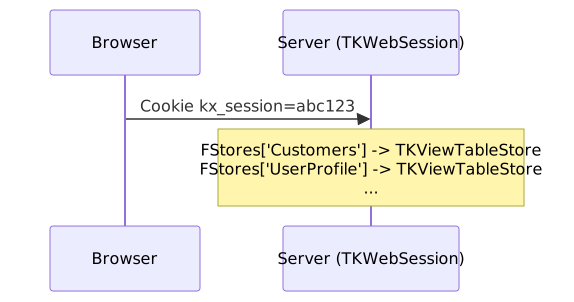
Every browser session is identified by a kx_session cookie. The server maintains a TKWebSession object for each active session, which holds authentication data, open controllers, and — crucially — a dictionary of active stores keyed by view name.
Lifecycle of a Store
1. Form Opens
When a form is opened (either as a modal dialog from a grid, or as a standalone form in a tab), the server:
- Creates a
TKViewTableStorefor the view's main table - Loads the record(s) from the database
- Registers the store in the session:
TKWebSession.Current.RegisterStore(ViewName, Store) - Renders the form HTML with field values from the loaded record
The store remains in memory — it is not freed at the end of the HTTP request.
2. Blob Request
When the browser requests a blob field (e.g., an image thumbnail), the URL is:
GET kx/view/{ViewName}/blob/{FieldName}?key=...The server:
- Looks up the store from the session:
TKWebSession.Current.FindStore(ViewName) - If found: accesses the record's blob field directly via
AsBytes - The blob data is lazy-loaded from the database at this point — only the blob column is fetched, not the entire record
This avoids a full SELECT * query for each blob field, which is especially important when a form has multiple image fields or when images are large.
Lazy Loading
Delphi's TBlobField loads blob data on demand. When the store is first loaded, blob columns contain only a placeholder. The actual binary data is fetched from the database only when AsBytes (or AsStream) is accessed. This is a built-in optimization of FireDAC and other Delphi database frameworks.
If no session store is found (e.g., the session expired), the server falls back to a direct database query with properly qualified key fields to avoid ambiguity in JOINs.
3. Save
When the user saves the form, the server:
- Processes the POST data and updates the record fields
- Persists to the database via
Model.SaveRecord - Releases the store from the session:
TKWebSession.Current.UnregisterStore(ViewName)
4. Cancel or Close
When the user cancels the form or closes the tab, the client sends a lightweight fire-and-forget request:
POST kx/view/{ViewName}/form-closeThe server simply releases the store: TKWebSession.Current.UnregisterStore(ViewName). No database operation is performed.
5. Session Timeout
If the user abandons the browser without closing forms, the stores remain in memory until the session expires. The session's store dictionary uses TObjectDictionary with doOwnsValues, so all stores are automatically freed when the session is destroyed.
Store Release Summary
| Scenario | Store Released | Mechanism |
|---|---|---|
| Save + close | Yes | UnregisterStore after successful save |
| Save & Clone | No (correct) | Form stays open for next entry |
| Save & KeepOpen | No (correct) | Form stays open for editing |
| Cancel (modal) | Yes | form-close from kxForm.cancel |
| Cancel (tab) | Yes | form-close from kxForm.cancel |
| Close tab with X | Yes | form-close from kxTabs.close |
| Session timeout | Yes | TObjectDictionary frees all stores |
Record State Tracking
Every record in a store has a state that tracks what happened to it since it was loaded:
TKRecordState = (rsNew, rsClean, rsDirty, rsDeleted)| State | Meaning | SQL Operation on Save |
|---|---|---|
rsNew | Record created in memory, not yet in DB | INSERT |
rsClean | Record loaded from DB, not modified | No operation |
rsDirty | Record loaded from DB, then modified | UPDATE (only modified fields) |
rsDeleted | Record marked for deletion | DELETE |
State transitions are managed by methods on TKRecord:
MarkAsNew— called when a record is created for insertionMarkAsModified— called automatically when a field value changes (only if not already New or Deleted)MarkAsDeleted— called when the user deletes a recordMarkAsClean— called after a successful save
Optimized Updates
The UPDATE SQL statement only includes fields that were actually modified (IsModified = True). Unchanged fields are not sent to the database, reducing network traffic and avoiding unnecessary trigger executions.
Transactional Master-Detail Saving
The Problem
In a master-detail form (e.g., an Invoice with Line Items), the user may:
- Modify the invoice header (master)
- Add new line items (detail —
rsNew) - Modify existing line items (detail —
rsDirty) - Delete line items (detail —
rsDeleted)
All these changes must be saved atomically: either everything succeeds, or nothing is written to the database. An invoice must never be saved without its line items, and line items must never be orphaned.
The Solution
KittoX uses the PersistRecord method which:
- BEGIN TRANSACTION
- Persists the master record (INSERT, UPDATE, or DELETE based on its state)
- Calls
PersistDetailStores— iterates all detail stores attached to the master record - For each detail store: saves each record according to its state
- COMMIT on success, ROLLBACK on any error
- Marks all saved records as
rsClean

Even if the master record is rsClean (not modified), its detail stores are still checked and saved. This allows the user to modify only detail records while leaving the master unchanged.
Detail Records Don't Persist Immediately
When editing a detail record (e.g., a line item in an invoice form), changes are stored in memory only. The detail record's state changes to rsDirty or rsNew, but no SQL is executed until the master form is saved.
This is determined structurally: ViewTable.IsDetail returns True when the view table is a child of another view table in the YAML hierarchy. The save logic uses:
Model.SaveRecord(ARecord, APersist and not ViewTable.IsDetail);For detail tables, APersist is forced to False — changes accumulate in the server-side store until the master triggers the final transactional save.
Rules Run When the Detail Row Enters the Store
The detail record's BeforeAdd / BeforeUpdate rules do not wait for the master save: they run when the detail form is submitted, against the in-memory store. This is what lets a rule such as "cannot invite the same girl twice" see the rows already added in this session, and lets a rule update the master's computed fields right away.
If a rule rejects the record, the store is left as it was before the submit: a new record is removed, a modified one gets its previous values back. The detail form stays open showing the error, so the user can correct the data and submit again without a rejected row lingering in the store — it would otherwise reappear in the grid at the next successful add and be saved along with the master.
API Reference
TKWebSession Methods
/// Registers a store for a view. The session becomes owner.
procedure RegisterStore(const AViewName: string; AStore: TKViewTableStore);

/// Returns the store for a view, or nil if none is registered.
function FindStore(const AViewName: string): TKViewTableStore;

/// Removes and frees the store for a view.
procedure UnregisterStore(const AViewName: string);
HTTP Endpoints
| Endpoint | Method | Purpose |
|---|---|---|
kx/view/{V}/form | GET | Opens form, registers store in session |
kx/view/{V}/blob/{Field}?key=... | GET | Reads blob from session store (lazy-load) |
kx/view/{V}/save | POST | Persists record to DB (with cascading details), releases store |
kx/view/{V}/save-cache | POST | Updates record in session store only (no DB) |
kx/view/{V}/enter-edit | POST | Applies EditRecordRules when transitioning from ViewMode to EditMode |
kx/view/{V}/form-close | POST | Releases store without saving (cancel/close) |
kx/view/{V}/detail/{I}/data | GET | Loads detail grid rows from session store |
kx/view/{V}/detail/{I}/save | POST | Adds/edits detail record in session store (no DB) |
kx/view/{V}/detail/{I}/delete | POST | Marks detail record as deleted in session store (no DB) |
TKRecordState
TKRecordState = (rsNew, rsClean, rsDirty, rsDeleted);| Method | Effect |
|---|---|
MarkAsNew | Sets state to rsNew |
MarkAsModified | Sets state to rsDirty (no-op if already rsNew or rsDeleted) |
MarkAsDeleted | Sets state to rsDeleted |
MarkAsClean | Sets state to rsClean (called after successful save) |
Form State Machine (ViewMode / EditMode)
Forms support two UI states — ViewMode (fields disabled, read-only) and EditMode (fields enabled, editable). The form always opens in ViewMode first, then transitions to EditMode if the operation requires it.
State Transitions
Simple form (no details):
Master-detail form:
How save-cache and SaveAll work
- save-cache (
POST /save-cache): updates the record in the session store only. No SQL is executed. The client switches to ViewMode and enables the Save All button. - Save All (
POST /savewith_saveAll=true): persists the master record and all attached detail stores in a single database transaction. The record in session was already updated by the previous save-cache, so the server skipsPopulateRecordFromPostand callsSaveRecorddirectly.
Server-Side Rules
When a form is opened or transitions between states, the server fires rule methods on TKViewTableRecord. Rules are defined in Delphi code (model-level or view-level) and can modify field values, enforce constraints, or trigger calculations.
Rule Event Chain
The event chain is uniform regardless of how the form is opened:
| Operation | Before render | After render | On Edit click |
|---|---|---|---|
| view | — | ApplyAfterShowEditWindowRules | ApplyEditRecordRules (via /enter-edit) |
| edit | ApplyEditRecordRules | ApplyAfterShowEditWindowRules | — (already in edit) |
| add | ApplyNewRecordRules | ApplyAfterShowEditWindowRules | — (already in edit) |
| dup | ApplyDuplicateRecordRules | ApplyAfterShowEditWindowRules | — (already in edit) |
ApplyAfterShowEditWindowRules is always called after the form is rendered, for every operation.
When the user clicks Edit on a form in ViewMode, the client calls the /enter-edit endpoint (fire-and-forget). The server invokes ApplyEditRecordRules on the record in the session store.
Rule Methods
| Method | When | Typical use |
|---|---|---|
ApplyNewRecordRules | New record created (add) | Set defaults, auto-generate codes |
ApplyEditRecordRules | Record enters edit mode | Lock fields, set calculated values |
ApplyDuplicateRecordRules | Record duplicated (dup) | Clear unique fields, generate new codes |
ApplyAfterShowEditWindowRules | Form rendered and shown | UI-dependent initialization |
ApplyBeforeRules | Before DB persist | Validation (BeforeAdd, BeforeUpdate, BeforeDelete) |
ApplyAfterRules | After DB persist | Side effects (AfterAdd, AfterUpdate, AfterDelete) |
Rules are defined by inheriting from TKRuleImpl and overriding the corresponding virtual methods. They are registered in the model or view YAML via the Rules node.
Thread Safety
Each HTTP request is handled by a thread from the pool. The thread sets TKWebSession.Current (a class threadvar) at the beginning of the request. Since stores are accessed only through the current session, and each session is accessed by one thread at a time, no additional locking is needed.
Implementation Status
| Phase | Status | Description |
|---|---|---|
| Phase 1 | Complete | Session store cache, blob lazy-load, store lifecycle management |
| Phase 2 | Complete | Transactional master-detail saving with PersistRecord cascading, save-cache, SaveAll |
| Phase 2b | Complete | ViewMode/EditMode state machine, Apply*Rules event chain, enter-edit endpoint |
| Phase 3 | Planned | Incremental client-to-server field synchronization |
| Phase 4 | Planned | Optimizations (store timeout, concurrency locks, blob cache) |
See KittoXServerStore.md in the repository root for detailed implementation notes.