
Notification Center & Background Tools
A Kittox tool normally runs synchronously: the user clicks the toolbar button, the server produces the result (e.g. a CSV/Excel/PDF file) and streams it back as a download, all within the HTTP request. For a large export or a heavy report this blocks an Indy worker thread for seconds and leaves the user staring at a spinner.
With background execution the same tool runs on a separate worker pool, the request returns immediately, and the user keeps working. Progress and completion are surfaced by the notification center — a bell in the top-right corner — and the produced file is downloaded from there when ready.
Same tool, one flag
Background execution is opt-in per tool with a single YAML line — RunMode: Background. The tool's own code is unchanged: the framework decides whether to run it inline (foreground) or on a worker.
Enabling background execution
Add RunMode: Background to the tool's Controller node in the view metadata:
MainTable:
  Model: Activity
  Controller:
    ToolViews:
      DownloadCSV:
        DisplayLabel: Download in CSV
        ImageName: download
        Controller: ExportCSVTool
          RunMode: Background          # <-- run off the request thread
          RequireSelection: False
          ClientFileName: ActivityList.csv
Without RunMode (or with RunMode: Foreground) the tool behaves exactly as before — an immediate, inline download.
What the browser gets back
A background tool answers 204 No Content: the job runs on a worker, and the only thing the response carries is the HX-Trigger header with the toast ("Operation started in the background…"). There is no fragment to attach, and saying so explicitly is what keeps the client quiet — a response left empty would make the HTTP layer substitute a body of its own, which the client would refuse as not produced by the application and report as "The server did not return a valid response (tool)", while the job in fact runs.
Which tools are supported
Background mode is supported for download-file tools — those that produce a file:
- ExportCSVTool, ExportTextTool, ExportXMLTool, ExportExcelTool
- MergePDFTool, the ReportBuilder tool, and any custom DownloadFile subclass.
A tool that is not a download-file controller reports a clear error if declared RunMode: Background.
What the user sees
- A bell icon appears in the top-right of the authenticated page (it uses the theme's Material icon style, so it matches the rest of the UI in light and dark).
- Launching a background tool shows a toast — "Operation started in the background…" — and the request returns at once.
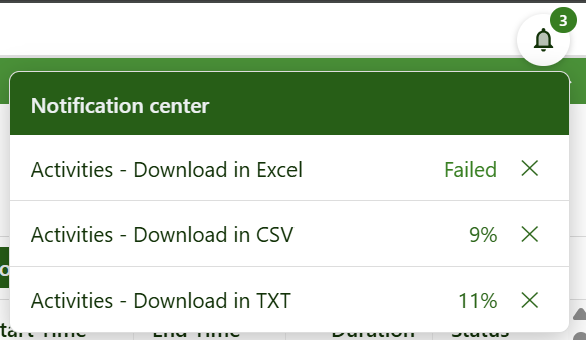
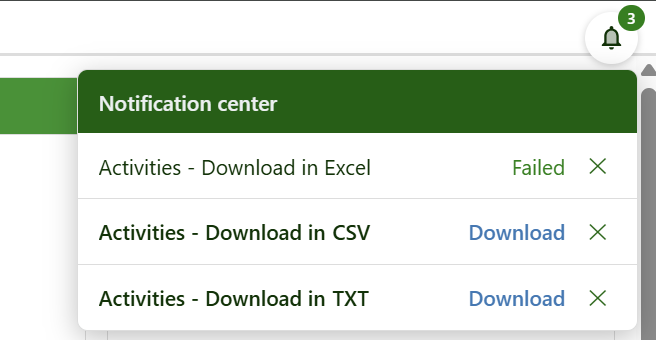
- The bell shows a badge with the number of jobs currently in the list — it does not reset when a job completes, only when a job leaves the list. Clicking it opens the Notification center, listing the user's jobs, each with an action:
- queued / running — a percentage that advances, and Cancel (✕) to stop it and drop it;
- completed — a Download link (downloading removes it from the list) and Delete (✕: drop it without downloading);
- failed — the error and Remove (✕);
- interrupted — a job that was still running when the app was last restarted (it cannot resume); re-launch it, then Remove (✕).
- When a job completes a short toast announces it.
- A job leaves the list — and its artifact file is deleted — when it is downloaded, cancelled, deleted or removed.
While the jobs run, the notification center shows each one advancing — here three exports launched together, one already failed and two still running with their percentage:
Once they finish, the completed jobs expose a Download link (and the failed one keeps its error), until each is downloaded or dismissed:
The full data set defined by the current grid filter is exported — not just the visible page — because the tool always loads all filtered records, independent of paging.
How it works

Key points:
- The data store is built on the request thread, where the per-request authentication and access control are available, so field-level ACL is respected exactly as in a foreground export. The store is then handed to the job; the worker only formats/writes it, so it never touches request-bound state.
- Jobs run on a dedicated worker pool (
Server/Jobs/PoolSize, default 4), independent of the Indy request threads, so long operations never starve the HTTP pool. - The produced file (artifact) is stored under
{JobsDir}\{user}\{JobId}\and served bykx/job/{JobId}/download. A user can only download their own jobs' artifacts. - Long tools can report progress to the notification center; the built-in exporters already do.
- Jobs are persisted on disk: each writes a small
job.jsonnext to its artifact, in a per-user folder. On startup the queue reloads them, so a user finds their jobs again after logging out and back in, or after a process restart — completed results stay downloadable (e.g. the next morning). A job that was still running at the restart cannot be resumed and is marked interrupted.
Configuration
The bell is opt-in: it appears only when Notifications/Enabled is True (and the user is authenticated). Enable it in apps that run background tools:
# Show the notification-center bell (top-right). Off by default.
Notifications:
  Enabled: True

Server:
  Jobs:
    PoolSize: 4                  # concurrent background workers (default 4)
    Directory: %APP_PATH%Jobs    # where jobs + artifacts are stored (default {AppHome}\Jobs)
    ArtifactRetentionHours: 24   # auto-remove finished jobs (and their files) after N hours
Directory accepts macros (e.g. %APP_PATH%) exactly like UploadPath; jobs are organized in a per-user sub-folder under it.
Managing the list
The panel header has two actions (themed Material icons):
- Clear all (trash): removes all finished jobs (completed / failed / cancelled / interrupted) and their artifacts in one go. Jobs still queued or running are left untouched, so a bulk cleanup never cancels an operation in progress.
- Close (✕): hides the panel.
Downloads are fetched in the background (not a top-level navigation): if a download fails (e.g. the artifact expired), an error dialog is shown and the application stays open, instead of the browser navigating away to a blank error page.
Endpoints
| Endpoint | Purpose |
|---|---|
kx/notifications | HTML fragment with the current user's jobs (polled by the bell). |
kx/job/{JobId}/download | Streams a completed job's artifact, then removes the job from the list. |
kx/job/{JobId}/remove (POST) | Cancels a running job / deletes a completed one / dismisses a failed one, deleting its artifact. |
Notes
- Persistence: jobs are persisted on the filesystem (a per-user
job.jsonnext to each artifact) and survive a process restart — completed results stay downloadable, while a job that was still running at the restart is marked interrupted and must be re-launched (there is no resume). - Scope: single application instance; background mode applies to download-file tools.
See also
- Tool Controllers · DownloadFile
- Web Server Configuration
- Help Chat (in-app assistant) — the twin subsystem (shared worker-pool pattern)