
KIDEx: the KittoX IDE
Kittox Enterprise feature
KIDE is part of the Kittoˣ Enterprise edition. See the Feature Matrix for the full comparison with the Open-Source edition.
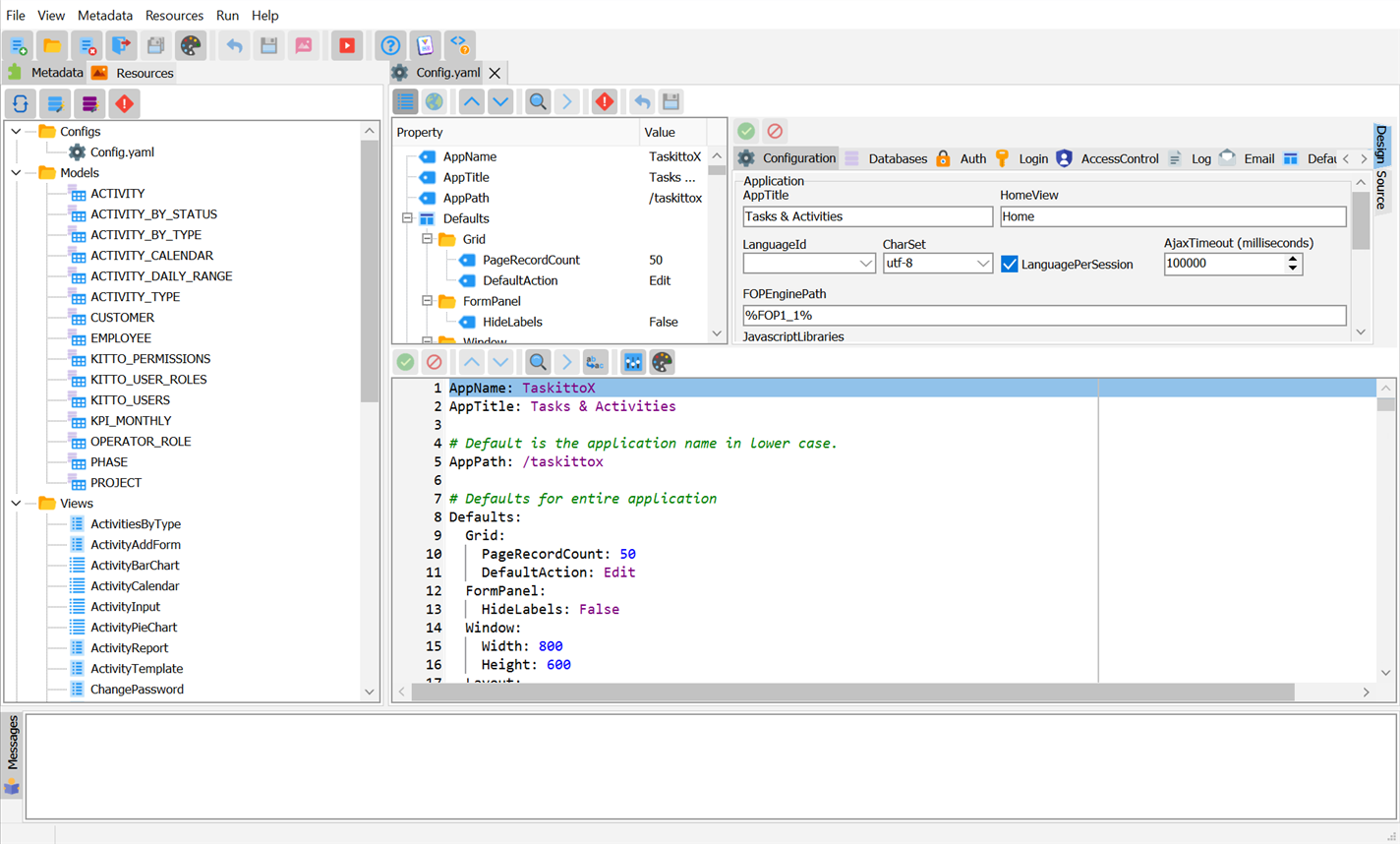
KIDEx is the visual development environment for Kittox applications. It provides a tree-based YAML editor with context-sensitive property menus, database reverse engineering, project creation wizards, and an integrated HTTP server for live preview.
Key features
- Tree-based metadata editor — Models, Views, Layouts and Config files are displayed as navigable trees. Each node can be expanded, edited, and enriched via right-click context menus.
- RTTI-based property discovery — Context menus are built dynamically from the framework's metadata classes, ensuring they are always in sync with the controllers and properties available in your installed version of Kittox.
- Database reverse engineering — Import table structures from any supported database (FireDAC, ADO, DBExpress) and generate Model YAML files automatically.
- Database generation from Models — The reverse direction: the Database Wizard generates and runs the DDL that brings the database in line with the project's Models, with an editable preview and multi-dialect support. See its limitations.
- Project wizards — Create new Kittox projects from templates (Empty, Basic) with a guided wizard that generates the
.dpr,UseKitto.pas,Config.yamland folder structure. - YAML syntax highlighting — Integrated SynEdit-based editor with YAML syntax highlighting, code folding, and auto-indentation.
- Validation driven by RTTI — Models, Views and Layouts are validated against the annotations on the framework classes themselves: node names, nested attributes and enum values, with unknown nodes reported as warnings. See YAML Attributes.
- Integrated HTTP server — Start/stop the Kittox server directly from KIDE and preview the application in your browser without leaving the IDE.
- Layout preview — Visual preview of form layouts before running the application.
- Scalable, DPI-aware icons and themes — The whole icon set is multi-resolution and follows the monitor DPI; a theme selector previews the twelve VCL styles live, and the editor colours follow the chosen light or dark theme.
- Check for updates — KIDEx can check for a newer KittoX release and download and install the setup.
Requirements
- Delphi 10.4 or later (RAD Studio)
- Kittox Enterprise Edition license
- A supported database server for reverse engineering
Quick start
- Launch KIDEx (
KIDEX.exe) - Open an existing project folder (the
Homedirectory of a Kittox application) or create a new one via File > New Project - The tree panel on the left shows the project structure: Models, Views, Layouts, Config
- Double-click any item to open it in the editor
- Right-click a tree node to see available properties and child nodes
- Click Start to launch the integrated server and preview the application
RAD Studio IDE plugin
KIDEx ships a design-time package — KittoXIDE.bpl — that integrates the New Project Wizard directly into the RAD Studio IDE. Once the package is installed (Component → Install Packages → Add → KittoXIDE370.bpl), the wizard is reachable without launching KIDEx standalone:
File > New > Other > KittoX Projects shows four entries — one per supported deployment mode:
| Gallery entry | Output |
|---|---|
| KittoX Windows App / Service (.exe) | Standalone executable (Indy embedded server) |
| KittoX Windows Desktop App (.exe) | Desktop executable with embedded WebView2 |
| KittoX ISAPI Module (.dll) | ISAPI library for IIS |
| KittoX Apache Module (.dll) | Apache 2.4 module |
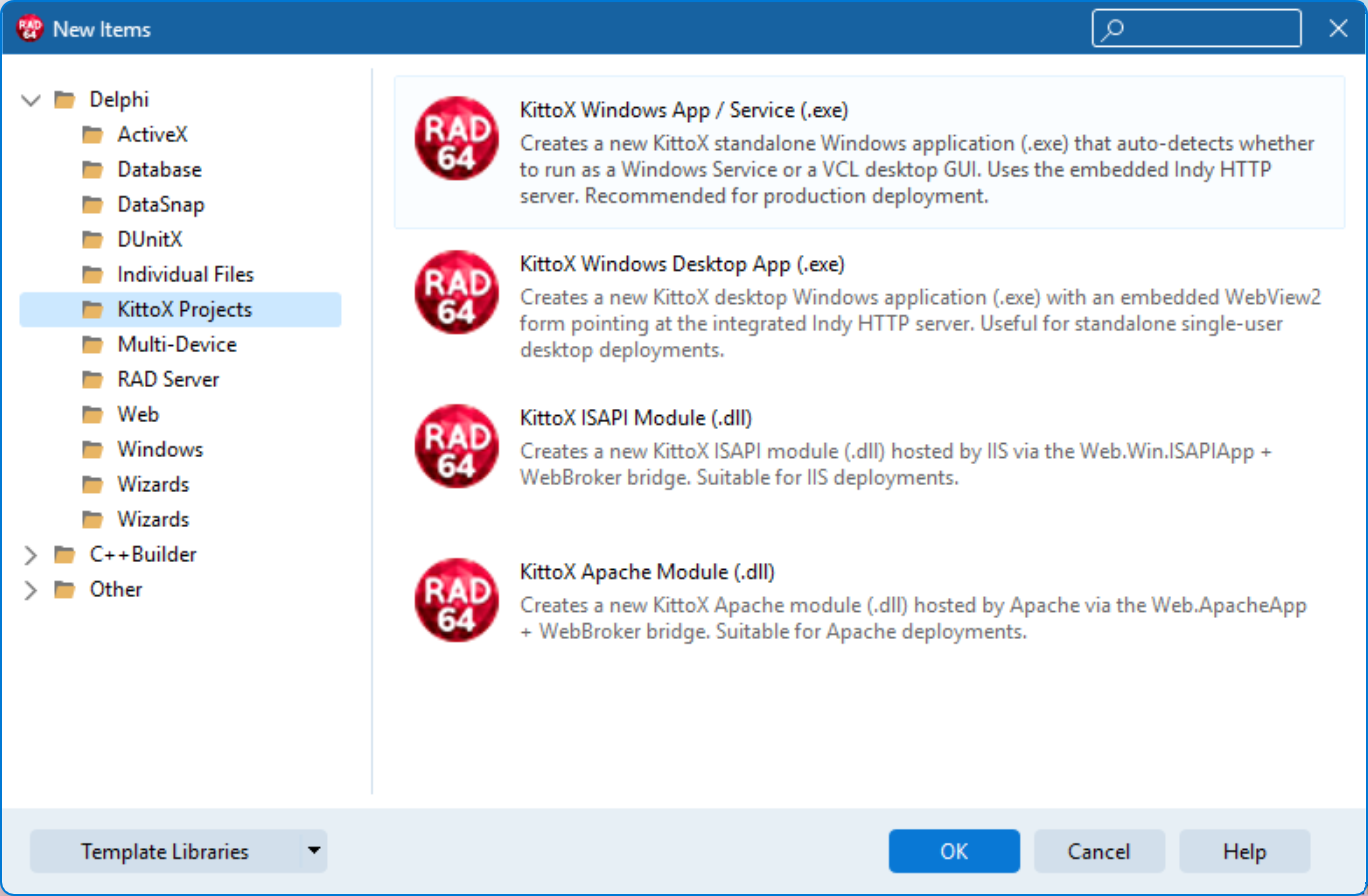
Picking any entry opens the same five-page wizard form used by KIDEx standalone, with the deployment mode that matches the gallery entry already ticked and locked on the first page. At Finish the IDE opens the generated .dproj (the one that matches the picked mode) as a new project group, ready to compile.
The package also installs a YAML syntax highlighter for .yaml files inside the IDE editor, so editing Config.yaml, Models and Views from the Project Manager has the same highlighting as inside KIDEx.
Three entry points, one engine
The visual wizard inside KIDEx standalone, the IDE plugin gallery entries described here, and the project_create_app tool of MCP-KittoX all share the same template engine and produce byte-identical output. Pick the entry point that fits the workflow you're already in.
Documentation
| Page | Description |
|---|---|
| Project Management | Opening existing projects, folder structure, integrated server, project tree |
| New Project Wizard | Creating a new Kittox application from a template — name, paths, databases, Delphi versions, authentication, server settings |
| Model Editor | Creating and editing models, field properties, references, detail references, validation |
| Model Wizard | Database reverse engineering — generate or update Model YAML files from a live DB schema |
| View & Layout Editor | Creating views, DataView wizard, layout editing with preview |
| Config Editor | Editing Config.yaml: databases, authentication, defaults, desktop settings |
| Update Locale Files | Extracting translatable strings from YAML metadata and Delphi sources, merging with existing .po translation files |