
TasKitto
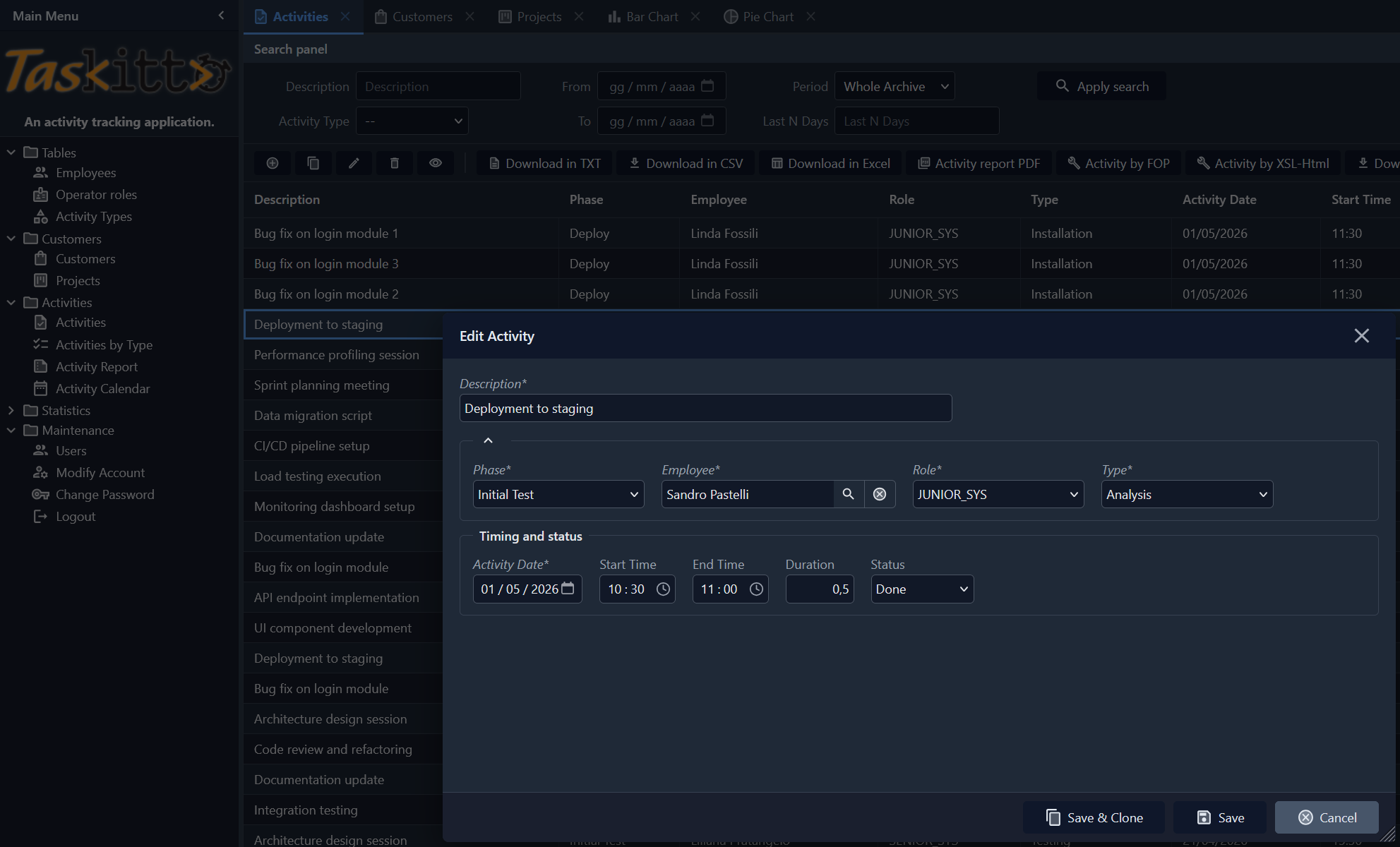
TasKitto is a sample application that manages a database of a few tables modeling a simple task tracking application. Use it together with the other example applications to explore Kittox and its features, or as a starting point for your own applications.
To create your own application the recommended way is the New Project Wizard; copying and renaming an example directory like this one is a quick manual alternative.
Languages
TasKitto is shipped translated in English, Italian, German, Spanish and Portuguese. The interface language follows the browser (Accept-Language) on the first visit and can be changed at any time with the flag LanguageSwitcher — on the login form and at the bottom of the left menu. See Localization for how the translation catalogs are built and maintained.
Live Demo
Click here to launch the Live Demo of TasKitto — or run it in your own environment, see Compiling and running the demos.
Demo accounts:
| User name | Password | Role | What they see |
|---|---|---|---|
guest | guest | viewer | All views read-only, except Users (hidden) |
user | user | user | Full CRUD on every view, except Users (hidden) |
admin | Nic2026Tita! | admin | Full CRUD everywhere — including the Users table |
guest and user use the same password as their user name. The three accounts demonstrate the layered ACL design shipped with the demo.
The login form comes pre-filled with admin, from the Defaults node of Auth in Config.yaml.
Features
The features of Kittox used by TasKitto are:
- Multiple config files:
- Config.yaml is the TasKitto application itself.
- ConfigMini.yaml uses a different menu and strips down some elements to create a GUI usable on smartphones.
- FireDAC-based database connection to SQL Server, PostgreSQL or Firebird (selectable via
DefaultDatabaseNameinConfig.yaml). - Login with environment choice: a drop-down on the login page lets the user pick which of the three databases (SQL Server, PostgreSQL, Firebird) to log into; the choice is persisted across sessions.
- JWT authentication (
Auth: TasKittowith aJWT:envelope) — the demo's stateless authentication envelope: signed token in an HttpOnly cookie, environment carried in thedbclaim, ACL snapshotted in thekx_aclclaim. See Config_AuthJWT. - Three-tier RBAC ACL (
AccessControl: JWT, closed-world) — wildcard read-only baseline + role-specific allows foradmin/user/viewer+ per-resource denies on the Users management view. See Sample ACL design. - In-app ACL administration (admin only) — the
Maintenancefolder of the menu exposes auto-built grids for theKITTO_USER_ROLESandKITTO_PERMISSIONStables (declared asView: Build AutoListdirectly against the model name, no dedicated view YAML required). Visibility is restricted to theadminrole via two deny rows per table (metadata://View/KITTO_USER_ROLES/KITTO_PERMISSIONSdenied touserandviewer). Logged-inadminusers can add/remove role assignments and grant rows from the UI;TKDBAccessControllerre-reads the tables on the next login. - DB authentication using a standard database table and clear passwords.
- With passepartout option enabled.
- HTMX theming.
- Models and model relationships (references and details).
- Cascade delete over two levels —
CUSTOMERdeclaresCascadeDelete: TrueonPROJECTandPROJECTonPHASE, so deleting a customer takes its projects and their phases with it, deepest first and all in one transaction. See Deleting the master. - Tree-based or Toolbar-based menu.
- Custom logo through the use of an HtmlPanel controller.
- Tabbed views (TabPanel controller).
- StatusBar controller.
- Data display and editing with rules.
- List grouping with a custom javascript template.
- List filtering with multiple user filters.
- Custom form layouts.
- Lookups on dynamic and fixed lists of values.
- Master/Detail display and edit forms.
- Grid cells coloring
- Download Tools:
- Excel
- Txt
- CSV
- Reporting Tools:
- PDF using Debenu Quick PDF
- PDF using FOP
- HTML using XSL-transformation
- Charts:
- Pie Chart
- Bar Chart
- Calendar: interactive activity calendar with month/week/day views and color-coded event types
- Data update: usage of a Form view)
Login with environment choice
TasKitto demonstrates the environment/database choice feature: the login page shows an "Environment" drop-down before the user name field, listing the three configured databases (SQL Server, PostgreSQL, Firebird). The user picks one, logs in, and that database becomes active for the entire session.
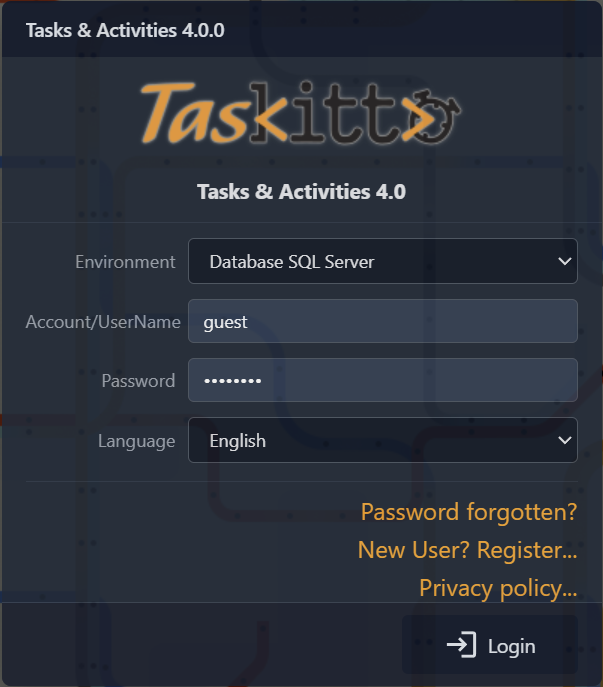
TasKitto is configured with a JWT envelope, so the choice rides inside the JWT db claim instead of a separate kx_db cookie: it survives across the entire token lifetime (slid on every active request) and is re-selected on the next login until the token finally expires. The active environment is shown in the StatusBar at the bottom of the home page via the %Auth:DatabaseName% macro.
The relevant Config.yaml setting:
Auth: TasKitto
  DatabaseChoices: FireDAC_MSSQL, FireDAC_PostgreSQL, FireDAC_Firebird
Each database under Databases carries an optional DisplayLabel (e.g. Database SQL Server) for the combo label.
Sample ACL design (three-tier)
TasKitto ships with a complete Access Control example exercising the three-layer pattern (wildcard baseline → role allows → per-resource denies) with three roles. The configuration uses AccessControl: JWT reading from the kx_acl claim snapshotted at login (with DB fallback enabled), backed by Auth: TasKitto with a JWT: envelope — see JWT Authenticator for the envelope details.
The relevant Config.yaml settings:
Auth: TasKitto
  DatabaseChoices: FireDAC_MSSQL, FireDAC_PostgreSQL, FireDAC_Firebird
  ...

  JWT:
    Claims:
      IncludeRoles: True

AccessControl: JWT
The framework auto-populates kx_acl at login because AccessControl: JWT is set; the controller is closed-world (anything not covered by the claim is denied).
The role matrix
The ACL uses ten rows in KITTO_PERMISSIONS and three roles in KITTO_USER_ROLES. The wildcard rule ('*', '*', 'VIEW,READ', '1') is the read-only baseline that lets every authenticated user open every view and read every cell. Role-specific rules add CRUD modes on top, and per-resource denies carve out exceptions:
| Pattern | Grantee | Modes | Grant | Effect |
|---|---|---|---|---|
* | * | VIEW,READ | 1 | Everyone sees every menu entry and reads every cell |
* | admin | MODIFY,ADD,DELETE,RUN | 1 | admin role gets full CRUD on every view |
* | user | MODIFY,ADD,DELETE,RUN | 1 | user role gets full CRUD on every view |
metadata://View/Users | user | VIEW,READ,MODIFY,ADD,DELETE,RUN | 0 | user role: explicit deny on all modes for the Users view |
metadata://View/Users | viewer | VIEW,READ,MODIFY,ADD,DELETE,RUN | 0 | viewer role: same deny on Users |
metadata://View/KITTO_USER_ROLES | user | VIEW,READ,MODIFY,ADD,DELETE,RUN | 0 | user role: ACL administration is admin-only |
metadata://View/KITTO_USER_ROLES | viewer | VIEW,READ,MODIFY,ADD,DELETE,RUN | 0 | viewer role: same deny on the user roles table |
metadata://View/KITTO_PERMISSIONS | user | VIEW,READ,MODIFY,ADD,DELETE,RUN | 0 | user role: ACL administration is admin-only |
metadata://View/KITTO_PERMISSIONS | viewer | VIEW,READ,MODIFY,ADD,DELETE,RUN | 0 | viewer role: same deny on the permissions table |
metadata://View/ActivityInput | viewer | MODIFY,ADD,DELETE | 0 | viewer role: read-only on ActivityInput (demo of FALSE-priority on top of role allows) |
Auto-built views and the metadata://View/<ModelName> URI
The two ACL administration views are declared in MainMenu.yaml as View: Build AutoList / Model: KITTO_USER_ROLES (and KITTO_PERMISSIONS) — there's no dedicated view YAML and therefore no PersistentName. The framework assigns MainTable.ModelName as the PersistentName the first time the menu renders (Kitto.Html.TreePanel.pas:122-130), so the URI seen by the access controller is metadata://View/KITTO_USER_ROLES (uppercase, exactly as the model name). Use the same pattern when you write deny rules for any other auto-built view in your apps.
How the three users experience this
The matrix produces three distinct experiences without enumerating per-view grants:
admin (role admin, login admin / Nic2026Tita!):
- Wildcard grants
VIEW,READon everything; theadminrow addsMODIFY,ADD,DELETE,RUNon everything. - No deny rules apply to the
adminrole. - Result: full CRUD on every view, including
Users,KITTO_USER_ROLESandKITTO_PERMISSIONS. Dashboard, charts, calendar, all reports — all accessible.
user (role user, login user / user):
- Same wildcard baseline + the
userallow row gives full CRUD everywhere. - The deny on
metadata://View/Users,metadata://View/KITTO_USER_ROLESandmetadata://View/KITTO_PERMISSIONSfor theuserrole wins for all six standard modes (FALSE-priority break inTKUserPermissionStorage.GetAccessGrantValue). - Result: full CRUD everywhere except the user-management and ACL administration views, which disappear from the menu (and any direct URL navigation is rejected).
guest (role viewer, login guest / guest):
- Only the wildcard baseline
VIEW,READmatches at the role level — noviewerrow grantsMODIFY/ADD/DELETE/RUN, so those modes default to deny. - The deny on
metadata://View/Users,metadata://View/KITTO_USER_ROLESandmetadata://View/KITTO_PERMISSIONShides those menu entries just like foruser. - The deny on
metadata://View/ActivityInputforMODIFY,ADD,DELETEis redundant forviewer(they have no allow on those modes anyway), but it is left in to demonstrate that an explicit deny on a specific URI still wins even when a future upgrade adds a wider allow rule (e.g. promotingviewertouser+ a deny for compliance reasons). - Result: every view visible and read-only, except the user-management/ACL views (hidden) and
ActivityInputwrite actions (Add/Edit/Delete buttons hidden, double-click opens inViewModeinstead ofEditMode).
Why this scales
The same pattern extends cleanly to dozens of roles and views without a permission-table explosion: each new role adds at most one allow row plus a small number of denies. The data shape stays small enough to fit comfortably in the kx_acl JWT claim (ten rows × ~80 bytes ≈ 800 bytes, well within the 4 KB cookie limit). See Config_AccessControl for the conceptual model and Config_AuthJWT for the JWT integration.
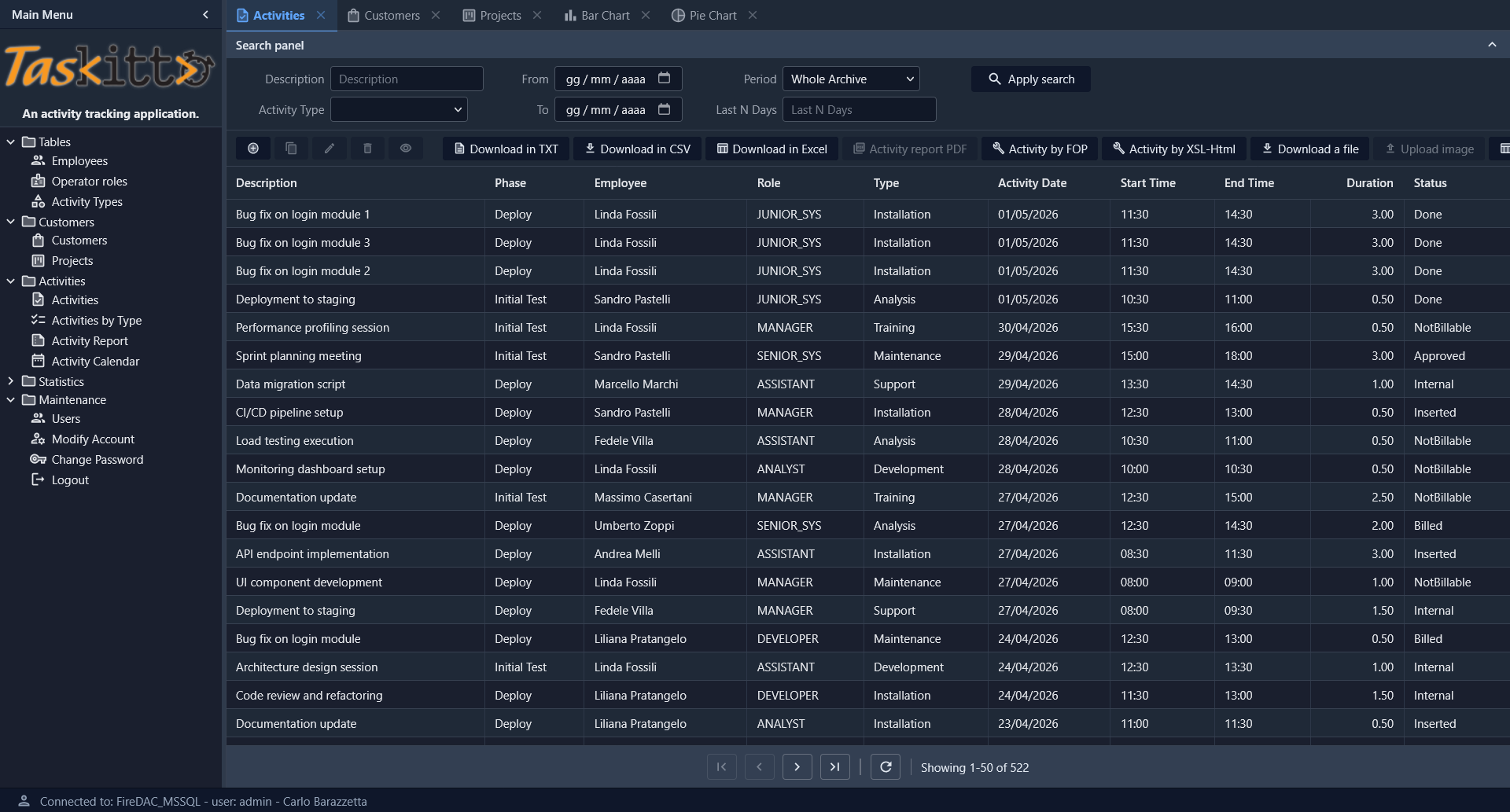
Activities List
The Activities view shows a full-featured List with search panel (filters by description, date range, activity type, period), toolbar with multiple export tools (TXT, CSV, Excel), reporting tools (PDF via FOP, HTML via XSL), and file upload capability.
Charts
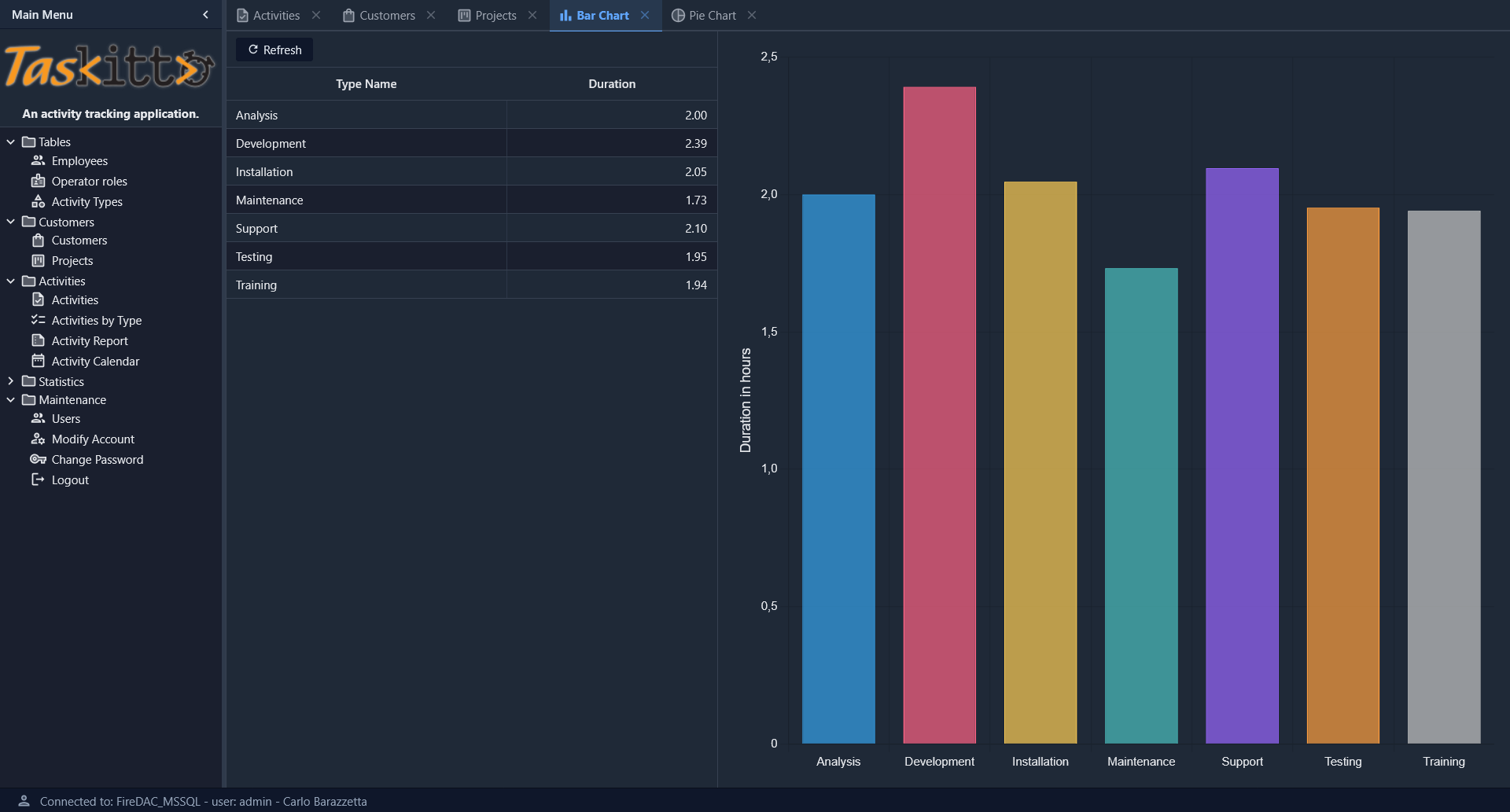
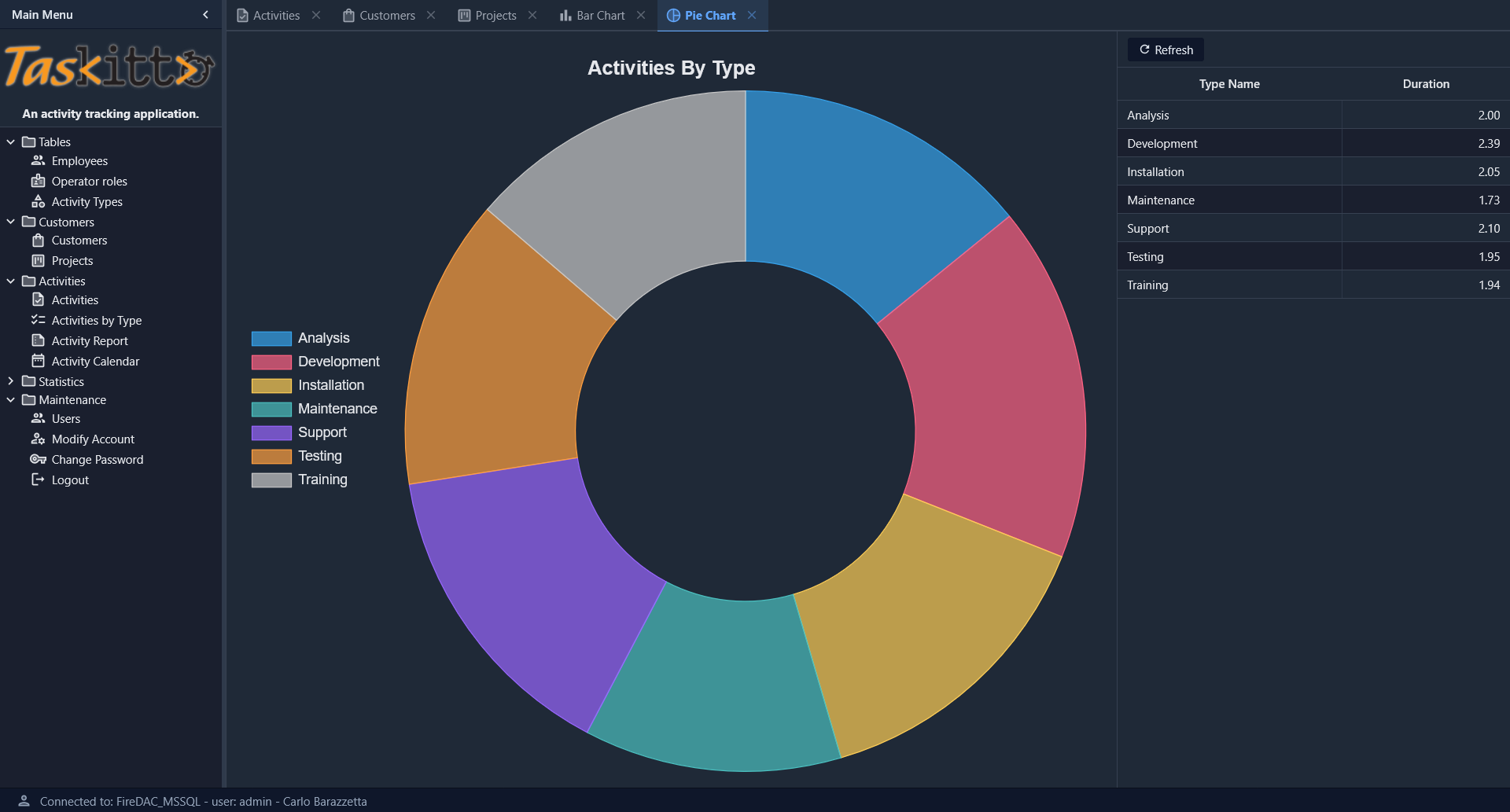
TasKitto includes two chart views built with the ChartPanel controller, both displaying the total activity hours grouped by type. The data is served by the ACTIVITY_BY_TYPE view, whose DURATION column is a SUM of hours per type (not an average) — so each bar/slice reflects the share of total time invested in that activity type.
Bar Chart
The Bar Chart view uses a WestController: GridPanel to display the data grid on the left, with the bar chart on the right showing total hours per activity type.
Pie Chart
The Pie Chart view uses a doughnut chart (with Donut: 50) and an EastController: GridPanel to show the data grid on the right. A left-docked legend identifies each activity type by color. Each slice is sized by the total hours logged for its type, so the chart reads as the proportion of total time per type.
Activity Dashboard
The Activity Dashboard demonstrates the Dashboard controller with KPI cards, bar/pie charts, and a daily trend line chart, all arranged in a responsive FlexPanel grid.
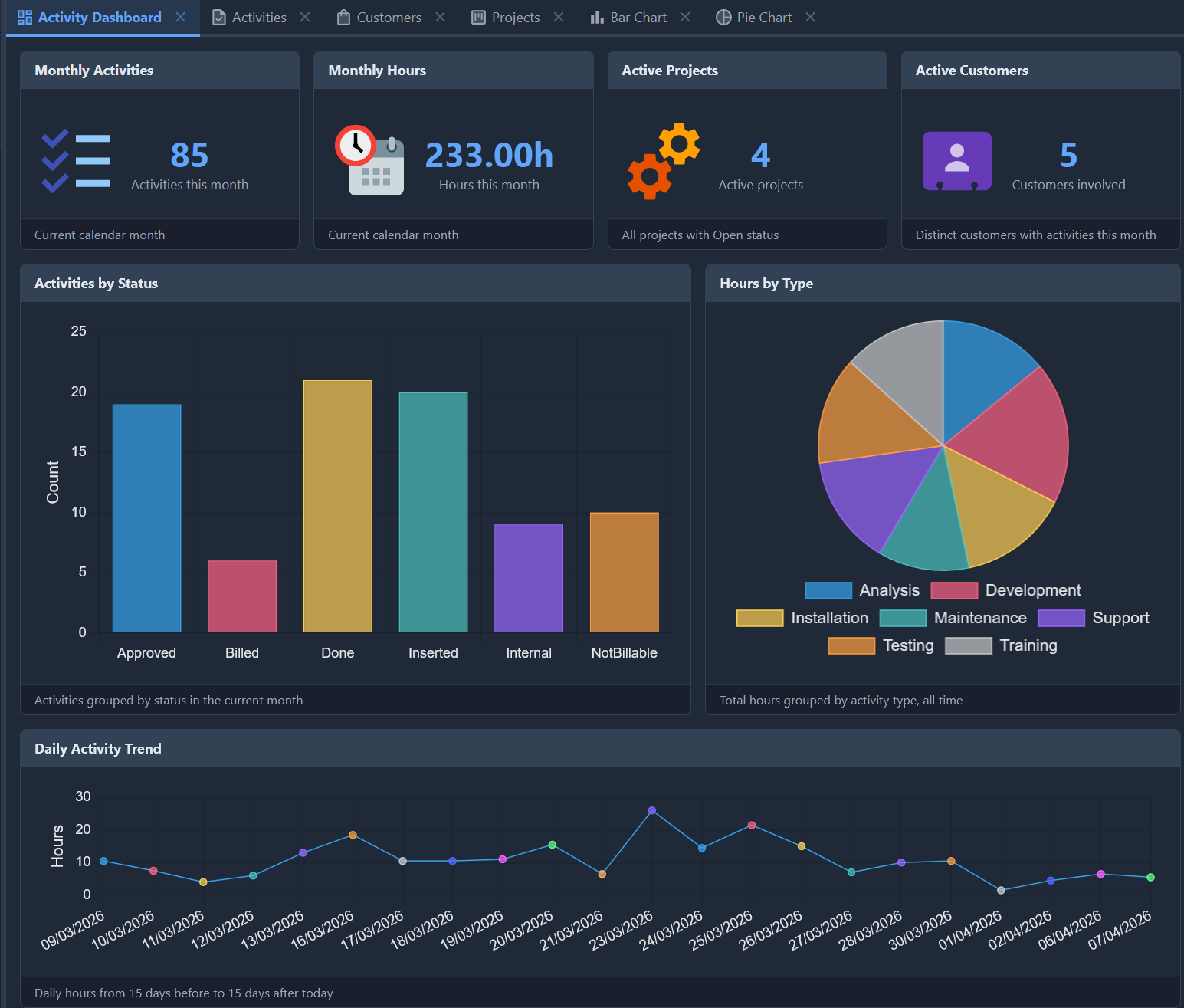
The dashboard includes:
- 4 KPI cards in the first row (
MaxColumns: 4): Monthly Activities, Hours, Active Projects, and Customers — each rendered with a TemplateDataPanel and a custom HTML template using{_ICON}for the Material Design icon - 2 chart views in the second row: a bar chart showing activities grouped by status, and a pie chart showing hours by activity type
- 1 line chart spanning the full width: daily activity hours over a 30-day range centered on today
The dashboard and chart data come from four SQL views — VW_KPI_MONTHLY, VW_ACTIVITY_BY_STATUS, VW_ACTIVITY_DAILY_RANGE, and ACTIVITY_BY_TYPE — that aggregate the ACTIVITY table. All four are provided for every supported backend (SQL Server, Oracle, PostgreSQL, Firebird) in the Examples/TasKitto/DB DDL scripts, each using its own dialect's date and duration functions.
The Dashboard is the first entry in the Statistics menu folder.
Activity Calendar
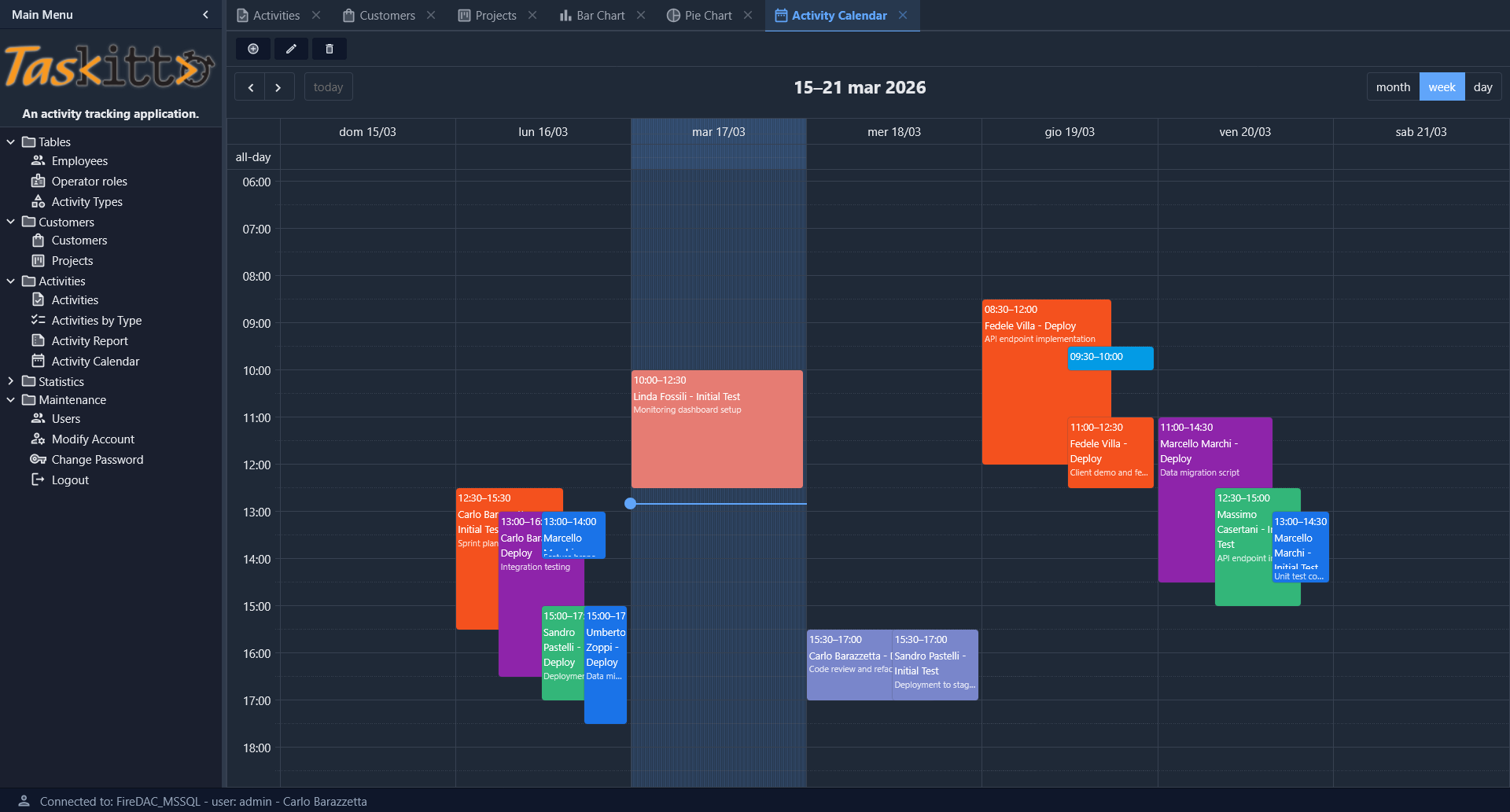
The Activity Calendar view provides an interactive weekly calendar (with month and day views) powered by EventCalendar. Events are color-coded by activity type and display employee name, phase, and description. Navigation controls allow browsing between weeks, and a toolbar provides view, edit, and delete actions on selected events.
Deployment modes
TasKitto includes Delphi projects for all four deployment modes. All projects are in Examples/TasKitto/Projects/:
| Project | Mode | Output |
|---|---|---|
TasKitto.dpr | Standalone (GUI / Windows Service) | Home/TasKitto.exe |
TasKittoDesktop.dpr | Desktop Embedded (WebView2) | Home/TasKittoDesktop.exe |
TasKittoISAPI.dpr | ISAPI (IIS) | Home/TasKittoISAPI.dll |
mod_taskitto.dpr | Apache Module | Home/mod_taskitto.dll |
All projects share the same Source/ directory (UseKitto.pas, Rules.pas, Auth.pas) and the same Home/Metadata/ configuration. See the Deployment guide for step-by-step instructions for each mode.
Testing
In order to use TasKitto you need to create the database using the scripts or backup files provided in the Examples/TasKitto/DB directory, and edit Config.yaml so it points to your database and uses the correct authentication credentials.
Database scripts
The DB folder contains everything you need to recreate the TasKitto sample database on Firebird, Microsoft SQL Server, PostgreSQL or Oracle. All four dialects share the same logical schema (tables KITTO_USERS, KITTO_USER_ROLES, KITTO_PERMISSIONS, CUSTOMER, PROJECT, PHASE, ACTIVITY, ACTIVITY_TYPE, EMPLOYEE, OPERATOR_ROLE plus the dashboard views) and the same sample data. Boolean columns (IS_ACTIVE, MUST_CHANGE_PASSWORD) use the native types of each engine: BIT on SQL Server, BOOLEAN on Firebird 3.0+ and PostgreSQL, and NUMBER(1) (0/1) on Oracle.
| File | Engine | Purpose |
|---|---|---|
Taskitto_SQLServer_DDL.sql | MS SQL Server | Tables, foreign keys, indexes, ACL tables (KITTO_USER_ROLES, KITTO_PERMISSIONS) |
Taskitto_SQLServer_DDL_Views.sql | MS SQL Server | The five SQL views (ACTIVITY_BY_DATE, ACTIVITY_BY_TYPE, VW_ACTIVITY_BY_STATUS, VW_ACTIVITY_DAILY_RANGE, VW_KPI_MONTHLY) — kept in a separate file with GO separators because T-SQL requires CREATE VIEW to be the first statement of a batch |
Taskitto_SQLServer_Data.sql | MS SQL Server | INSERT script with the sample data (6 customers, 9 employees, 9 projects, 6 user accounts including admin, user, guest and the layered ACL grants) |
TasKitto_Firebird_DDL.sql | Firebird 3.0+ | Tables + the same five views translated to Firebird dialect (COALESCE/CURRENT_DATE/DATEADD(DAY, -(EXTRACT(DAY FROM CURRENT_DATE) - 1), CURRENT_DATE) for the SQL Server ISNULL/GETDATE/DATEFROMPARTS idioms; FROM RDB$DATABASE for scalar-only views). Verified on Firebird 5.0 64-bit |
TasKitto_Firebird_Data.sql | Firebird | Same sample data as the SQL Server script (TRUE/FALSE literals for the native BOOLEAN columns) |
TasKitto_PostgreSQL_DDL.sql | PostgreSQL | taskitto schema, tables, constraints, indexes and the same five dashboard views in PostgreSQL dialect |
TasKitto_PostgreSQL_Data.sql | PostgreSQL | Sample data + ACL grants |
TasKitto_Oracle_DDL.sql | Oracle 19c | Tables, FKs and the same five views in one file, translated to Oracle (TRUNC(SYSDATE,'MM')/ADD_MONTHS/(END_TIME-START_TIME)*24/FROM DUAL for the DATEFROMPARTS/DATEADD/DATEDIFF idioms). Booleans are NUMBER(1); the time columns START_TIME/END_TIME are stored in DATE |
TasKitto_Oracle_Data.sql | Oracle | Same sample data; booleans as 1/0, dates/times wrapped in TO_DATE(...) |
Taskitto_SQLServer_ShiftDates.sqlTasKitto_PostgreSQL_ShiftDates.sqlTasKitto_Firebird_ShiftDates.sqlTasKitto_Oracle_ShiftDates.sql | each engine | Optional helper that shifts the demo ACTIVITY/PHASE dates forward so the Activity Dashboard keeps showing fresh data — see Refreshing demo dates |
Creating the database on SQL Server
- Create an empty database (for example
TasKitto) on your SQL Server instance. - Run
Taskitto_SQLServer_DDL.sqlto create the tables, FKs and indexes. - Run
Taskitto_SQLServer_DDL_Views.sqlto create the five SQL views (theGOseparators ensure eachCREATE VIEWstarts a fresh batch as required by T-SQL). - Run
Taskitto_SQLServer_Data.sqlto load the sample data and the ACL rows. - Update
Home/Metadata/Config.yamlso theDatabasesnode points to your SQL Server instance, and adjust authentication credentials (see Config_Databases). TasKitto ships with aFireDAC_MSSQLblock ready to use.
Creating the database on PostgreSQL
- Create an empty database (for example
taskitto) on your PostgreSQL server, owned by a role of your choice (the example useskittox_admin). - Run
TasKitto_PostgreSQL_DDL.sqlagainst the new database to create thetaskittoschema, the tables, constraints and the four views used by the Activity Dashboard. - Run
TasKitto_PostgreSQL_Data.sqlto load the sample data. - In
Home/Metadata/Config.yamlsetDefaultDatabaseName: FireDAC_PostgreSQLand update theFireDAC_PostgreSQLblock with your server, role and password. Make sure theSchemaparameter matches the schema you created (default:taskitto) — this controls thesearch_pathset for every connection. See the PostgreSQL Schema andsearch_pathsection.
Each dialect uses its native boolean representation for IS_ACTIVE and MUST_CHANGE_PASSWORD: BIT on SQL Server, BOOLEAN on Firebird 3.0+ and PostgreSQL, and NUMBER(1) (0/1) on Oracle. The login query in Config.yaml is dialect-agnostic thanks to the %DB.TRUE% macro: WHERE IS_ACTIVE = %DB.TRUE% expands to = 1 on SQL Server and Oracle, and to = TRUE on Firebird and PostgreSQL.
Refreshing demo dates
The Activity Dashboard views (VW_KPI_MONTHLY, VW_ACTIVITY_BY_STATUS, VW_ACTIVITY_DAILY_RANGE) filter ACTIVITY.ACTIVITY_DATE relative to today (current month, and ±15 days). As real time advances past the seeded data, those windows go empty and the dashboard shows nothing. The *_ShiftDates.sql scripts push the demo data forward to fix this.
By default each script auto re-centers: it finds the month holding the most activities and shifts every ACTIVITY.ACTIVITY_DATE and PHASE.START_DATE/END_DATE so that month lands on the current month — keeping the dashboard's busiest period always "now". Junk dates (< 2000-01-01, e.g. the Delphi zero-date 1899-12-30) and the START_TIME/END_TIME columns are left untouched. The scripts are safe to re-run: each run recomputes the shift it needs. To push by a fixed number of months instead, flip the in-script flag (@AutoReCenter = 0 / v_auto_recenter := FALSE / V_AUTO = 0).
Run each script in its native client: SSMS/sqlcmd (SQL Server, honours the GO separators), psql (PostgreSQL, a single DO block), isql (Firebird, uses SET TERM + EXECUTE BLOCK), SQL*Plus/SQLcl (Oracle, an anonymous PL/SQL block ended with /). See Examples/TasKitto/DB/README.md for details — including how to run the Firebird shift as plain statements when a client rejects EXECUTE BLOCK, and the Oracle shift as plain UPDATEs when a client rejects anonymous PL/SQL.
Creating the database on Firebird
- On Firebird 3.0+ (TasKitto is verified on Firebird 5.0 64-bit), create an empty database file via
isqlor your preferred tool, e.g.:create database 'D:\FirebirdDatabases\TASKITTO.FDB' user 'SYSDBA' password 'masterkey' default character set utf8; - (Optional) Add an alias to
databases.confso the connection string isTASKITTOinstead of the full path. - Run
TasKitto_Firebird_DDL.sqlon the new database (isql -i TasKitto_Firebird_DDL.sql) to create the tables, FKs, indexes and the five views. - Run
TasKitto_Firebird_Data.sqlto load the sample data and the ACL rows. - In
Home/Metadata/Config.yamlsetDefaultDatabaseName: FireDAC_Firebirdand update theFireDAC_Firebirdblock with your alias / path and credentials.
The pure-JS Firebird drivers used by some MCP servers and admin tools require WireCrypt = Disabled in firebird.conf (Firebird 3.0+ defaults to Required) and AuthServer = Srp, Srp256, Legacy_Auth + UserManager = Srp, Legacy_UserManager for username/password authentication.
Creating the database on Oracle
- Create (or reuse) an Oracle 19c schema/user that will own the objects; connect as that user.
AL32UTF8is the recommended database character set. - Run
TasKitto_Oracle_DDL.sqlto create the tables, foreign keys and the five dashboard views (all in one file). - Run
TasKitto_Oracle_Data.sqlto load the sample data and the ACL rows. - (Optional) Run
TasKitto_Oracle_ShiftDates.sqlso the Activity Dashboard shows fresh data — see Refreshing demo dates. - In
Home/Metadata/Config.yamladd aFireDAC_Oracledatabase block pointing to your service/credentials and setDefaultDatabaseNameto it. Oracle support requires theFireDAC.Phys.Oracledriver — enable theORACLE_SUPPORTdefine when compiling (see Config_Databases).
Use the metadata of TasKitto as both example and study material. You can find more details about the features in this wiki or in the Kittox Reference.