
Database Wizard
The Database Wizard — Update Database Structure — is the reverse direction of the Model Wizard. Where the Model Wizard reads a live database and writes Model YAML files, this one reads the project's Models and writes the DDL that brings the database in line with them.
It is the tool for a project whose models are the source of truth: you design in YAML, and the database follows.
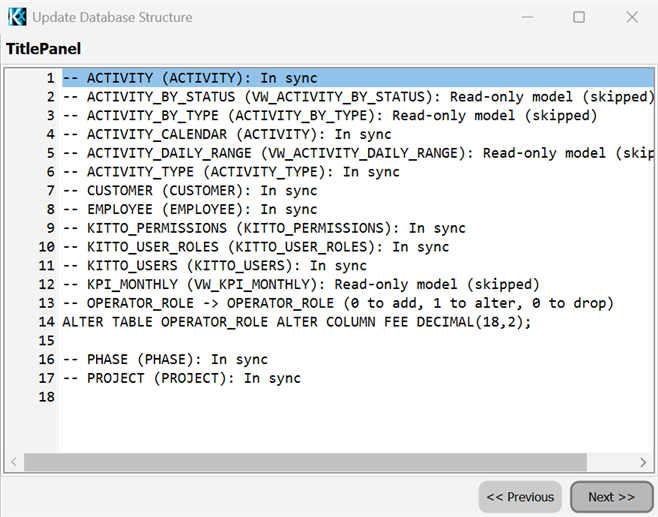
Opening it
From the project file tree, right-click:
- a single model → Update Database Structure… for that table alone
- the Models folder → Update Database Structure… for the whole project
What it does
For each selected Model it compares the Model against the live schema and produces:
| Situation | DDL |
|---|---|
| The table does not exist | CREATE TABLE, primary key included |
| The table exists but differs | ALTER TABLE ADD COLUMN for a missing field |
ALTER TABLE ALTER/MODIFY COLUMN for a changed type, size or nullability | |
ALTER TABLE DROP COLUMN for a column no Model field claims — opt-in |
Fields that produce no column are skipped: Expression and computed fields, and models that are read-only (a view).
Dialects
The SQL dialect is taken from the connection, not chosen by hand:
MSSQL, PostgreSQL, Firebird, Oracle, MySQL, plus a generic ANSI fallback. Identifier quoting and the ALTER syntax (ALTER COLUMN / MODIFY / MODIFY COLUMN) follow the dialect.
The wizard
Four pages: pick the models, choose the options, review the DDL, run it.
- Options are remembered per project, so the second run starts where you left off
- The DDL preview is editable: what you see is what runs. Correct it, cut a statement you do not want, or copy the whole script out and run it with your own tools
- Statements are executed one at a time, with progress and warnings reported as they happen
Defaults
| Option | Default | |
|---|---|---|
| Create missing tables | on | |
| Add missing columns | on | |
| Alter changed columns | on | |
| Primary keys | on | |
| Drop extra columns | off | destructive: a dropped column takes its data with it |
| Foreign keys | off | emits nothing even when enabled — see the limitations below |
Limitations ##
- No
FOREIGN KEYis emitted, with the option on or off. The generator only considers a reference field that declares no sub-field, and a well-formed KittoX reference always declares one (theFields:node the framework requires), so nothing is produced. Add the constraints by hand on the preview page if you need them. - The match between an existing column and a Model field is approximate: only the SQL type category is compared — the one
GetColumnTypeSQLwould emit — not size, precision or nullability, because those are reported differently by each driver and producedALTERs on tables that were in sync. AnALTERtherefore appears when the category changes (string to integer), while a pure size, precision or NULL/NOT NULL change is not detected - No data migration: an
ALTERthat narrows a column is the database's problem, not the wizard's
Because of these, the DDL preview is not a formality. Read it before you run it.
Under the hood
The engine (KIDE.DatabaseCreator) is headless and reusable: it holds no form and no UI, so the MCP server can drive the same diff-and-DDL logic for an AI agent working on the project.