
ChangePassword Controller
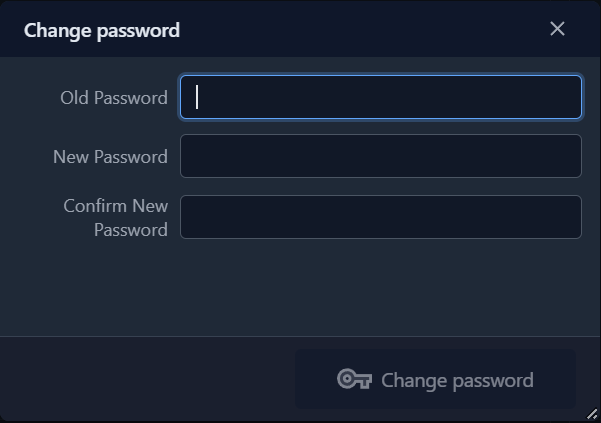
By default opens a windows that allows the user to change the password.
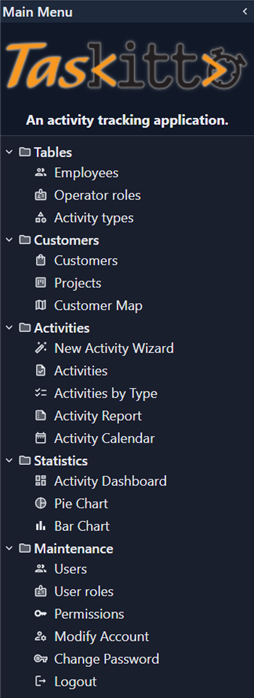
For example, you can use the controller in a MainMenu file as following:
...
Folder: Session
  View:
    Controller: ChangePassword
and this is the result:
Voluntary change and imposed change
The same controller serves two different situations, and it adapts itself to them.
| Situation | Old Password field | Server-side check |
|---|---|---|
| The user picks Change Password from the menu | shown and required | the old password must match the stored one |
The change is imposed (MustChangePassword) | not shown | skipped |
The change is imposed after a registration or a password reset, when the user has received a temporary password by mail — or after an administrator forced a reset. In that case asking for the old password would be asking for something the user never chose, so the field is not rendered at all, is not submitted, and the check is skipped on the server too.
MustChangePassword comes from the authenticator: the base implementation reads the MUST_CHANGE_PASSWORD item of the session authentication data, which the DB authenticator fills from the columns returned by its ReadUserCommandText query. When it is True the framework shows this view as the home page, and the user cannot reach the application until the password has been changed — and that is enforced on every request, not only on the home page: while the flag is set, endpoints outside this view answer 404. This requires the view to be named exactly ChangePassword; see Imposed steps are enforced server-side. See Config_Auth for the authenticator configuration.
Password verification
The controller never compares password hashes on its own: both the old-password check and the "new password must differ from the current one" check go through the authenticator's IsPasswordMatching method, which each authenticator may implement its own way. The DBCrypt authenticator, for one, stores a salted bcrypt value that cannot be recomputed from the clear password: only its own verifier can tell whether the two match, so a literal comparison of hashes would always fail.
For the same reason, when the authenticator reports IsBCrypted, the clear-text password is handed to it instead of an MD5 hash: computing the hash up front would produce a value the verifier could never match.
Authenticators that do not support the change
Not every authenticator can change a password, and the dialog now asks before letting the user type one: SupportsPasswordChange is checked when the view is displayed and again by the kx/changepassword endpoint. Where it answers False the user gets an explicit message and nothing is written:
| Authenticator | Change | Why |
|---|---|---|
DB, DBCrypt, OSDB | yes | they own the stored credential |
LDAP | no | passwords live in the directory |
TextFile | no | the user list file is not rewritten by the application |
DBServer | no | the accounts are database-server users — a DBA job |
Null | no | there is no account |
A JWT envelope does not affect this table: password change depends on the underlying authenticator (the rows above), and the token layer is orthogonal to it.
TIP
For a configuration whose authenticator cannot change passwords, keeping this view out of the menu is tidier than showing a menu item that always refuses.
When no password is stored
The "new password must differ from the current one" check is skipped when the session carries no stored password, because there is nothing to differ from. That covers two cases that would otherwise be stuck:
- an account created without a password — an administrator adding a user from a form that has no password field, for instance. Note that such an account cannot be logged into (see No login with an empty password), so it is reached through the password-reset flow, which sets a temporary password and brings the user straight here;
- the OSDB authenticator using the system user name, which reports every password as matching because the operating system has already authenticated the user, and keeps no hash of its own.
Password strength
Strength rules are enforced by the authenticator, not by this controller: the new password reaches SetPassword, and it is that method that may reject it. The DBCrypt authenticator, for instance, validates it against a ValidatePassword node of its own configuration:
Auth: DBCrypt
  ValidatePassword:
    RegEx: '^(?=.*[A-Za-z])(?=.*\d)[ -~]{8,63}$'
    Message: At least 8 characters, with letters and digits
RegEx defaults to ^[ -~]{8,63}$ — any printable character, from 8 to 63 — and Message is what the user sees when the password is rejected. The same node also constrains the passwords generated automatically by GenerateRandomPassword, so a temporary password is never one the user would be unable to re-enter.
An application authenticator can apply its own rules by overriding SetPassword in the same way. Note that the node is looked up on the authenticator's own configuration: when the authenticator is wrapped — see Config_AuthJWT — it must be declared on the inner one, and read through EffectiveConfigNode.