
Help Chat (in-app assistant)
The Help Chat is a conversational assistant for the end user of a Kittox application: a floating bubble in the bottom-right corner that opens a chat drawer where the user can ask how to do things ("how do I export a grid?", "what is this screen for?") and get an answer. (see the picture below).
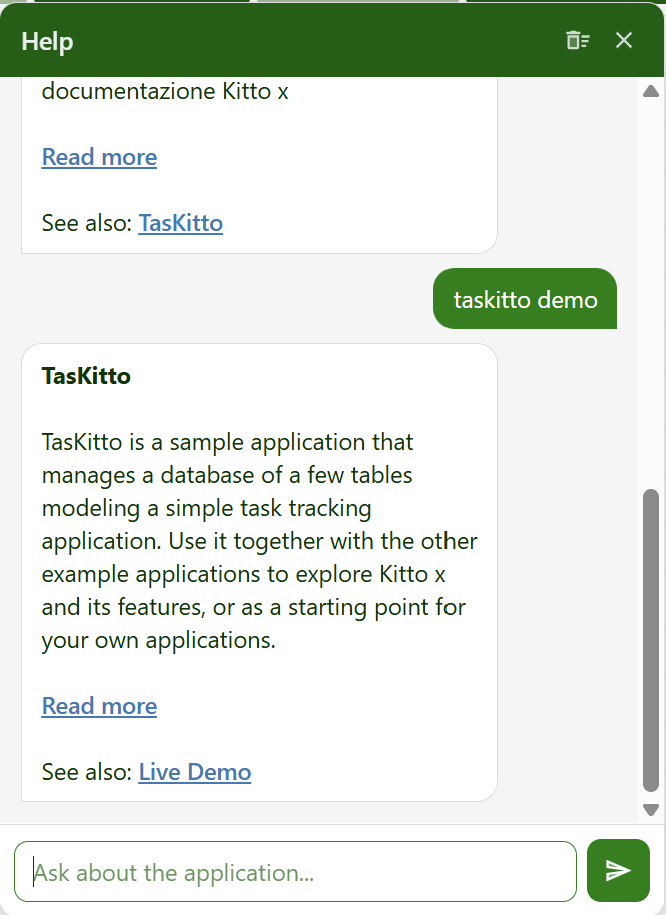
It is not a chat between users — it is a per-user help assistant. The way answers are produced is pluggable: out of the box a deterministic provider searches the KittoX documentation and links the relevant page; an AI backend (Claude, grounded on the docs) is switchable from config with no code change.
Two steps, not one
A YAML flag turns the assistant on — HelpChat/Enabled: True, with the answer engine chosen by HelpChat/Provider — but the units that implement it are opt-in from UseKitto.pas, like every other optional subsystem. Enabling the flag without linking them stops the application at startup with an error naming the exact unit to add.
Enabling it
1. Turn it on in Config.yaml:
HelpChat:
  Enabled: True
  Provider: docsearch            # deterministic docs search (default fallback: stub)
With Enabled: False (default) nothing is shown. The bubble appears only on the authenticated page.
2. Link the units from your UseKitto.pas — the endpoint unit plus the provider you configured:
  // Help Chat (HelpChat/Enabled) — endpoints plus the provider in use:
  , Kitto.Web.Handler.Chat
  //, Kitto.Chat.DocSearch          // provider 'docsearch' (offline docs search)
  , Kitto.Chat.Provider.Claude    // provider 'claude' (Anthropic AI, streaming)
Help Chat is not part of Kitto.Html.All (the core umbrella): it is a feature subsystem with its own background workers, linked only into the applications that use it — an application that does not use the assistant carries neither its code nor the Markdown library behind it. Linking the units while Enabled is False costs only binary size; note though that the kx/chat/* endpoints are registered by the unit itself and are not gated by the flag.
If HelpChat/Enabled: True but the units are missing, the application fails fast at startup (CheckOptionalFeatureUnits) with an error naming the exact unit to add — the framework never silently falls back to the stub for a forgotten unit:
HelpChat is enabled in Config.yaml but its units are not linked into this application. Add "Kitto.Web.Handler.Chat" and a provider unit … to your project's UseKitto.pas.
The HelpChat provider "claude" is configured in Config.yaml but is not registered. Add the unit Kitto.Chat.Provider.Claude to your project's UseKitto.pas.
The Notification Center behaves the same way: add Kitto.Web.Handler.Notification.
3. If your application compiles the framework sources (rather than using the KittoXCore package), add the Markdown library to the unit search path of the .dproj — Kitto.Web.Handler.Chat renders the provider's answer through it:
DCC_UnitSearchPath = ...;..\..\..\Source\ThirdParty\MarkdownProcessor\source;$(DCC_UnitSearchPath)Add it to every .dproj, not just the one you build day to day
Desktop, service, ISAPI and Apache projects all compile the same UseKitto.pas, so they all need the entry. A deployment project left behind gives no sign of it until someone actually rebuilds it, and then fails with Unit 'MarkdownProcessor' not found pointing at a unit that has nothing to do with whatever was being changed. The sample applications carry the entry in all of their projects.
What the user sees
- A floating assistant bubble (bottom-right). Clicking it opens a drawer with the conversation history and a composer (Enter to send, Shift+Enter for a new line, Esc to close). It uses the theme's Material icon and colours, matching the rest of the UI in light and dark.
- The user types a question; their message appears immediately, a typing indicator shows while the answer is produced on the server, then the assistant reply is displayed (links, bold and inline code are rendered). The conversation can be cleared from the drawer header.
- Contextual help: on List and Form screens a ? button in the toolbar opens the chat with a question about that screen, anchored to the screen's controller type so the answer points to the matching documentation page. (When the chat is disabled, the ? button keeps its classic behaviour of opening a configured help URL in a new tab.)
Answer providers
The provider is selected by name (HelpChat/Provider); an unknown/empty name falls back to stub, so the chat always has a working backend.
| Provider | Name | Behaviour |
|---|---|---|
| Stub | stub | Returns an honest placeholder. Validates the UI/flow with no dependency or key. |
| Doc search | docsearch | Searches the bundled KittoX documentation index and answers with the best page's summary plus a Read more link to the published docs. Deterministic, offline, no API key. |
| Claude | claude | AI answer grounded on the retrieved documentation (RAG). Requires an API key and the Kitto.Chat.Provider.Claude unit in UseKitto.pas (see the opt-in note above). |
The docsearch engine
docsearch loads a compact help index — Home/Resources/help/kittox-help.json, generated from the VitePress documentation corpus by Tools/build_help_index.py and shipped in the framework's system Home so every app gets it for free. On a question it scores the user's terms against each page (title weighted higher than body) and returns the best page's summary with a link to HelpChat/DocBaseUrl (default https://ethea.it/docs/kittox/), plus a See also link when a second page is a good match. If nothing matches, it points to the documentation home.
Because the corpus is in English, term-based matching works best on English/keyword queries and on controller names (List, Form, Chart, Calendar…); the natural-language AI provider handles free-form questions and other languages.
The claude engine
claude answers with Anthropic's Claude (Messages API, POST /v1/messages), grounded on the same documentation index (RAG): before calling the model it retrieves the pages best matching the question (and the current screen's controller type) and injects them into the system prompt, so the answer is anchored to the real docs and cites the linked page instead of inventing details. It handles free-form, natural-language questions in any language.
- Streaming, no server-push required. The provider requests a streamed response and forwards each token as it arrives; the reply is appended to the pending message in the conversation store, so the existing poll endpoint returns the growing partial and the drawer fills in block by block. No SSE-to-the-browser machinery is involved — the same client poll used by
docsearch/stubis enough, so streaming works identically on every deployment mode (standalone/Indy, IIS/ISAPI, Apache). - No SDK dependency. There is no official Anthropic SDK for Delphi, so the call uses
System.Net.HttpClientand the Server-Sent-Events response is parsed as bytes arrive. - Model. Defaults to
claude-haiku-4-5(fast and inexpensive — a good fit for a high-volume, latency-sensitive help chat); any model can be set viaHelpChat/Claude/Model. - API key. Read from
HelpChat/Claude/ApiKey(macro-expanded, so%ENV(ANTHROPIC_API_KEY)%works), with a fallback to theANTHROPIC_API_KEYenvironment variable. When neither is set the chat shows a clear configuration error. Keep the real key out of a public repository (the same practice asGoogleMapsApiKey): the recommended setup is to leave the key out ofConfig.yamlentirely and set the environment variable on the machine/service.
How it works

Key points:
- The provider call runs on a dedicated worker pool (
HelpChat/PoolSize, default 2), so a slow backend (e.g. an LLM HTTP round-trip) never blocks the web server, and chat activity never appears in the notification-center bell. - Streaming is opt-in per provider and needs no client change: a streaming provider (
claude) appends tokens to the pending message as they arrive, so each poll returns a longer partial and the bubble grows; a non-streaming provider (docsearch,stub) simply fills the bubble once when done. - The conversation is kept in memory per user for the session (no database persistence).
- Assistant replies are rendered from Markdown to safe HTML with Ethea's MarkdownProcessor (vendored in
Source/ThirdParty/MarkdownProcessor), using the CommonMark dialect in safe mode: active HTML (script,iframe,object, …) is escaped, so no markup produced by a provider (or an AI) can reach the page. Headings, lists, tables, code blocks, links, bold and inline code are supported.
Configuration
HelpChat:
  Enabled: True
  Provider: docsearch                # docsearch | claude | stub
  PoolSize: 2                        # background workers for the provider (default 2)
  HistoryMaxMessages: 50             # how many messages are passed to the provider as context
  MessageMaxLength: 4000             # server-side input length cap
  Greeting: Hi! Ask me anything...   # optional opening message (localizable)
  DocIndex: ''                       # optional override of the help index path
  DocBaseUrl: https://ethea.it/docs/kittox/   # base URL for docsearch "Read more" links
To use the AI provider, switch Provider to claude and add its subtree:
HelpChat:
  Enabled: True
  Provider: claude
  Claude:
    ApiKey: '%ENV(ANTHROPIC_API_KEY)%'   # or the key directly; env ANTHROPIC_API_KEY is the fallback
    Model: claude-haiku-4-5              # default
    MaxTokens: 1024                      # cap on the reply length
    GroundingMaxPages: 3                 # documentation pages injected as RAG context (0 = off)
    Version: 2023-06-01                  # anthropic-version header
    BaseUrl: https://api.anthropic.com   # override for a proxy/gateway
    SystemPrompt: ''                     # optional override of the base instruction
    ConnectTimeoutMs: 15000
    ResponseTimeoutMs: 120000
Keep the API key out of your public repository
Treat HelpChat/Claude/ApiKey exactly like GoogleMapsApiKey. The cleanest approach is to omit the key from Config.yaml and set the ANTHROPIC_API_KEY environment variable on the host, so no secret is ever committed.
Endpoints
| Endpoint | Purpose |
|---|---|
kx/chat/panel | HTML of the current user's conversation (loaded when the drawer opens). |
kx/chat/send (POST) | Accepts the user message (+ optional viewName/controllerType), enqueues the provider call, returns the user bubble and a pending assistant bubble. |
kx/chat/poll/{id} | Returns the assistant bubble once the worker has produced the reply. |
kx/chat/clear (POST) | Clears the current user's conversation. |
Localization
All UI labels and messages go through gettext (_()), including the client-side chrome bridged via KX_STRINGS, so the assistant is localized like the rest of the framework (see the Italian catalog in Home/Locale/it). The docsearch answers are the documentation text itself.
Notes
- Providers:
stubanddocsearchneed no API key; theclaudeprovider adds AI answers grounded on the documentation (RAG). - Persistence: the conversation is kept in memory per user for the session.
- Application-specific help (e.g. a project running its own DocuWiki) is served by a dedicated provider rather than the shared KittoX documentation.
See also
- Notification Center & Background Tools — the twin subsystem (shared worker-pool pattern)