
KIDEx Licensing & Registration
Kittox Enterprise feature
KIDEx is part of the Kittox Enterprise edition. See the Feature Matrix for the full comparison with the Open-Source edition.
KIDEx is licensed software. On first launch — and whenever the license is missing or expired — KIDEx tells you it is not registered and opens the License Manager, from which you can get everything you need without leaving the IDE. There are three ways to obtain a working license, all in the same window:
- Request a trial online — get a 30-day evaluation license from Ethea's license service (90 days with a special coupon handed out at Ethea events).
- Register a purchased product — activate an Enterprise license you have bought, using the license number you received.
- Enter codes manually — paste the activation codes you were given (e.g. by e-mail), for machines without direct internet access.
The same machine-bound license is shared by KIDEx and the bundled MCP-KittoX server — see Where the license is stored below.
Opening the License Manager
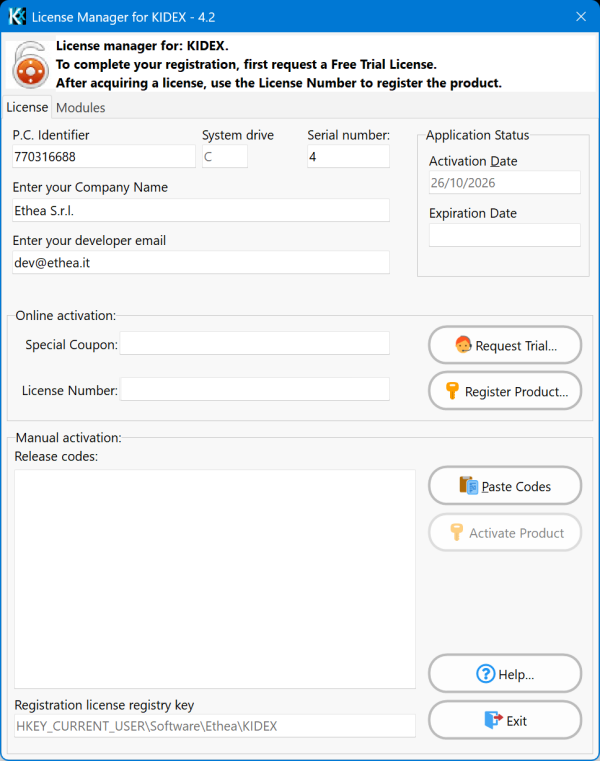
The License Manager opens automatically when KIDEx starts unregistered. You can also open it at any time from Help ▸ Register…. The top of the window shows read-only machine information (the P.C. Identifier, system drive and serial number) that the license is bound to — you do not edit these; they identify this installation to the license service. The same holds for the Activation Date and for the registry key at the bottom of the window: both report what the registration did, so they are shown greyed out. The only fields you fill in are the Company Name, the developer e-mail and — depending on how you register — the coupon, the license number or the release codes.
The Help… button, just above Exit, opens this page in your browser.
Once registered, KIDEx shows the license status in the title bar, worded by kind:
- a trial: (Trial version. Expiration days: N);
- a subscription: Software registered to "<company>" (<email>). Subscription expires in N days.;
- a perpetual license: Software registered to "<company>" (<email>).
Requesting a trial online
The fastest way to start evaluating KIDEx:
- Enter your Company Name and your developer e-mail (both required; the e-mail must be a valid address).
- Optionally type a Special Coupon in the Online activation group — see below. Leave it empty for the standard trial.
- Click Request Trial…. KIDEx contacts the license service, which returns the activation codes; they are filled into the release-codes box and the license is registered immediately.
The standard trial lasts 30 days, and needs nothing but the two identity fields.
Special coupons: a 90-day trial at Ethea events
At events such as Delphi Day and ITDevCon, Ethea hands attendees a special coupon that extends the trial to 90 days. Type it in the Special Coupon field before pressing Request Trial… and the longer period is granted at once.
You can also use a coupon later, on a trial already running: ask for the trial again with the coupon filled in and the extra days are applied as an upgrade (see below).
The trial is bound to this machine. Asking for it again on the same machine simply re-issues the same codes with the same expiration — the trial period does not restart. A more generous coupon is applied as an upgrade: you get the extra days and modules, but the expiration stays anchored to the original activation date, so the period is extended, not reset. So a 30-day trial started on the 1st, upgraded with a 90-day event coupon on the 20th, expires 90 days after the 1st — not after the 20th. A coupon that grants fewer or equal days never shortens an existing trial.
Registering a purchased product
When you buy an Enterprise license you receive a license number (for example 3F2A-9C71-4E80-1B5D). To activate it:
- Type the license number in its field in the online-activation group.
- Click Register Product….
KIDEx sends the license number (and this machine's identifier) to the license service, which looks up your purchase and returns the activation codes bound to your machine. The Company Name, developer e-mail and serial number of the licensed product are taken from the purchase itself and filled into the form — you do not have to retype them — and the license is registered.
Machine-bound activation
The first activation ties the license to this computer and sets the expiration to the day of activation plus the number of days you purchased (a perpetual license has no expiration). Re-activating the same license on the same machine re-issues the identical codes; trying to activate it on a different machine is refused. If you change computer, contact Ethea for a re-activation.
Entering codes manually
If the machine has no direct access to the license service, you can register with codes obtained out of band:
Paste the release codes you received into the release-codes box (the Paste Codes button clears the box and pastes the clipboard). They are one line per key, for example:
MK=56B1-5A2B-9A41-C504
IK=B916-00ED-027C-543F
UN=2D56-06B9-3605-8965
Click Activate Product.
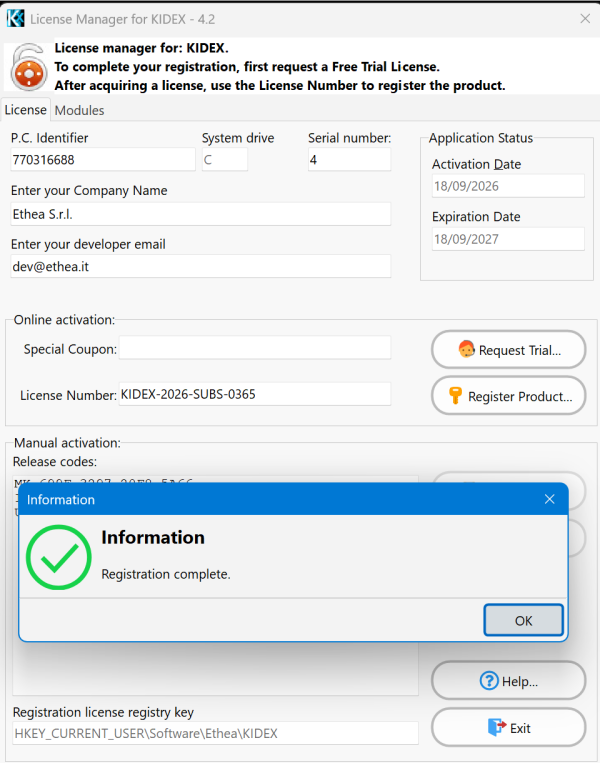
This is the same final step used by the two online flows: it validates the codes against this machine and, if valid, stores the registration. On success the dialog confirms Registration Complete. The License Manager stays open after a successful registration — close it yourself with Exit when you are done. Your entries (company, e-mail, coupon, license number and the last codes) are remembered, so re-opening the window shows them again.
Expiry reminder
When a registered license — trial or purchased product — has fewer than 20 days left, KIDEx reminds you at start-up, with a message tailored to the license kind:
- Trial approaching its end: a prompt to purchase the Enterprise license in time so you can keep using KIDEx, or to use a promotional coupon to extend the trial.
- Purchased product approaching its end: a reminder to renew in time — and, if you have already bought the renewal, to open the License Manager and register it (via Register Product… with the new license number).
The reminder does not block KIDEx; it disappears once the license is renewed with more than 20 days of validity.
Where the license is stored — and why multiple versions coexist
The license is stored in the Windows registry, under:
HKEY_CURRENT_USER\Software\Ethea\KIDEXThe registry storage is per-user: it needs no administrator rights, is Terminal-Server / multi-user friendly, and is not tied to the folder the executable runs from. Nothing is written to an .ini file.
Register once, run every version
Because the registration lives in a single per-user registry key (not in a file inside each install folder), you can install and run several versions of Kittox / KIDEx side by side on the same machine — they all read the same key, so a single activation unlocks every installed version (and the same key also unlocks MCP-KittoX). The license is bound to the machine, so it is valid for each user only on the computer it was issued for.
The license service endpoint
The trial and product activations reach Ethea's hosted license service. The base URL is built into KIDEx, but it can be overridden in the project Config.yaml — useful when a site runs its own instance of the service:
LicenseServer:
  URL: https://licenses.ethea.it/licenses
Only the public activation endpoints are called from KIDEx; no private key ever travels in the request, and the application's own OnGuard master key never leaves the executable.