
MCP-KittoX: the MCP server
Kittox Enterprise feature
MCP-KittoX is part of the Kittoˣ Enterprise edition and ships together with KIDEx. It uses the same OnGuard license file (%CSIDL_COMMON_DOCUMENTS%\Ethea\KIDEX\Registration.ini) — a single registration unlocks both. See the Feature Matrix for the full comparison with the Open-Source edition.
MCP-KittoX is a standalone executable (MCPKittoX.exe) that exposes the functionality of KIDEx to AI agents — Claude Desktop, Claude Code, Codex, LM Studio and any other client compatible with the Model Context Protocol.
While KIDEx remains the human-facing visual IDE, MCP-KittoX is the AI-facing design tool: agents can scaffold new applications, reverse- engineer Models from a database, generate Views and Layouts, validate metadata, and refresh translation files — all conversationally, without leaving the agent.
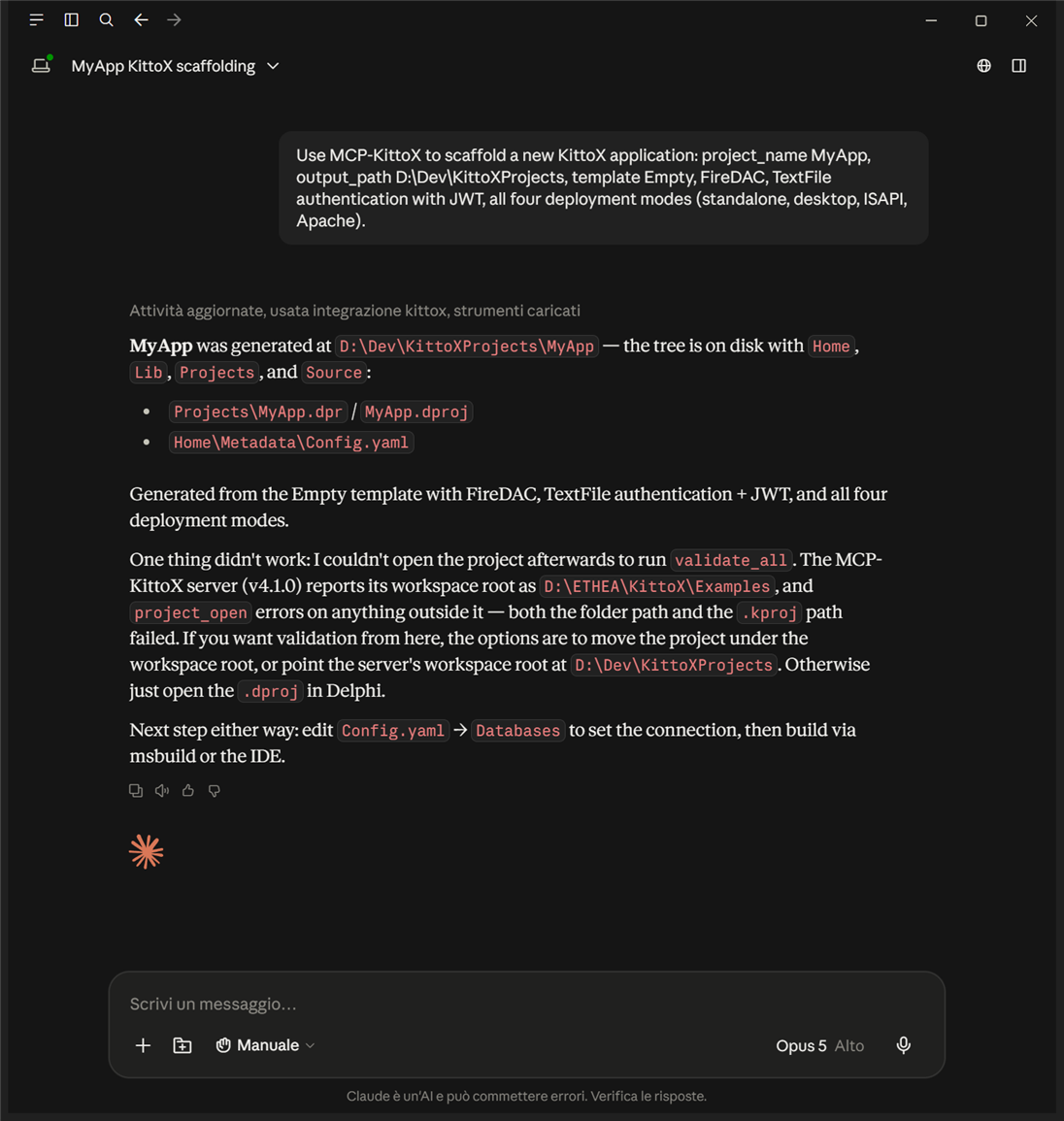
Why use it
- Fast onboarding: an agent can create a complete Kittox app scaffold ("scaffold an app named MyApp under D:\Dev with FireDAC, JWT auth and all 4 deployment modes") without you opening RAD Studio or KIDEx.
- Assisted maintenance: ask the agent to validate the project, refresh the
.potranslation files, or propagate database schema changes back into the Model YAML files. - Enterprise differentiator: pair the visual IDE with an AI tool — the same way a developer pairs an IDE with an LLM-powered code assistant.
Quick start
After installing KIDEx Enterprise (which deploys MCPKittoX.exe to the same Bin\ folder as KIDEX.exe) and registering the OnGuard license, wire your MCP client:
Claude Desktop / Codex (STDIO transport)
%APPDATA%\Claude\claude_desktop_config.json (Windows):
{
  "mcpServers": {
    "kittox": {
      "command": "C:\\Program Files\\Ethea\\KIDEX\\Bin\\MCPKittoX.exe",
      "args": ["--stdio", "--workspace=D:\\Dev\\KittoXProjects"]
    }
  }
}
Restart Claude Desktop. The agent will discover all the tools registered by the server (currently 29 — see the Feature Matrix below) and use them autonomously when you ask for Kittox development tasks.
Test the connection
MCPKittoX.exe --versionprints MCP-KittoX 4.0.7 and exits with code 0. From a JSON-RPC client (or MCPJam Inspector), invoke meta_version to verify the license check passes:
{
  "name": "MCP-KittoX",
  "version": "4.0.7",
  "build_date": "2026-05-07",
  "mcp_spec": "2025-06-18",
  "kittox_version": "4.0.7",
  "license_status": "(Trial version. Expiration days: 30)"
}
Conversational example: scaffold + reverse-engineer Models
A typical end-to-end interaction once the MCP server is wired:
You — "Scaffold a new Kittox app named
Northwind2underD:\Dev\Examples, then point me at the SQL ServerNorthwinddatabase and generate Models for every table."Agent —
- Calls
project_create_app(project_nameNorthwind2, templateBasic). The wizard's defaults kick in:Auth: TextFilewith the demoFileAuthenticator.txt(admin/admin), JWT envelope,AccessControl: Null.- Asks you to edit
Home\Metadata\Config.yamlsoDatabases.Mainpoints at your SQL Server (or you tell the agent how it's reachable and it edits the file via your IDE).- Calls
project_openon the freshly-generated.kproj.- Calls
models_create_from_dbwithdry_run: trueand shows you the proposed action tree — typically Nadd_modelactions and a few hundredadd_field/add_reference_fieldsub-actions.- After your OK, calls
models_create_from_dbagain withdry_run: false— this time the tool executes the actions and writes the YAML files toHome\Metadata\Models\. Returnsapplied: trueand a summary.- Calls
menu_generate_main_menu—MainMenu.yamlis updated with oneView: Build AutoList / Model: <Name>entry per Model under a top-levelFolder: Menu. TheFolder: Usershipped with the template (Logout / ChangePassword) is preserved.- Suggests the next step (open the project in KIDEx or RAD Studio, customize the auto-generated Views or the menu, or ask the agent to drill into specific files using
models_read/views_read).
The whole exchange runs without you opening RAD Studio or KIDEx — the agent uses MCP-KittoX's tools the same way it would use a filesystem or a shell tool, and the resulting Models/ is identical to what the Model Wizard would have written if you'd driven it visually.
Architecture
| Aspect | Implementation |
|---|---|
| Library | MCPConnect (delphi-blocks, MIT) — attribute-driven, multi-transport |
| Serialization | Neon (MIT) — RTTI-based JSON, snake_case field naming |
| Logging | Logify (MIT) — meta-logging facade |
| Transport (current) | STDIO (Claude Desktop, Codex) |
| Transport (planned) | Indy HTTP (LM Studio, web-based clients) |
| MCP spec | 2025-06-18 |
| Naming convention | snake_case for tool args/results, plural scope for collections (models_list), singular-typed scope for typed creators (view_list_create) |
| License gate | OnGuard, shared with KIDEx; every tool method calls EnsureLicensed first; unlicensed → EKXLicenseError (EJRPCException) → JSON-RPC error visible to client |
The server is a standalone executable, not embedded in your Kittox runtime nor inside KIDEx. Agents talk to it; KIDEx continues to be the human visual IDE. Both share a common headless layer so that — for instance — the models_create_from_db tool produces a Models/ folder byte-identical to what the Model Wizard writes when driven manually.
Feature Matrix
The following table tracks the implementation status of each MCP tool. Tools are organised by scope: collections use plural names (e.g. models, views) for browse/CRUD operations; typed creators use singular per-controller scopes (e.g. view_list, view_chart) so the tool surface can grow additively without breaking changes.
Implemented (Phases 1 → 4)
| Scope | Tool | Description | Status |
|---|---|---|---|
meta | meta_version | Server identity, build date, MCP spec, license status | ✅ Done |
meta | meta_capabilities | Registered tool scopes + runtime feature flags (readonly, allow-update, allow-delete, workspace root) | ✅ Done |
meta | meta_list_metadata_templates | List the YAML templates KIDEx uses as design-time defaults | ✅ Done |
project | project_open | Open a Kittox project (.kproj file or Home/ folder) | ✅ Done |
project | project_info | Snapshot of the currently-open project | ✅ Done |
project | project_list_apps | List the application configs (Config.yaml variants) | ✅ Done |
project | project_close | Close the currently-open project | ✅ Done |
project | project_create_app | Generate a new app from a template (Empty / Basic), with full parametrization: DB drivers, auth + JWT envelope, access control, server settings, deployment modes (Standalone / Desktop / ISAPI / Apache), language, charset, theme. Default Auth: TextFile ships with a ready-to-use FileAuthenticator.txt so the generated app authenticates without a users table | ✅ Done |
models | models_list | List all Models in the active project. Each call refreshes the catalog from disk so external edits to YAML files since project_open are picked up. Returns name, physical_name, display_label, plural_display_label, field_count, is_large per entry | ✅ Done |
models | models_read | Read a Model YAML by name (case-insensitive lookup). Returns name (canonical casing), file_name (absolute path), content (raw YAML byte-identical to disk — comments and formatting preserved) | ✅ Done |
models | models_create_from_db | Reverse-engineer Models from a database connection (the headless equivalent of the Model Wizard inside KIDEx). Reads the live schema, diffs it against the open project's Models/, and returns the proposed action tree. Defaults to dry_run: true (preview only); pass dry_run: false to commit. Output is byte-identical to what the visual Model Wizard would write. Auto-populates each Model field's DisplayLabel from the database's native column comment when present (MSSQL extended property MS_Description, PostgreSQL pg_description, Firebird RDB$DESCRIPTION, MySQL COLUMN_COMMENT, Oracle USER_COL_COMMENTS). Accepts an optional field_descriptions array — a list of {model_name, field_name, display_label, hint} overrides — for the case where the agent has descriptions in a non-DB source (CSV export, glossary, prior YAML); override wins on every non-empty property, DB-fetched descriptions are preserved for the rest | ✅ Done |
models | models_delete | Delete a Model YAML by name. Two-step safety: confirm=false (default) returns a no-op preview confirming the file exists; confirm=true executes the delete and requires the server to be started with --allow-delete. Lookup is case-insensitive. Inbound references (other Models with Reference(name), Views with Model: name) are left dangling — the agent is responsible for inspecting and cleaning them up with the read tools beforehand if needed | ✅ Done |
models | models_update | Apply a list of granular operations to a Model's YAML tree and persist. Operations are {path, op, value} records applied in order, where op is 'set' (sets a node at the slash-separated path, creating missing intermediates) or 'delete' (removes a node). Two-step safety: confirm=false (default) returns a no-op preview; confirm=true executes the patch and requires the server to be started with --allow-update. Comments and original formatting of the YAML file are not preserved across the save (the tree is re-serialized) | ✅ Done |
models | models_generate_ddl | Generate the DDL that would align a database to the project's Models — the forward direction of models_create_from_db, and the headless equivalent of the Database Wizard. For each Model it reads the live table through the framework's schema introspection and emits CREATE TABLE (table missing) or ALTER TABLE ADD / ALTER / DROP COLUMN (table divergent), plus the per-Model summary and the engine log. Read-only: it never touches the database. The six option flags mirror the wizard's checkboxes and default to its safe values (drop_columns and create_foreign_keys off, the rest on). Note: create_foreign_keys currently emits nothing — add the FOREIGN KEY clauses by hand in the script if you need them | ✅ Done |
models | models_apply_to_db | Execute DDL against the database to align it to the project's Models. Two-step safety: confirm=false (default) returns the script and the statement count without touching the database; confirm=true executes it and requires the server to be started with --allow-delete, because altering a schema is at least as consequential as a delete. Accepts an optional script to run verbatim — so the agent can review, edit and then apply exactly what it reviewed — or regenerates one from the Models when none is supplied. Statements run one at a time, outside any transaction, and a failure does not stop the batch: read the returned log to see what ran and what failed | ✅ Done |
views | views_list | List all Views in the active project. Same disk-refresh semantics as models_list. Returns name, display_label, controller_type, image_name per entry | ✅ Done |
views | views_read | Read a View YAML by name (case-insensitive). Same response shape as models_read | ✅ Done |
views | views_delete | Delete a View YAML by name. Same two-step confirm=false/true + --allow-delete pattern as models_delete. Inbound references from other Views (typically MainMenu entries) are left dangling | ✅ Done |
views | views_update | Apply a list of granular operations to a View's YAML tree and persist. Same {path, op, value} shape and confirm / --allow-update semantics as models_update | ✅ Done |
views | views_controllers | Discovery — list every controller type currently registered in the running MCPKittoX.exe binary, i.e. every value an agent can write after Controller: in a view YAML. Returns name (the registry key, e.g. 'List', 'Form', 'BorderPanel') and class_name (the underlying Delphi class) for each entry, sorted alphabetically. The list reflects the units linked in the running binary: any Enterprise add-on (Chart, Calendar, GoogleMap, Dashboard) registered via its own initialization section appears here automatically | ✅ Done |
view_list | view_list_create | Scaffold a data grid View (Type: Data with Controller: [List](List)) from a Model of the open project — the headless equivalent of KIDEx's Create DataView… context action. List is the HTMX data-grid controller (it replaces the ExtJS GridPanel; the two were fused in the porting, so there is no separate view_grid). Output is byte-identical to the visual DataView wizard: a MainTable referencing the Model with every field as a column, a recursively-built detail-table block per detail reference, and a default FreeSearch filter over the text fields (both delegate to the framework's TKAutoListViewBuilder). model_name (required) selects the Model; view_name (optional) is the persistent file name, defaulting to the Model's plural name. Filter captions are language-independent: the composed Filters/DisplayLabel is not written (the grid falls back to the framework's translated Filters caption) and the free-text filter is emitted as FreeSearch: _(Free Search). Non-destructive: refuses to overwrite an existing View and reports the existing path instead — enabled by default, no --allow flag needed | ✅ Done |
layouts | layouts_list | List all Layouts in the active project (the YAML files under Home/Metadata/Views/Layouts/). Same disk-refresh semantics as models_list. Returns name, is_form_layout, is_grid_layout per entry | ✅ Done |
layouts | layouts_read | Read a Layout YAML by name (case-insensitive). Same response shape as models_read (name, file_name, content) | ✅ Done |
layouts | layouts_delete | Delete a Layout YAML by name. Same two-step confirm=false/true + --allow-delete pattern as models_delete | ✅ Done |
layouts | layouts_update | Apply a list of granular operations to a Layout's YAML tree and persist. Same {path, op, value} shape and confirm / --allow-update semantics as models_update | ✅ Done |
resources | resources_list | List static resources under the open project's Home/Resources/ (app) and/or the framework's shipped Home/Resources/ (system). Two-tier lookup mirrors the runtime /res/* precedence: each entry carries a source: 'app' | 'system' discriminator. Optional filters: subpath (e.g. 'icons/outlined'), pattern glob ('*.svg'), include_app / include_system, recursive. Returns path (forward-slashed, relative), source, size_bytes, mime_type per entry. Filesystem is enumerated live on every call | ✅ Done |
resources | resources_read | Read a single static resource by forward-slashed relative path. App takes precedence over system, mirroring the runtime resolver. Text resources (text/*, JSON, XML, JS, SVG, YAML) are returned as UTF-8 in content; binaries as base64 in content_base64. Files above 1 MB return metadata only with content_too_large: true (clients can still fetch via the runtime's /res/<path> HTTP route). Path-traversal (.., drive letters, absolute) is rejected | ✅ Done |
menu | menu_generate_main_menu | Create or refresh the project's MainMenu.yaml (the TreeView referenced by the standard HomeView). Adds one inline View: Build AutoList / Model: <Name> entry under a top-level Folder: Menu for every Model in the project. Idempotent: when the file already exists, only the Models not yet referenced are appended (any hand-edited folders or entries are preserved, including the standard Folder: User with Logout / ChangePassword). When the file does not exist, the tool creates it from scratch with the standard scaffold. Single parameter file_name (default 'MainMenu') | ✅ Done |
db | db_list_connections | List every database connection defined under Databases/ in the open project's Config.yaml. Returns name (the YAML key), driver ('FD' / 'DBX' / 'ADO') and display_label per entry. Credentials and connection-string sub-nodes (Password, User_Name, Server, ...) are not included | ✅ Done |
db | db_test | Test a single database connection by opening it and immediately closing it. On success returns success: true with the driver name; on failure returns success: false with error_class + error_message captured structurally, so an agent can branch on the exception type (driver not deployed, server down, wrong credentials, OLEDB provider missing). The test goes through a standalone connection that does not pollute the runtime per-request connection pool. Lookup is case-insensitive | ✅ Done |
db | db_list_tables | Enumerate the tables exposed by a database connection via the framework's TEFDBInfo.Schema introspection — the same primitive the Model Wizard uses internally before diff-ing against existing Models. Opens a standalone connection, iterates Schema.Tables, returns a flat array of table names plus count. Optional include_views: Boolean (default false) merges DB views into the result (mirrors the use_views parameter of models_create_from_db). On connection failure the exception is propagated verbatim (class name + message). Use db_test first if you want a non-throwing probe | ✅ Done |
db | db_describe_table | Describe a single database table via the framework's schema introspection (TEFDBInfo.Schema.FindTable) — columns with data_type (KittoX-normalized: String, Integer, Decimal, Date, DateTime, Boolean, Memo, Blob, ...), size, scale, nullable, is_pk, is_fk, native column description (when the DB exposes one); the ordered primary key column list; and the foreign keys (each with name, local columns, ref_table and ref_columns). Same primitive the Model Wizard reads to build the action tree for one table. Opens a standalone connection. On connection failure the exception is propagated verbatim. Both connection_name and table_name lookups are case-insensitive | ✅ Done |
db | db_introspect | Full schema snapshot of a database connection — one db_describe_table-shaped entry per table the framework exposes, in declaration order. Composition of db_list_tables + db_describe_table over a single CreateDBInfo so the framework reads the metadata cursors only once (more efficient than calling db_describe_table N times). Optional include_views: Boolean (default false) extends the snapshot to DB views. Payload size grows linearly with the schema; on very large databases prefer iterating db_list_tables + db_describe_table to stream the output | ✅ Done |
config | config_read | Read a single Config YAML by app name ('default' for Config.yaml, '<X>' for Config<X>.yaml / Config_<X>.yaml). Returns app_name, file_name, content (raw YAML, UTF-8, byte-identical to disk — no sanitization). Use project_list_apps first to discover the available app names | ✅ Done |
config | config_update | Apply a list of granular operations ({path, op, value} with op = 'set' | 'delete') to a Config YAML and persist via the same TEFYAMLReader + TEFYAMLWriter pair KIDEx's Config Editor uses on Ctrl+S. confirm=false (default) is a no-op preview; confirm=true executes the patch and requires the server to be started with --allow-update. When the patched file is the active Config.yaml the runtime's in-memory config is invalidated so subsequent reads pick up the new state. Touches the most sensitive file in the project (DB credentials, auth/JWT keys) — the dual --allow-update + confirm=true gating exists for this reason. Comments and original formatting of the YAML are not preserved across save | ✅ Done |
locale | locale_list_languages | List every language declared under the open project's Home/Locale/ directory. Returns name (language code, e.g. 'it', 'en'), path (absolute directory), and po_count (number of .po files under <lang>/LC_MESSAGES/) per entry. Returns an empty list when Locale/ does not exist or contains no .po files. Sorted alphabetically by name | ✅ Done |
locale | locale_read_po | Read a single .po file at <AppHome>/Locale/<language_name>/LC_MESSAGES/<domain>.po. Returns language_name, domain, file_name, content (raw .po text, UTF-8, byte-identical to disk). domain defaults to 'default' (KittoX uses a single domain) | ✅ Done |
validate | validate_config | Run KIDEx's TConfigValidator headlessly against the open project's Config YAML for the requested app name. Same validator class the Config Editor invokes on the Validate Metadata button. Captures every info / warning / error log line emitted during the run (via a TEFLogEndpoint sink on TEFLogger.Instance, classifying messages by their 'default' for Config.yaml, suffix for variants | ✅ Done |
validate | validate_models | Run TModelValidator headlessly. Pass a model name (case-insensitive) to validate a single Model, empty string to validate every Model in the project. Same uniform result shape as validate_config: scope, name, file_name, per-tag counts, lines | ✅ Done |
validate | validate_views | Run TViewValidator headlessly. Single view by name or empty for all. Same result shape as the other validate_* tools | ✅ Done |
validate | validate_layouts | Run TLayoutValidator headlessly. Single layout by name or empty for all. Same result shape | ✅ Done |
validate | validate_all | Orchestrate the four validators (Config → Models → Views → Layouts) in sequence sharing a single log sink so the returned result aggregates info/warning/error counts and messages across all four. scope='all', name='', file_name='' | ✅ Done |
Planned (Phase 5 and beyond)
| Scope | Tool | Description | Status |
|---|---|---|---|
models | models_patch_node | Granular edit of a single Model YAML node | ⏳ Todo |
view_grid | view_grid_create | Dropped — the implemented tool is view_list_create. The HTMX port fused the ExtJS GridPanel and List controllers into a single List controller, so the grid view tool is named after the real controller (List); there is no separate Controller: GridPanel to target | ❌ N/A |
view_grouping_list | view_grouping_list_create | Scaffold a GroupingList view | ⏳ Todo (future) |
view_chart | view_chart_create | Scaffold a ChartPanel view (bar/line/pie/doughnut) | ⏳ Todo (future) |
view_calendar | view_calendar_create | Scaffold a CalendarPanel view | ⏳ Todo (future) |
view_googlemap | view_googlemap_create | Scaffold a GoogleMap view | ⏳ Todo (future) |
view_template_data | view_template_data_create | Scaffold a TemplateDataPanel view | ⏳ Todo (future) |
locale | locale_update_files | Run Update Locale Files headlessly: extract translatable strings from YAML metadata + Delphi sources, merge with existing .po files preserving translations | ⏳ Todo (Phase 3) |
Safety: write operations are opt-in
By default MCPKittoX.exe exposes read tools only. Update operations require --allow-update on the command line; delete operations require --allow-delete. Delete tools further follow a two-step preview→confirm pattern: a first call with confirm: false returns the impact (would_delete, references_count, would_break: [...]); a second call with confirm: true actually executes, only if the preview is still in cache for the session.
Workspace sandboxing (--workspace=PATH) prevents path traversal outside an allowed root.
CLI flags
MCPKittoX.exe [options]

Transport:
  --stdio                 STDIO transport (default — for Claude Desktop, Codex)
  --http                  Indy HTTP transport (planned)
  --port=PORT             HTTP port (default 4000, ignored in --stdio)
  --bind=ADDRESS          HTTP bind address (default 127.0.0.1)

Project:
  --project=PATH          Project to open at startup (optional)
  --workspace=PATH        Sandbox root — projects must live underneath

Security:
  --api-key=KEY           API key required for HTTP transport
  --readonly              Disable all write tools (creates / updates / deletes)
  --allow-update          Enable *_update tools (off by default)
  --allow-delete          Enable *_delete tools (off by default)

Diagnostics:
  --log-file=PATH         Logify file destination
  --log-level=LEVEL       debug | info | warn | error (default info)
  --version               Print version and capabilities, exit
License status
When the server starts, the OnGuard license check runs. The result is:
- printed to stderr as a one-line banner (visible when running interactively):
[LICENSE] (Trial version. Expiration days: 30) [LICENSE] Software registered to "Carlo Barazzetta". [LICENSE] Unregistered version! You must acquire license from "support@ethea.it" - exposed in the JSON-RPC
meta_versionresponse underlicense_status(so an agent can read it and warn the user when expiration is approaching).
If the license is invalid, every tool method throws an EKXLicenseError that propagates through the JSON-RPC envelope as a structured error:
{"error":{"code":-32603,"message":"Unregistered version! You must acquire license from \"support@ethea.it\""},"id":2,"jsonrpc":"2.0"}The server still answers initialize and tools/list so the client can show the tool catalog — but no tool can be invoked successfully until KIDEx is registered.
See also
- KIDEx: the KittoX IDE — the visual IDE whose functionality MCP-KittoX exposes to AI agents; also includes the RAD Studio IDE plugin section that documents the gallery entries under File > New > Other > KittoX Projects
- New Project Wizard — the visual counterpart of
project_create_app; same template engine, identical output - Kitto Enterprise — what's included in the commercial edition
- Feature Matrix — Open Source vs Enterprise comparison
- Model Context Protocol (external) — the protocol specification
- MCPConnect (external) — the underlying Delphi MCP library