
LanguageSwitcher
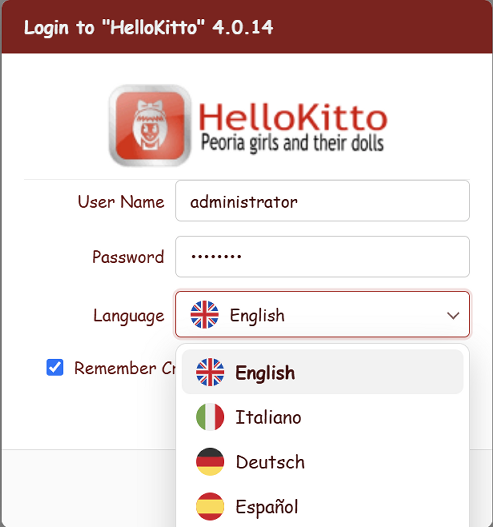
LanguageSwitcher is the controller that renders the interface-language chooser: a small drop-down showing the current language's flag and native name, with a menu of every language the application ships. It is the companion of the ThemeSwitcher and is placed the same way — dropped into a layout region via YAML — so it can appear identically on the login page and inside the home.
How it works
Unlike the theme (a purely client-side preference), the language is a server-side, per-session setting driven by GNU gettext. Picking a language therefore does a short round-trip:
- The menu item calls
kxLang.set('<code>')(inkxlang.js). - That posts to the anonymous endpoint
POST /kx/setlang/{Lang}, which validates the code and stores it on the session. - The client reloads the current page, and the whole UI re-renders in the chosen language.
Because the endpoint is anonymous, the switcher works before sign-in too, so a visitor can pick their language and then log in.
Available languages
The list of offered languages is discovered, not configured, and discovery follows two rules:
- a language is offered when the application's
Home/Locale/<code>/LC_MESSAGES/holds at least one compiled catalog (*.mo), plus English (the source language, which needs no catalog); - the framework's
KittoX/Home/Locale/is not scanned. ItsKitto.mocatalogs keep translating the framework's own strings, but they no longer make a language selectable on their own.
Adding a language is therefore a matter of putting the application's compiled catalog in place — see Adding a new language.
Why both rules matter
A bare Locale/fr/ folder — or one holding only the .po source — would otherwise add French to the menu and translate nothing: the user picks it and the page comes back unchanged.
And since KittoX ships framework catalogs for de, es, it and pt, an application translated only into Italian and Spanish would otherwise offer German and Portuguese as well — choosing one would produce a half-translated screen: framework chrome translated (Passwort, Sprache) with every application label still in the source language.
Each language id is mapped to a native display name and an ISO 3166 country code for the flag SVG under Home/Resources/flags/:
| Id | Name | Flag |
|---|---|---|
en | English | gb |
it | Italiano | it |
de | Deutsch | de |
es | Español | es |
pt | Português | pt |
fr | Français | fr |
Any other id falls back to the up-cased code as the name and the code itself as the flag. Region variants such as pt_BR are matched to their base language (pt) for the flag and name.
The current session language is preselected in the menu; a region-qualified session language (e.g. it_IT) is matched to its base entry.
Enabling it
The switcher is gated by the same flag that governs per-session language:
# Config.yaml
LanguageId:            # empty → follow the browser (Accept-Language); set a code (en, it, …) to force it
LanguagePerSession: True- With
LanguagePerSession: Truethe controller renders; withFalse(or when fewer than two languages are available) it emits nothing and the container collapses — so you can drop it in defensively. - With an empty
LanguageId, the initial language is auto-detected from the browser'sAccept-Language; the switcher then lets the user override it. See Choosing the language.
Placing it
Drop the controller into any layout region:
Controller: LanguageSwitcherTypical placements (as in the shipped examples):
Login — as a labelled field row inside the form (the framework renders it there automatically when LanguagePerSession: True, with the Language label on the left), or in a BorderPanel region of the login dialog.
Home — at the bottom of the left menu, next to the ThemeSwitcher. In the examples both share a small chrome band:
Controller: BorderPanel
  Width: 230
  # … NorthView (logo), CenterView (TreePanel) …
  SouthView:
    Height: 44
    Controller: BorderPanel
      Border: False
      Header: False
      WestView:
        Width: 112
        Controller: ThemeSwitcher
      CenterView:
        Controller: LanguageSwitcher
Styling
The switcher's markup uses the .kx-lang-switcher / .kx-lang-current / .kx-lang-menu classes in kittox.css. It is theme-aware and adapts to the context:
- On a chrome band (
.kx-region-south) it uses the light chrome text and its pop-up opens upward. - Inside the login form (
.kx-login-lang-cell) it matches the other inputs (same border, radius and drop-down arrow as the Environment combo).
Configuration summary
| Key | Default | Effect |
|---|---|---|
LanguagePerSession | True | Render the switcher (and allow a per-session language). False → hidden |
LanguageId | (empty) | Empty = auto-detect from the browser; a code forces that language |
See also
- Localization — the
.po/.mosystem, language selection, browser detection - Update Locale (KIDEx) — generate/refresh the translation catalogs
- ThemeSwitcher — the companion theme-chooser controller
- Login — the login page and its language row