
Update Locale
Keeping the GNU gettext .po files of an application in sync with the strings you mark for translation — scattered across YAML metadata and Delphi code — is tedious by hand. KIDEx automates it: with one command it scans the project's metadata and sources, extracts every translatable string, and merges the result into a language's default.po — preserving the translations already done.
This is the recommended way to build and maintain the .po files of a Kittox application: you mark strings with _(...) (and use the standard label nodes), then re-run this command whenever metadata or code changes. Translators working in parallel never lose their work.
Why this matters
A typical Kittox application has hundreds of strings scattered across:
- YAML metadata —
DisplayLabel,PluralDisplayLabel,Hint,AllowedValueslabels, button/ToolView captions, dialog titles, filter labels - Delphi source — strings inside
_('...')calls inControllers.pas,Rules.pas,UseKitto.pasand your own units
Manually keeping the .po files aligned with all of this is impractical. KIDEx does it in seconds with two extraction passes merged into a single .po:

What it extracts
1. YAML metadata
KIDEx walks the loaded metadata catalog — Models, Views, Layouts and the top-level Config *.yaml files — and collects a node's value when either:
- the node name is one of the configured localizable keys — by default
AppTitle,ConfirmationMessage,DisplayLabel,Folder,FreeSearch,Hint,PluralDisplayLabel(list read fromLocalization/Yaml/DefaultKeyNamesin KIDEx'sConfig.yaml); or - the node value is already wrapped as
_(...).
The _(...) wrapper is stripped, so the msgid is the plain text (e.g. DisplayLabel: _(Bar Chart) → msgid Bar Chart).
Wrap everything you want translated
The name list above is intentionally small. Any other translatable YAML value must be wrapped in _(...) to be picked up — view Title, ToolViews labels, filter captions, AllowedValues descriptions (never the DB codes), etc. For model fields the recommended form is an explicit DisplayLabel: _(English), which is both extracted and self-documenting.
Scaffolded views come out translatable
A View generated by KIDEx — the Create DataView… action, the DataView wizard, or the view_list_create / view_form_create MCP tools — no longer carries the filter captions in the language of whoever generated it. The composed Controller/Filters/DisplayLabel (Search Dolls) is not written at all, so the grid falls back to the framework's own Filters caption, which follows the session language; the free-text filter is written as FreeSearch: _(Free Search), a plain msgid already in the framework catalog. Everything else you add by hand still needs the _(...) wrapper.
Never wrap a value that is not shown to the user
The _(...) wrapper makes a value change with the session language. That is right for a label and wrong for anything the application matches, stores or emits. Leave these alone:
| Node | What it really is |
|---|---|
PluralModelName | the XML element name wrapping a record set in GetAsXML (TKViewTableRecords.GetXMLTagName), used by the XML export and FOP report tools — not a label, despite the name |
AllowedValues keys, filter Items keys | the codes stored in the database — translate the value after the colon, never the key |
SQL comparison literals inside Expression | WHEN {Q}STATUS = 'ATT' and the like; only the displayed text in the same expression may be wrapped |
PhysicalName, ClientFileName, TemplateFileName, FileName, Model, View, Layout, Field, ImageName, DefaultValue, rule parameters | table/column, file and object names |
The plural caption is a different node, PluralDisplayLabel, and that one you do wrap. See what must not be wrapped for the reasoning.
2. Delphi sources
KIDEx then runs the bundled dxgettext (dxgettext.exe --delphi) over the project's sibling Source\ folder, extracting every _('...') / gettext string from your Delphi units into a temporary catalog.
3. Merge
The two passes are merged into the target language's default.po with msgcat: existing msgstr values are kept, and strings found for the first time are added with an empty translation, ready to be filled in.
The operation is non-destructive — it only adds missing msgids; it never overwrites an existing translation.
Scope
- It maintains the application catalog only —
default.poper language. The framework strings (Kitto.po) are shipped translated by Ethea and are not regenerated here. - It works on one language at a time: you run it on a specific
default.po.
Prerequisites
- A project open in KIDEx.
- The bundled dxgettext tools (
dxgettext.exeandmsgcat.exe), shipped underKide\Bin\dxgettexttools. The folder is read fromLocalization/dxgettext/Pathin KIDEx'sConfig.yaml(default%APP_PATH%dxgettexttools) and shown read-only in the dialog. - Project layout:
Home\Metadata\(the YAML), a siblingSource\folder (the Delphi units), and the targetHome\Locale\<lang>\LC_MESSAGES\default.po. The New Project Wizard creates the locale skeleton.
Running it
- In the KIDEx file tree, expand the project's Locales node — each language appears with its
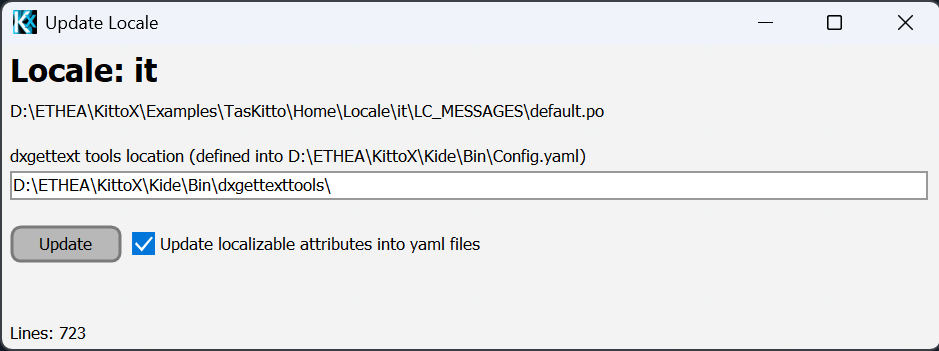
default.po. - Right-click the language you want and choose Update…. The Update Locale dialog opens, showing the target
.poand the dxgettext tools path. - Click Update. The status line reports progress and ends with
Done.
Repeat for each language you ship.
After the update: translate and compile
KIDEx updates the .po but does not compile the .mo. Newly-found strings appear with an empty msgstr:
- Open
Home\Locale\<lang>\LC_MESSAGES\default.poin Poedit (or any gettext editor). - Translate the empty entries.
- Save — Poedit writes
default.moautomatically (or runmsgfmt default.po -o default.mo). The runtime reads the.mo.
See Localization for the runtime side (file structure, .mo, language selection).
Adding a new language
- Create
Home\Locale\<lang>\LC_MESSAGES\(e.g.de,es,pt,pt_BR) and copy an existingdefault.pointo it — or start from an empty file. - Run Update… on it to fill it with all current msgids.
- Translate and compile as above.
The login/menu language switcher is built from the locale subfolders, so the new language appears automatically once its folder exists.
Notes & limitations
- Non-destructive: existing translations are preserved; the update only adds new (empty) msgids.
- It does not mark changed strings as
fuzzy, nor move removed strings to an obsolete section — cleaning up stale entries is a manual/translator task (e.g. Poedit's Catalog → Purge deleted translations). - The top-level Resources → Update Locale Files… main-menu entry is currently a placeholder; use the per-language Update… tree action described above.
See also
- Localization — runtime localization,
.po/.mostructure, language selection - How To: Localize an Application — the end-to-end workflow
- New Project Wizard — creates the
Home\Localeskeleton