
Description of TStyledBindNavigator
TStyledBindNavigator is the styled version of the VCL TBindNavigator: the record navigator for LiveBindings data sources (TBindSourceDB, TPrototypeBindSource and any other TBaseLinkingBindSource). Like TStyledDbNavigator, every button is a styled button with captions, custom images and the full Style attributes of the library.
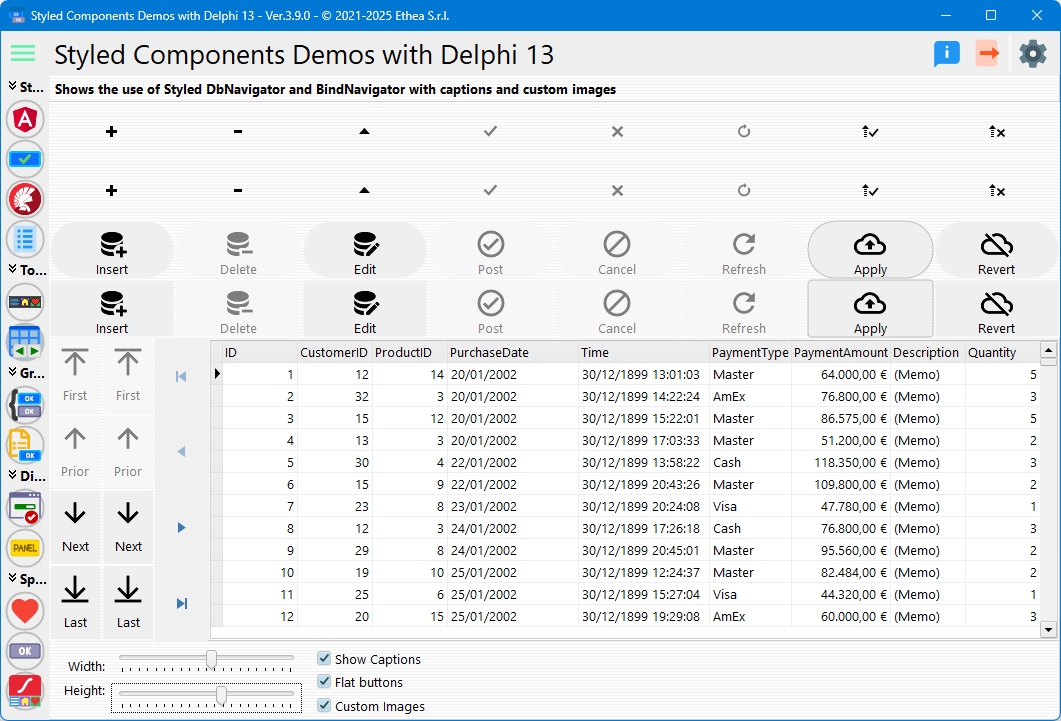
- Unit:
Vcl.StyledDbNavigator(the same unit of TStyledDbNavigator) - Palette: Styled Components
- Inheritance:
TCustomPanel>TCustomStyledDBNavigator>TStyledBindNavigator(implementsIBindNavigator) - All properties, methods and events: TStyledBindNavigator Reference
- Live demo: TStyledDbNavigator Demo (shows the DB and the Bind navigator together)
When to use it
Use TStyledBindNavigator when the form works with LiveBindings (the data source is a TBindSourceDB, TPrototypeBindSource, ...) and you want to replace TBindNavigator. If the controls are linked to a plain TDataSource use TStyledDbNavigator.
All the styling features (StyleFamily, StyleClass, StyleAppearance, StyleDrawType, StyleRadius, StyleShadowSize, StyleBorderWidth, captions, images, Flat, OnEnableNavBtn, the Component Editor) are the ones of the base class and work exactly as described in TStyledDbNavigator.
Differences from TStyledDbNavigator
| TStyledDbNavigator | TStyledBindNavigator | |
|---|---|---|
| Data source property | DataSource: TDataSource | DataSource: TBaseLinkingBindSource |
| Buttons enumeration | TNavigateBtn (Vcl.DBCtrls) | TNavigateButton (Data.Bind.Controls) |
VisibleButtons | TNavButtonSet | TNavigateButtons; default NavigatorDefaultButtons |
BeforeAction, OnClick | ENavClick, parameter TNavigateBtn | TNavigateButtonEvent, parameter TNavigateButton |
| Orientation | Kind: TDBNavigatorKind | Kind and also Orientation: TNavigatorOrientation (orHorizontal, orVertical): they are the same setting |
BtnClick | BtnClick(Index: TNavigateBtn) | BtnClick(Index: TNavigateButton) |
| Enabling the buttons | from the dataset state | from the state of the binding source (TBindNavigatorController) |
ActiveStyleName | published | not published |
The identifiers of the two enumerations are the same (nbFirst, nbPrior...). If a unit uses both Vcl.DBCtrls and Data.Bind.Controls, qualify them (TNavigateButton.nbFirst) to select the right one.
To reach a single button use ButtonItems[...], indexed by TNavigateBtn (the property Buttons indexed by TNavigateButton is protected).
Design-time
Drop a TStyledBindNavigator from the Styled Components palette and set DataSource to the binding source (for example a TBindSourceDB). The Component Editor (verb Styled DbNavigator Editor...) is the same of the DB navigator: see Component Editor.
Examples
Create a styled BindNavigator at runtime
uses
  Data.Bind.Controls, Vcl.StyledDbNavigator, Vcl.BootstrapButtonStyles;

var
  Nav: TStyledBindNavigator;
begin
  Nav := TStyledBindNavigator.CreateStyled(Self,
    BOOTSTRAP_FAMILY, btn_primary, BOOTSTRAP_NORMAL);
  Nav.Parent := Self;
  Nav.Align := alBottom;
  Nav.DataSource := BindSourceDB1;
end;
Visible buttons, captions and orientation
Nav.VisibleButtons := [TNavigateButton.nbFirst, TNavigateButton.nbPrior,
  TNavigateButton.nbNext, TNavigateButton.nbLast];
Nav.ShowCaptions := True;
Nav.Orientation := orVertical;   // same as Nav.Kind := dbnVertical
Nav.Align := alLeft;
Style the navigator and a single button
uses
  Vcl.AngularButtonStyles;

Nav.SetDbNavigatorStyle(ANGULAR_M3_LIGHT_FAMILY, btn_Basic, FilledAttr);
Nav.ButtonItems[TNavigateBtn.nbDelete].StyleAppearance := OutlinedAttr;
See Angular Material 3 families.
Events
procedure TForm1.BindNavBeforeAction(Sender: TObject; Button: TNavigateButton);
begin
  // Abort skips the action
  if (Button = TNavigateButton.nbDelete) and not UserCanDelete then
    Abort;
end;

procedure TForm1.BindNavClick(Sender: TObject; Button: TNavigateButton);
begin
  if Button = TNavigateButton.nbPost then
    StatusBar1.SimpleText := 'Record saved';
end;
Programmatic click
Nav.BtnClick(TNavigateButton.nbNext);Replacing TBindNavigator globally
The unit Vcl.StyledComponentsHooks declares TBindNavigator = class(TStyledBindNavigator): with it in the uses clause the TBindNavigator of the forms become styled ones, without changing the code. See Interposer Unit. The default style of all the navigators (DB and Bind) is set with TCustomStyledDBNavigator.RegisterDefaultRenderingStyle.