
How to Install StyledComponents into Delphi
There are three ways to install StyledComponents into Delphi: using the "Setup", with DPM (Delphi Package Manager) or manually.
Before Installation: Skia4Delphi is recommended
The StyledComponents library contains some components that take advantage of Skia4Delphi.
If you are not using Delphi 12 or 13 it is recommended that you first install Skia4Delphi from here before proceeding.
The installer determines whether you have installed Skia4Delphi before installing the animated components: TStyledAnimatedButton, TStyledAnimatedTaskDialog and TStyledAnimatedToolbar (the last one is experimental and is not on the component palette).
The animated packages exist for Delphi XE7 and later (not for Delphi XE6). To run the animated page of the demo, enable the SKIA conditional define in the project options of the demo (see Main Demo).
1.Automatic Installation using Setup
Download the Setup file StyledComponents_Setup.exe
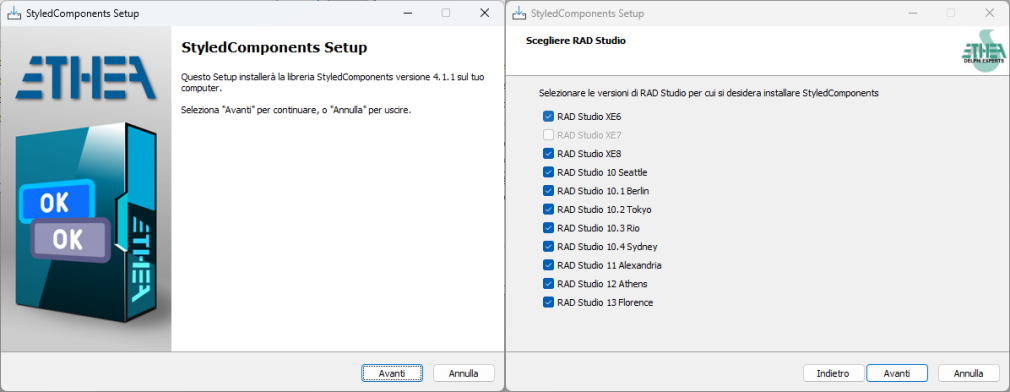
Running this Setup you can easily:
- Select the version of Delphi present in your system
- Select a specific developing folder The Setup automatically:
- Builds units (32 and 64 bits in release mode)
- Builds Runtime Packages (for Win32 and Win64 Platforms)
- Builds and Install Designtime Packages (for Win32 bits only)
- Builds and Install Designtime Packages (for new Win64 Delphi IDE)
- Installs the automated test suite in the Test folder (see Automated Test Suite)
- Adds a STYCOMPDIR environment variable
- Adds the 32 and 64 bit paths form:
- the binaries units
- all the sources
Please note that if you have already installed a GetIt package version of the same library, it will be uninstalled first.
2.Installation with DPM (Delphi Package Manager)
The library is also published on delphi.dev as the package EtheaDev.StyledComponents (Delphi XE6 to 13, Win32 and Win64): you can install it with DPM, the Delphi Package Manager, as an alternative to the Setup. From the IDE, right click on your project in the Project Manager and choose Manage DPM Packages, or from the command line:
dpm install EtheaDev.StyledComponents <path of your project>.dprojDPM downloads the package, builds it for the Delphi version and the platforms of your project and adds it to the project.
3.Manual Installation
Installation of Packages for Delphi/VCL (from XE6 to Delphi 13)
Open the package group 1.Vcl.StyledComponents.groupproj from the correct folder of your Delphi version (eg. \StyledComponents\Packages\D13).
Then build the run-time package: StyledComponentsXXX and install the design-time package: dclStyledComponentsXXX.
Remember to add the "{Folder}\StyledComponents\source" path to use the components in your application or the library path "{Folder}\StyledComponents\Lib\DXX\WinXX\Release"
Installation of Animated Components for Delphi/VCL (from XE7 to Delphi 13)
If you want to use also the Animated Components, you need Skia4Delphi previously installed in your IDE (In Delphi 12 and 13 it's already installed).
Open the package group 2.Vcl.StyledAnimatedComponents.groupproj from the correct folder of your Delphi version (eg. \StyledComponents\Packages\D13).
Then build the run-time package: StyledAnimatedComponentsXXX and install the design-time package: dclStyledAnimatedComponentsXXX.
Building from the command line (PowerShell scripts)
Instead of opening the group projects in the IDE you can build the packages with the PowerShell scripts in the Packages folder:
BuildAllPackages<Delphi version>.ps1(for exampleBuildAllPackagesD13.ps1,BuildAllPackagesDXE6.ps1,BuildAllPackagesD10.3.ps1) rebuilds the runtime package (StyledComponents) and then the design-time package (dclStyledComponents), for Win32 and Win64 (the design-time package for Win64 only from Delphi 12, the first with a 64 bit IDE), and prints a summary table. Add-Animatedto build also the animated packages (Skia4Delphi required, not available for Delphi XE6).BuildAllPackages.ps1 -DelphiVersion <version>is the common script,BuildPackages.ps1builds a single package (-Project).
Common parameters: -Platform (Win32, Win64, Both), -Config (Debug, Release), -Target (Build, Clean, Rebuild) and -BDSRoot (root of the RAD Studio installations, default C:\BDS\Studio, with one subfolder for each version: 14.0 ... 37.0).
.\BuildAllPackagesD13.ps1
.\BuildAllPackagesD12.ps1 -Platform Win64 -Config Debug -Target Build
.\BuildAllPackages.ps1 -DelphiVersion D10.4 -Animated
The same scripts exist in the Demos folder to build the demo application: BuildDemo<Delphi version>.ps1 (for example BuildDemoD13.ps1) builds StyledComponentsDemo into Demos\Bin\<Platform>, and BuildAllDemos.ps1 builds it for several versions at once (-DelphiVersion D12,D13, default all of them; the versions that are not installed are skipped) and prints a summary.
.\BuildAllDemos.ps1 -Platform Win32 -Config Debugif you need package for other Delphi version not included (newer than XE6) please add a new Issue
License
Licensed under the Apache License, Version 2.0, (the "License")