
Views and Controllers
In Kittox, a View is a user interface unit; it might be a page or panel, a tabbed panel, a tree, a toolbar, a list or grid panel, and so on. Often, a view is linked to underlying data from the database, in which case it is a more specific concept, a DataView.
In all cases, a View uses a Controller that renders it. While a View is a pure metadata object (implemented by a Delphi class that encapsulates the tree of nodes), a Controller is a Delphi class that generates HTML fragments to render the user interface and manage user interaction through HTMX-powered AJAX calls.
Controller-level properties are specified under the view's Controller subnode, and the set of supported properties depends on the controller type.
All panel-based controllers support common properties like IsModal, Maximized, AllowClose, Width, and Height. See Panel-based Controllers for the full list. Key properties:
- IsModal (
True/False): determines whether the view is shown as a dialog overlay or inline in a tab. DefaultTruefor Forms,Falsefor Lists. - AllowClose (
True/False): determines whether the view can be closed by the user (X button in dialog, Close button in forms). DefaultTrue. Set toFalsefor views that should not be dismissible (e.g. Login). - Maximized (
True/False): forces the dialog to fill the entire viewport. On mobile, this is automatically set toTruefor all views.
Defining views
Yaml file View
A view can be defined in its own yaml file in the Views directory, and referenced where it's used. You can use a view in several places.
Inline View
You can also define a view inline, which is convenient for very simple views you don't need to reference more than once.
Example:
# Refers to Views\MyHomeView.yaml
HomeView: MyHomeView

# Defines the view inline
HomeView:
  Controller: BorderPanel
    CenterView:
      Controller: HtmlPanel
        Html: <h1>Hello World!</h1>
The latter example actually defines two inline views, one inside the other, each using its own controller, and also shows the smallest possible self-contained Kittox application.
Using the ViewBuilder
The ViewBuilder is a convenient way to build a simple Data View with search support, without using a Yaml file. It is most useful for management of data like parameters or configuration tables.
Example:
# Refers to Taskitto example: Views\MainMenu.yaml
Type: Tree
Folder: Tables
  View: Employees
  View: Build AutoList
    Model: OPERATOR_ROLE
    DisplayLabel: Operator Roles
...
The latter example request to the Builder to generate an DataView based on the model OPERATOR_ROLE with a free search on it. The only required node is Model. This is the result:
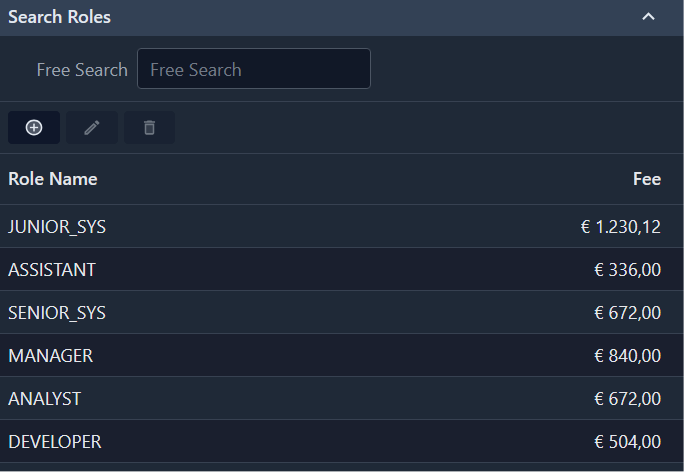
Regardless of how you specify it, a view has some important subnodes. Special types of views have their own special nodes, but all views have a DisplayLabel (user-visible short description) and a Controller.
Controllers
The value of the Controller node specifies its name, while the subnodes configure it. Often the most part of a view definition consists of controller configuration.
Here is a list of currently available controllers. Keep in mind that new controllers are going to be added frequently, and that you can easily create custom controllers and use them to render your views.
Top Level Controllers
The following are top-level controllers, that is controllers that can render autonomously. All other types of controllers need to be (ultimately) nested inside one of these. You must use one of these to render the Home view.
| Name | Description |
|---|---|
| BorderPanel | Hosts from 1 to 5 subviews in a border layout — use as top-level Home View controller |
WARNING
The Viewport controller from Kitto1 is deprecated. Use BorderPanel directly as the top-level controller. See Viewport for migration instructions.
Other predefined Controller
| Name | Description |
|---|---|
| TreePanel | Renders a TreeView (a special kind of view that is a tree of subviews) as a visual tree. Useful for menus. |
| TabPanel | Shows subviews as tabbed panels. |
| ToolBar | Renders a TreeView as a set of buttons with potentially multi-level menus. |
| StatusBar | The classic status bar for messages and info. |
Data-bound controllers
(all need to render a DataView):
| Name | Description |
|---|---|
| List | Renders a list of records. |
| Form | Renders a single record (optionally allowing used editing). |
Action Controllers
Action controllers are meant to perform operations rather than render something; views using these controllers are usually rendered as buttons or other clickable elements that launch the server-side code embedded inside the controller. Often you create custom controllers to be used this way, but Kittox includes several predefined controllers of this type that you can use or inherit from:
| Name | Description |
|---|---|
| URL | Navigates to a given URL (supports macros). |
| FilteredURL | Navigates to a URL chosen from a set according to filter expressions. |
| DownloadFile | Downloads an already existing file or one prepared on-demand. |
You can see most of these controllers in action in the examples bundled with Kittox.