
TreePanel
The TreePanel is a menu controller that renders a tree view (a special kind of view that is a hierarchy of subviews) as a collapsible navigation tree. It is the standard menu controller for desktop applications.
Overview
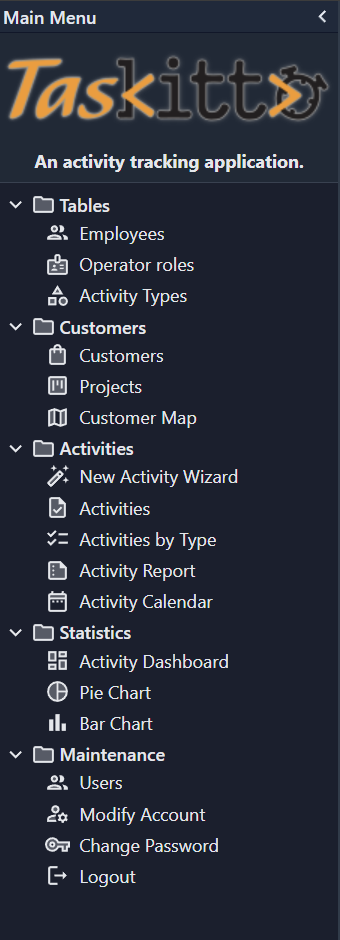
The TreePanel reads menu items from a tree view YAML file and renders them as a hierarchical tree with expandable/collapsible folders and clickable leaf items. Each leaf opens a view.
Controller: TreePanel
  TreeView: MainMenu
The tree structure is defined in a separate YAML file (e.g. MainMenu.yaml), so the same menu can be shared between a TreePanel and a ToolBar controller.
Configuration
| Property | Type | Default | Description |
|---|---|---|---|
TreeView | String | MainMenu | Name of the tree view YAML file that defines the menu structure |
The TreePanel also inherits all Panel properties (Width, Collapsible, Border, Header, etc.).
Tree view YAML
The tree view file uses Type: Tree and defines a hierarchy of Folder and View nodes:
# MainMenu.yaml (from TasKitto)
Type: Tree
Folder: _(Tables)
  View: Employees
  View: Build AutoList
    Model: OPERATOR_ROLE
    DisplayLabel: Operator roles
  View:
    Type: Data
    Controller: List
      Width: 320
      Height: 160
    MainTable:
      Model: ACTIVITY_TYPE
Folder: _(Customers)
  View: Customers
  View: Projects
  View: CustomerMap
Folder: _(Activities)
  View: NewActivity
  View: ActivityInput
  View: ActivitiesByType
  View: ActivityReport
  View: ActivityCalendar
Folder: _(Statistics)
  IsInitiallyCollapsed: False
  View: Dashboard
  View: ActivityPieChart
  View: ActivityBarChart
Folder: _(Maintenance)
  View: Users
    ImageName: group
  View: UserForm
    ImageName: manage_accounts
  View:
    Controller: ChangePassword
  View:
    Controller: Logout
This is the result:
Menu item types
| YAML node | Description |
|---|---|
Folder: Label | Collapsible folder with child items |
View: ViewName | Opens a named view (from Views/ViewName.yaml) |
View: with inline Controller: | Opens a controller directly (e.g. ChangePassword, Logout) |
View: with inline Type: Data | Defines an inline data view with its own controller and model |
Folder properties
| Property | Type | Default | Description |
|---|---|---|---|
IsInitiallyCollapsed | Boolean | True | Whether the folder starts collapsed or expanded |
View item properties
| Property | Type | Default | Description |
|---|---|---|---|
ImageName | String | (from view) | Override the icon displayed next to the menu item |
DisplayLabel | String | (from view) | Override the label text |
View opening behavior
When a menu item is clicked, the TreePanel delegates to kxApp.openView() — the same function used by TilePanel. The behavior depends on the context:
- Desktop (central TabPanel exists): DataViews open in a new tab
- Mobile (no central TabPanel): DataViews are appended to the body as fullscreen dialog overlays
Modal views (Wizard, IsModal: True) and non-DataViews (ChangePassword, Logout) always open as dialog overlays appended to the body.
Example: desktop Home with TreePanel
This example from TasKitto shows a typical desktop layout with a TreePanel menu on the left and a TabPanel in the center:
# Home.yaml (from TasKitto)
Controller: BorderPanel
  WestView:
    DisplayLabel: _(Main Menu)
    Controller: BorderPanel
      Width: 230
      Collapsible: True
      Border: True
      Split: True
      Header: True
      NorthView:
        Controller: HtmlPanel
          Split: False
          Html: |
            <center>
              <p><img src="%IMAGE(taskitto_logo_150)%"></p>
              <p><b>An activity tracking application.</b></p>
            </center>
          Height: 100
      CenterView:
        Controller: TreePanel
          TreeView: MainMenu

  CenterController: TabPanel
    Border: True
    SubViews:
      View: Dashboard
      View: ActivityInput
      View: Customers

  SouthView:
    ImageName: person
    Controller: StatusBar
      Text: Connected to: %Config:DefaultDatabaseName% - user: %Auth:USER_NAME%
The SubViews node in the TabPanel lists views that are automatically opened as tabs on startup.
Mobile alternative: TilePanel
For mobile-friendly applications, consider creating an alternative home page using a TilePanel instead of a TreePanel. The TilePanel renders menu items as touch-friendly colored tiles that work well on small screens.
In Config.yaml, configure different home views for different screen sizes:
HomeView: Home              # Desktop: TreePanel + TabPanel
HomeSmallView: HomeTablet   # Tablet: TilePanel with larger tiles
HomeTinyView: HomeTiles     # Phone: TilePanel with compact tiles
Both TreePanel and TilePanel read from the same tree view YAML file (TreeView property), so you only need to maintain one menu definition.
See How to customize for mobile for details on mobile home view selection.
See also
- TilePanel — tile-based menu controller (mobile-friendly)
- ToolBar — toolbar menu controller
- Panel — common panel properties
- BorderPanel — layout with regions (West, Center, etc.)
- TabPanel — tabbed panel for hosting views