
Localization
Kittox default language is english, but it allows you to localize applications in any language.
In order to Localize an application you have to localize both the standard Kittox interface (i.e. messages), and your application interface (i.e. all fields'captions).
Kittox Interface Localization
folder ...**Kittox**\Home\Locale must contain a subfolder for each language. Italian has been already provided. copy the folder for you language and edit the file Kittox.po. You can use a tool like [poedit] (http://poedit.net/)
Application Interface Localization
folder ...{App}\Home\Locale must contain a subfolder for each language. See the example [HelloKitto] (HelloKitto) and [Taskitto] (Taskitto).
How to write code
If you intend to write an application ready for localization you have to invoke the _ function any time you write strings, messages and so on , both in Delphi either in .yaml files. The correct syntax is _(xxx)
file .yaml
For example: here is the Doll Model in [HelloKitto] (HelloKitto). Pay attention to DisplayLabel, AllowedValues and Hint nodes:
ModelName: Doll
ImageName: Doll
Fields:
  Doll_Id: String(32) not null primary key
    IsVisible: False
    DefaultValue: %COMPACT_GUID%
  Doll_Name: String(40) not null
    DisplayLabel: _(Name)
    Rules:
      ForceUpperCase:
      SubType: alpha_space
  Date_Bought: Date
    DisplayLabel: _(Birth Date)
    DefaultValue: {date}
  Hair: Reference(Hair)
    Fields:
      Hair_Id:
  Dress_Size: String(4)
    DisplayWidth: 8
    AllowedValues:
      XS: _(Extra Small)
      S: _(Small)
      M: _(Medium)
      L: _(Large)
      XL: _(Extra Large)
  Mom: Reference(Girl) not null
    Fields:
      Mom_Id:
  Aspect: Memo
    DisplayWidth: 40
    Rules:
      MaxLength: 1024
  Picture: Blob
    DisplayLabel: _(Photo)
    Hint: _(Select a picture)
    MaxUploadSize: 100KB
    .DefaultFileName: test.gif
    IsPicture: True
      Thumbnail:
        Width: 150
        Height: 150
Delphi
For a Delphi example refer to Rules.pas in [HelloKitto] (HelloKitto):
procedure TCheckDuplicateInvitations.BeforeAdd(const ARecord: TKRecord);
begin
  if ARecord.Store.Count('INVITEE_ID', ARecord.FieldByName('INVITEE_ID').Value) > 1 then
    RaiseError(_('Cannot invite the same girl twice.'));
end;
The LanguageforSession parameter
It is possible to have multi-languages applications. To allow any user to select his own language at login time, just set the node LanguagePerSession in Config.yaml
LanguagePerSession: Trueand this is the result:
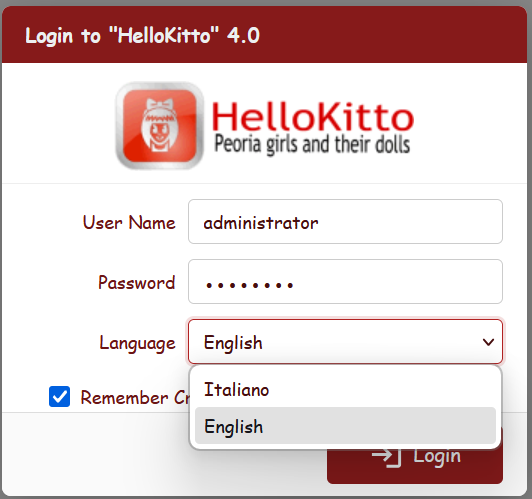
The login page language depends on the default language chosen for the application (LanguageId node in Config.yaml file). In this case the node is set to en:
LanguageId: en