
The Markdown Processor Demo
The project includes a simple VCL application that shows how to use the TMarkdownToHTML component: you can find it in the folder Demo\MarkdownProcessorDemo (project MarkdownProcessorDemo.dproj, Win32 and Win64), and it is also installed by the Setup.
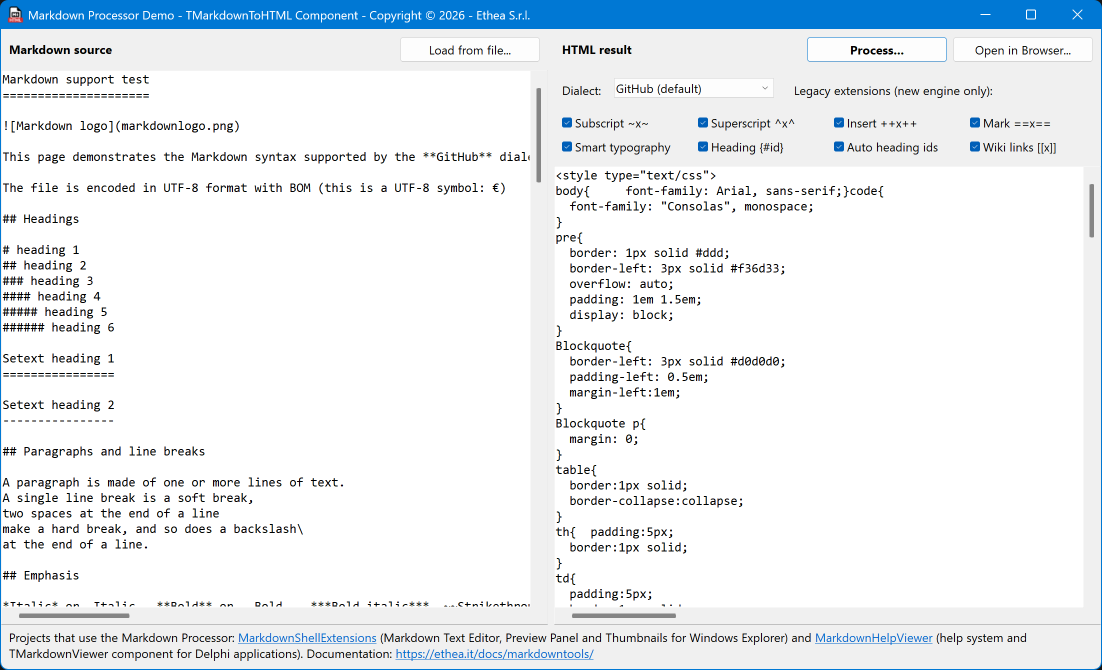
What the demo shows
The form is divided in two by a splitter:
- On the left, Markdown source: a memo that already contains, at design time, the sample document
TestFile\MarkDown Support Test.md, with all the features of the GitHub dialect (headings, emphasis, links, images, a video, lists, task lists, code, tables, alerts, math formulas, mermaid diagrams, raw HTML) and of the legacy extensions of the Markdown Processor. With Load from file... you can load any other Markdown file. - On the right, HTML result: Process... converts the source with the component and shows the HTML produced (the stylesheet followed by the HTML fragment).
Above the HTML you can change the options of the component:
- Dialect: GitHub (the default), GFM, CommonMark, DaringFireball (legacy) and TxtMark (legacy). Changing the dialect resets the extensions to the defaults of the new dialect.
- Legacy extensions: one checkbox for each of the extensions enabled by default in the component (subscript
~x~, superscript^x^, insert++x++, mark==x==, smart typography, heading{#id}, automatic heading ids, wiki links[[x]], video). They are disabled for the legacy dialects, which ignore the extensions.
When the HTML has already been produced, every change of an option converts the document again, so you can see the effect immediately.
Open in Browser... saves a full HTML page in the temporary folder and opens it in the default browser: the page adds the KaTeX and mermaid.js scripts, so math formulas and mermaid diagrams are drawn, and a <base> tag pointing to the folder of the Markdown file, so the relative images are found.
The note at the bottom of the form lists the projects that use the Markdown Processor (MarkdownShellExtensions and MarkdownHelpViewer) and the link to this documentation.
The code
The conversion needs only the component and its options:
procedure TMainForm.ProcessButtonClick(Sender: TObject);
begin
  // the component converts its MarkdownContent with its options
  // (ProcessorDialect, Extensions, AllowUnsafe, MathRendering, CssStyle)
  MarkdownToHTML.MarkdownContent.Text := MarkdownSourceMemo.Lines.Text;
  HTMLDestMemo.Lines.Text := MarkdownToHTML.HtmlContent.Text;
end;
The dialect combo and the checkboxes change the properties of the component; each checkbox has the ordinal value of its extension in Tag:
procedure TMainForm.DialectComboBoxChange(Sender: TObject);
begin
  // a new dialect resets the extensions to its defaults (legacy ones included)
  MarkdownToHTML.ProcessorDialect := ComboDialects[DialectComboBox.ItemIndex];
  UpdateOptionControls;
  RefreshHTML;
end;

procedure TMainForm.LegacyExtensionCheckBoxClick(Sender: TObject);
var
  LExtension: TMarkdownExtension;
begin
  LExtension := TMarkdownExtension((Sender as TCheckBox).Tag);
  if (Sender as TCheckBox).Checked then
    MarkdownToHTML.Extensions := MarkdownToHTML.Extensions + [LExtension]
  else
    MarkdownToHTML.Extensions := MarkdownToHTML.Extensions - [LExtension];
  RefreshHTML;
end;
The wiki links ([[Main Page]]) are written by an emitter of the application, assigned to SpecialLinkEmitter: the demo turns them into links to .md files (see Public properties).
Other examples
The Markdown Processor is used in two complete open source projects:
- MarkdownShellExtensions: Markdown Text Editor, Preview Panel and Thumbnails for Windows Explorer.
- MarkdownHelpViewer: help system and
TMarkdownViewercomponent for Delphi applications.