
Mermaid Diagrams
Mermaid is an open source JavaScript library (MIT License) that draws diagrams from a text description: you write the structure of the diagram with a simple syntax, similar to Markdown, and Mermaid lays it out and draws it as an SVG image. Created by Knut Sveidqvist, it is supported by GitHub, GitLab, Azure DevOps, Notion, Obsidian and many other tools.
A diagram written as text is easy to write, to read in the source and to keep up to date together with the document: no drawing tool, no image to export again after each change, and the version control shows the differences line by line.
Mermaid in Markdown
A mermaid diagram is written in a fenced code block with the language mermaid:
```mermaid
flowchart LR
  A[Markdown] --> B(Markdown Processor)
  B --> C[HTML]
```
The Markdown Processor, with the mexMermaid extension (enabled in the GitHub dialect, the default), writes the block as <pre class="mermaid">, which the Mermaid library turns into the drawing when the page is shown:
| Where | The diagram |
|---|---|
| Markdown Help Viewer | drawn (with Microsoft Edge WebView2) |
| Preview of the Markdown Text Editor | drawn (with Microsoft Edge WebView2) |
| TEdgeMarkdownViewer component (Delphi 12 and 13) | drawn |
| Preview Panel of Windows Explorer, TMarkdownViewer component, viewers without WebView2 | its source text is shown |
The Help Viewer, the Editor and the applications that use TEdgeMarkdownViewer draw the diagrams also without an Internet connection: Mermaid 11.17.2 is installed with them, in the Scripts folder (see Deploy an application with TEdgeMarkdownViewer); without that folder it is loaded from the jsDelivr CDN.
The kinds of diagram
The first word of the block chooses the kind of diagram. The main ones:
| Diagram | First line | Useful for |
|---|---|---|
| Flowchart | flowchart LR (or graph TD) | processes, algorithms, architectures |
| Sequence diagram | sequenceDiagram | messages between actors and systems |
| Class diagram | classDiagram | classes, properties, methods and relations (UML) |
| State diagram | stateDiagram-v2 | states and transitions |
| Entity Relationship | erDiagram | database tables and relations |
| User Journey | journey | the steps of a user, with the satisfaction |
| Gantt | gantt | project planning |
| Requirement | requirementDiagram | requirements and their verification (SysML) |
| Git graph | gitGraph | branches, commits and merges |
| C4 | C4Context | software architecture (C4 model) |
| Mindmap | mindmap | ideas organized around a central topic |
| Timeline | timeline | events in chronological order |
| Block | block-beta | blocks placed by the author |
| Packet | packet-beta | the fields of a network packet |
| Kanban | kanban | tasks in columns |
| Architecture | architecture-beta | cloud services and their connections |
Mermaid draws also charts (pie, bar and line, quadrant, sankey, radar, treemap): see Charts.
Examples
Flowchart
```mermaid
flowchart TD
  Start([Open a file]) --> Kind{Markdown?}
  Kind -- Yes --> Process[Convert to HTML]
  Kind -- No --> Show[Show the HTML]
  Process --> Show
```
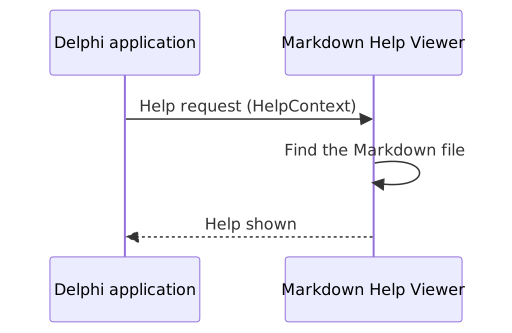
Sequence diagram
```mermaid
sequenceDiagram
  participant App as Delphi application
  participant Viewer as Markdown Help Viewer
  App->>Viewer: Help request (HelpContext)
  Viewer->>Viewer: Find the Markdown file
  Viewer-->>App: Help shown
```
Class diagram
```mermaid
classDiagram
  class TMarkdownProcessor {
    +Config: TConfiguration
    +AllowUnsafe: Boolean
    +Process(source) string
  }
  TMarkdownProcessor <|-- TMarkdownCommonMark
  TMarkdownCommonMark <|-- TMarkdownGFM
  TMarkdownProcessor <|-- TMarkdownDaringFireball
```
State diagram
```mermaid
stateDiagram-v2
  [*] --> Editing
  Editing --> Saved: Save
  Saved --> Editing: Change
  Saved --> [*]: Close
```
Entity Relationship
```mermaid
erDiagram
  CUSTOMER ||--o{ ORDER : places
  ORDER ||--|{ ORDER_LINE : contains
  PRODUCT ||--o{ ORDER_LINE : "ordered in"
```
Gantt
```mermaid
gantt
  title Release plan
  dateFormat YYYY-MM-DD
  axisFormat %d %b
  section Development
    New engine      :done, eng, 2026-07-01, 60d
    WebView2 viewer :active, view, after eng, 20d
  section Release
    Documentation   :doc, after view, 7d
```
Mindmap
```mermaid
mindmap
  root((Markdown Tools))
    Help Viewer
    Text Editor
    Shell Extensions
    Markdown Processor
```
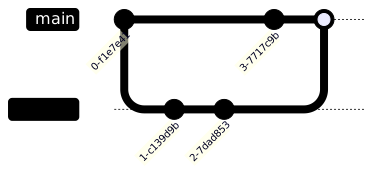
Git graph
```mermaid
gitGraph
  commit
  branch feature
  commit
  commit
  checkout main
  commit
  merge feature
```
Learn more
The complete syntax of each kind of diagram, the options (themes, directions, styles, links, notes, icons) and many examples are in the official documentation: mermaid.js.org. To try a diagram before writing it in a document, use the online editor mermaid.live.
Some diagrams marked as -beta can change in the next versions of Mermaid: the documentation of the version used by the tools (11.17.2) is the reference.