
Markdown Processor
Latest Version 2.1.2 - 31 Oct 2026 — version 2.0.0 (08 Oct 2026) introduced the new CommonMark/GFM engine described in this page.
A Markdown Processor library for Delphi, to process and convert Markdown content to HTML.
The library is the engine that powers the preview of all the Markdown Tools (the Editor, the Shell Extensions Preview panel and the Help Viewer): it takes Markdown text and produces the corresponding HTML, ready to be rendered in an HTML viewer or saved to disk.
It is a pure Delphi library, compatible from Delphi XE3 up to the latest version, and it is also available as a standalone GitHub project: EtheaDev/MarkdownProcessor.
Supported Dialects
The processor implements five Markdown dialects, selectable at creation time:
| Dialect | Value | Description |
|---|---|---|
| GitHub (default) | mdGitHub | What github.com renders: GitHub Flavored Markdown plus math formulas, alerts and mermaid diagrams. |
| GFM | mdGFM | GitHub Flavored Markdown 0.29: CommonMark plus tables, task lists, strikethrough, extended autolinks and the filter of disallowed raw HTML. All the 24 examples of the GFM specification pass. |
| CommonMark | mdCommonMark | CommonMark 0.31.2, the standard: all the 652 examples of the specification pass. |
| DaringFireball | mdDaringFireball | The original Markdown syntax by John Gruber. |
| TxtMark | mdTxtMark | An enhanced dialect with additional extensions. |
GitHub, GFM and CommonMark run on the new engine, written after the parsing strategy of the CommonMark specification: its output is exactly the one of the specifications, it can return a syntax tree and it is extensible with optional syntax. DaringFireball and TxtMark keep the original engine, with exactly the same output as before.
In the Markdown Text Editor and in the Preview Settings of the Shell Extensions, the dialect can be chosen from the Markdown processor options in the Settings dialog.
Installation
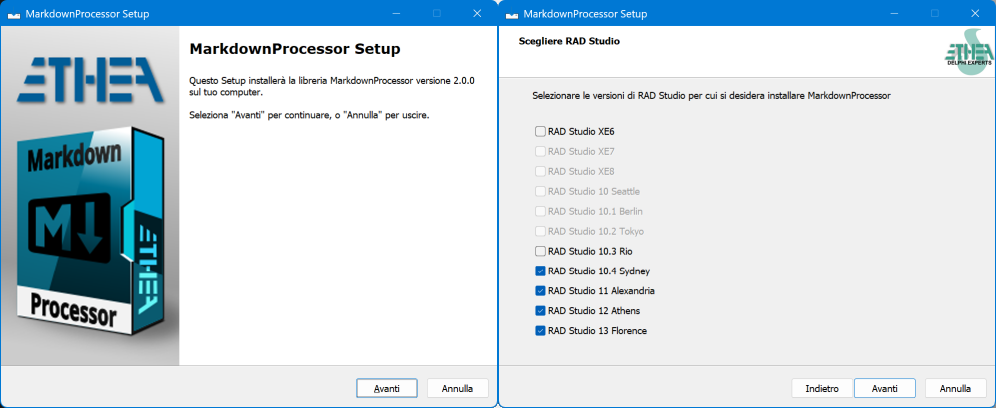
From version 2.0.0 a ready-to-use installer is available in the Release area: Download MarkdownProcessor_Setup.exe.
The installer automatically detects the Delphi versions installed (from XE6 to 13 Florence), installs the sources, builds and installs the packages in the selected versions and adds the source paths. Optionally it also installs the MarkDownToHTML.exe utility, 32 or 64 bit.
The library is also published on delphi.dev as the package EtheaDev.MarkdownProcessor (Delphi XE6 to 13, Win32 and Win64): you can install it with DPM, the Delphi Package Manager, as an alternative to the installer. From the IDE, right click on your project in the Project Manager and choose Manage DPM Packages, or from the command line:
dpm install EtheaDev.MarkdownProcessor <path of your project>.dprojDPM downloads the package, builds it for the Delphi version and the platforms of your project and adds it to the project. The package contains the library and the TMarkdownToHTML component; the MarkDownToHTML.exe utility is installed only by the installer.
To install manually, open Packages\<Delphi version>\MarkdownProcessor.groupproj and build the runtime package (MarkdownProcessor) and the design-time package (dclMarkdownProcessor), or run the script Packages\BuildAllPackages<Delphi version>.ps1 (for example BuildAllPackagesD13.ps1). The library can also be used without packages, adding the source folder to the search path of the project.
Using the Library
The library can be used in two ways: with the TMarkdownToHTML component, configurable at design time, or directly with the TMarkdownProcessor class.
The TMarkdownToHTML component
| Component | Description |
|---|---|
 TMarkdownToHTML | Non-visual component (unit MarkdownProcessorComponents.pas, palette page Markdown) that holds the options of the processor (ProcessorDialect, Extensions, AllowUnsafe, MathRendering, CssStyle) and converts MarkdownContent into HtmlContent every time the content or an option changes. By default it uses the GitHub dialect and enables all the legacy extensions. |
MarkdownToHTML.MarkdownContent.Text := MarkdownText;
HTML := MarkdownToHTML.HtmlContent.Text;
Properties, methods and examples: The TMarkdownToHTML Component; a complete example: the Demo.
The TMarkdownProcessor class
The whole processing is exposed through a single class, TMarkdownProcessor, created via the CreateDialect factory method. Without arguments it creates the default dialect, GitHub.
uses
  MarkdownProcessor, MarkdownUtils;

var
  md: TMarkdownProcessor;
  html: string;
begin
  // Create the processor: mdGitHub by default, or pass the dialect
  md := TMarkdownProcessor.CreateDialect;
  try
    // When AllowUnsafe = true the processor keeps scripts and raw HTML:
    // enable it only with trusted content.
    md.AllowUnsafe := False;

    // Convert a markdown string to an HTML fragment
    html := md.Process(markdownText);
  finally
    md.Free;
  end;
end;
The available dialect values are defined by the TMarkdownProcessorDialect enumeration. New values are always appended at the end, so the ordinal value of the existing dialects never changes; the default dialect is given by the constant DefaultMarkdownDialect:
TMarkdownProcessorDialect = (mdDaringFireball, mdCommonMark, mdTxtMark, mdGFM, mdGitHub);

const
  DefaultMarkdownDialect = mdGitHub;
The HTML returned is a fragment, not a full HTML page: the application adds the page, the stylesheet and, when needed, the scripts (see Math formulas and Mermaid diagrams).
Processing a file directly
TMarkdownProcessor also offers a convenience method to read a Markdown file and return its HTML in one call, with an optional encoding:
html := md.ProcessFile('Readme.md', TEncoding.UTF8);Extensions
The new engine (GitHub, GFM and CommonMark dialects) can enable optional syntax one by one, through the set Config.Extensions:
md := TMarkdownProcessor.CreateDialect(mdGFM);
md.Config.Extensions := md.Config.Extensions + [mexMath, mexAlerts, mexMark];| Extension | Syntax | GitHub | GFM | CommonMark |
|---|---|---|---|---|
mexTables | Tables with alignment | ✓ | ✓ | |
mexTaskLists | - [ ] and - [x] task list items | ✓ | ✓ | |
mexStrikethrough | ~~text~~ | ✓ | ✓ | |
mexAutolinks | www., http://, https:// and e-mail addresses without <> | ✓ | ✓ | |
mexTagFilter | Neutralizes script, iframe, style... in raw HTML | ✓ | ✓ | |
mexMath | $x$, $$x$$, $$ blocks and ```math fences | ✓ | ||
mexAlerts | GitHub alerts: > [!NOTE], [!TIP], [!IMPORTANT], [!WARNING], [!CAUTION] | ✓ | ||
mexMermaid | ```mermaid diagrams for mermaid.js | ✓ | ||
mexSubscript | H~2~O | |||
mexSuperscript | x^2^ | |||
mexInsert | ++inserted++ | |||
mexMark | ==highlighted== | |||
mexSmartTypography | -- --- ... (C) (R) (TM) << >> and curly quotes | |||
mexHeadingAttributes | # Title {#id} | |||
mexAutoHeadingIds | GitHub-style ids for the headings (# Hello World → id="hello-world") | |||
mexWikiLinks | [[Page]], rendered by Config.specialLinkEmitter | |||
mexVideo | : an image of a video file written as <video controls> (see Videos) |
With both mexStrikethrough and mexSubscript, ~~x~~ is strikethrough and ~x~ is subscript.
Math formulas and Mermaid diagrams
Math formulas and mermaid diagrams are drawn in the page by JavaScript libraries, so the output depends on the viewer that shows the HTML:
| Viewer with JavaScript (e.g. WebView2) | Viewer without JavaScript (e.g. HTMLViewer) | |
|---|---|---|
| Math | Config.MathRendering := mmrMarkup (default): markup for KaTeX or MathJax, which the page must load | Config.MathRendering := mmrCodeCogsImage: each formula is an image from latex.codecogs.com (needs the network) |
| Mermaid | mexMermaid on: the diagram is written as <pre class="mermaid">, which mermaid.js turns into a drawing | the diagram shows its source text |
The HTML of a formula with mmrMarkup:
<p>Energy: <span class="math">\(E=mc^2\)</span></p>
<div class="math">\[
\frac{-b \pm \sqrt{b^2-4ac}}{2a}
\]</div>
The HTML of a mermaid diagram with mexMermaid:
<pre class="mermaid">graph TD
A --> B
</pre>The processor does not add the scripts: the page template of the application loads KaTeX (or MathJax) and mermaid.js.
Charts
Charts are mermaid diagrams too: write the data in a mermaid code block, for example a pie chart and a bar and line chart:
```mermaid
pie title Markdown dialects
  "GitHub" : 45
  "GFM" : 25
  "CommonMark" : 20
  "Legacy" : 10
```

```mermaid
xychart-beta
  title "Monthly downloads"
  x-axis [Jan, Feb, Mar, Apr, May, Jun]
  y-axis "Downloads" 0 --> 1000
  bar [250, 400, 520, 610, 780, 900]
  line [250, 400, 520, 610, 780, 900]
```
The Help Viewer and the preview of the Markdown Editor (with WebView2) draw them, also without an Internet connection: KaTeX and mermaid.js are installed with them (Scripts folder).
All the kinds of diagram and chart, with examples: Mermaid Diagrams and Charts.
Videos
Markdown has no syntax for videos. With mexVideo (enabled by default in the TMarkdownToHTML component, in MarkDownToHTML.exe and in the viewers) an image whose file is a video, .mp4, .m4v, .webm, .ogv or .mov, is written as a <video> with its controls:
<p><video src="video/rocket.mp4" controls title="Growth Rocket"><a href="video/rocket.mp4">Rocket</a></video></p>The alt text becomes a link to the file inside the <video>: a browser (WebView2) plays the video and does not show the link, while a viewer that cannot play videos (HTMLViewer) shows the link, which opens the video with the player of the system. Without alt text the link shows the name of the file. Unlike a <video> tag written as raw HTML, the video is shown also in safe mode.
Browsers play .mp4 (H.264) and .webm videos; .mpeg and .mpg files are not supported by browsers and must be converted. Keep the videos small: they are files of the documentation.
Local images, videos and links
A link or an image is a URL: write the path of a local file relative to the Markdown document, with /, as on GitHub:
| Markdown | The file |
|---|---|
 | in the folder of the document |
 | in a subfolder |
 | in a sibling folder |
 or  | with spaces (or other special characters) in the name |
A Windows path, such as C:\folder\image.png or C:/folder/image.png, is not a URL: a browser cannot show it (CommonMark writes \ as %5C, and C: is read as the scheme of the URL) and neither can the viewers. A file of another drive needs a file URL (file:///D:/folder/image.png), which the safe mode removes: keep the images and the videos of a document in its folder or in its subfolders.
The Syntax Tree
The new engine can also return the document as a read-only syntax tree, IMarkdownNode (unit MarkdownAST.pas), reference counted: no need to free it.
var
  doc: IMarkdownNode;
begin
  doc := md.Parse(markdownText);
  // doc.Kind = nkDocument; doc.FirstChild, doc.Children[i], node.Next...
  // node.StartLine / node.EndLine: the source lines of a block,
  // useful to synchronize an editor with its preview
  html := md.Render(doc);   // the same HTML as md.Process(markdownText)
end;
Each node exposes its kind (paragraph, heading, list, table, code block, alert, math, link, emphasis...), its children and the properties of its kind: heading level, list type, code block info string, link destination and title, table cell alignment, task state, alert type, heading id. The legacy dialects (DaringFireball, TxtMark) do not build a tree: Parse raises ENotSupportedException.
Hooks
Two hooks of the configuration let the application customize the output:
Config.codeBlockEmitter(aTBlockEmitter): when assigned, it receives every code block, fenced and indented, mermaid included, with its lines and its whole info string (for exampledelphiormermaid), and writes the HTML of the block: use it for syntax highlighting or to render diagrams. Without it the standard<pre><code class="language-xxx">is written.Config.specialLinkEmitter(aTSpanEmitter): withmexWikiLinks, it receives the content of every[[...]]link.
The configuration owns the emitters assigned to it and frees them.
The Public API
| Member | Description |
|---|---|
class function CreateDialect(dialect: TMarkdownProcessorDialect = DefaultMarkdownDialect): TMarkdownProcessor | Creates a processor instance for the requested dialect (GitHub by default). |
function Process(const ASource: string): string | Converts a Markdown string to an HTML fragment. |
function ProcessFile(const AFileName: TFileName; const AEncoding: TEncoding = nil): string | Loads a Markdown file and returns its HTML. |
function Parse(const ASource: string): IMarkdownNode | Returns the syntax tree (new engine only). |
function Render(const ADocument: IMarkdownNode): string | Renders a syntax tree: the same HTML as Process. |
property AllowUnsafe: Boolean | When True, raw HTML and every link are kept as they are; keep it False for untrusted content. |
property Config: TConfiguration | Configuration: Extensions, MathRendering, codeBlockEmitter, specialLinkEmitter. |
The MarkDownToHTML.exe Utility
The project also ships a small command-line utility, MarkDownToHTML.exe, that converts a Markdown file to an HTML file, with options to choose the dialect and the stylesheet. It is handy for batch conversions or to integrate Markdown-to-HTML generation into a build pipeline.
MarkDownToHTML.exe processfile -in:<file.md> [-out:<file.html>]
  [-dialect:GitHub|GFM|CommonMark|DaringFireball|TxtMark] [-style:<file.css>|none] [-unsafe]
The default dialect is GitHub, with the same default extensions as the TMarkdownToHTML component (the ones of the dialect plus the legacy extensions: heading ids, smart typography, video...). The pages it writes contain no scripts, so math formulas are written as images and mermaid diagrams show their source. Run MarkDownToHTML.exe help processfile for the complete help.
Security Note
By default the processor runs in a safe mode (AllowUnsafe = False). With the new engine raw HTML is omitted (it is replaced by <!-- raw HTML omitted -->) and the links and images with a javascript:, vbscript:, file: or data: destination are emptied (only data:image/png, gif, jpeg and webp images are allowed); the legacy dialects escape the unsafe HTML elements. Set AllowUnsafe := True only when you fully trust the source of the Markdown content.
Conformance
The project includes a DUnitX test suite (folder Tests) that checks, on Win32 and Win64, every official example of the CommonMark 0.31.2 and GFM 0.29 specifications, the corpora of the math, alerts and extensions syntax, the safe mode, a set of pathological inputs that must be processed in linear time, and that the output of the DaringFireball and TxtMark dialects does not change. The results are summarized in the file Tests/CONFORMANCE.md of the project.
Migrating from a previous version
Programs that used the CommonMark dialect get a different output with the new engine (tables, strikethrough and the non-standard syntax now need the GFM or GitHub dialect or the matching extensions; math is written for KaTeX/MathJax; safe mode omits raw HTML). Read Migrating to the new engine for the details and for the code that restores the previous features.
Credits
The library is a Delphi port and evolution of:
- FPC-markdown by Miguel A. Risco-Castillo
- Delphi-markdown by Grahame Grieve (Health Intersections Pty Ltd)
The new engine follows the parsing strategy of the CommonMark specification and the structure of its reference implementation commonmark.js by John MacFarlane (BSD-2-Clause); the GFM extensions follow cmark-gfm (GitHub). The math syntax, its test corpus and the alerts rules come from Markdown4D by GDK Software (MIT).
The command-line utility was inspired by a presentation by Marco Breveglieri at the Italian Delphi Day 2020.
License
Licensed under the Apache License, Version 2.0.