
Logging
The assistant tells the application what it does: every start, question, reply, search, request to the service, action and command can reach a log. The application decides where it goes - a file, a logging library, a window - through one event, and how much of it through one setting.
Turning it on
| Where | What |
|---|---|
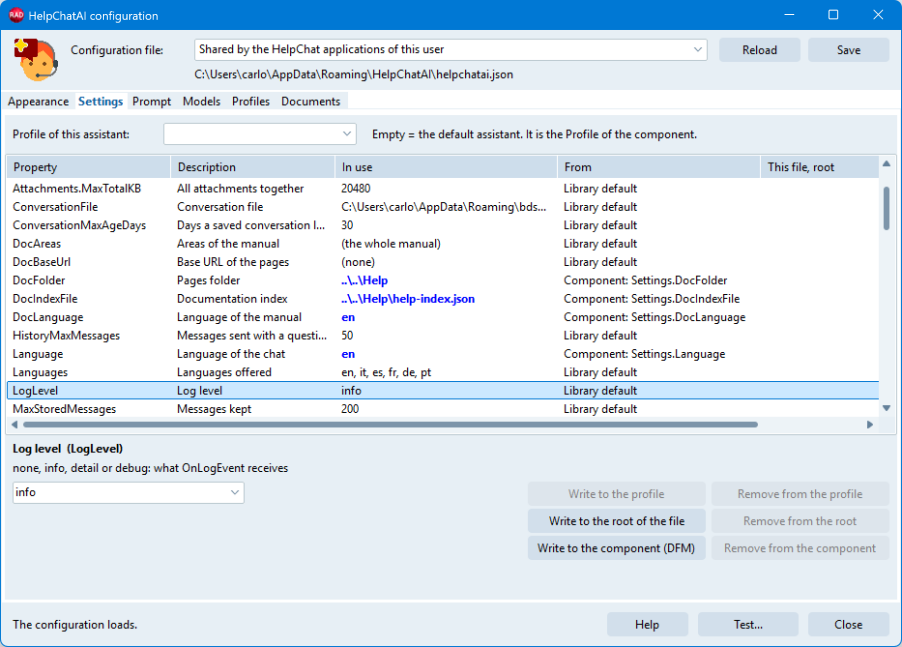
Settings.LogLevel | How much: llNone, llInfo (the default), llDetail, llDebug. In helpchatai.json "LogLevel": "none", "info", "detail" or "debug", at the root or in a profile |
OnLogEvent | On both components: receives every entry at that level |
HelpChatOnLog | A global procedure variable of HelpChatAI.Log: every entry of every assistant of the process, for code with no component (the console server, a test) |
The level lives under Settings, like the language and the provider, so whoever supports an installed application raises it in the configuration file - "LogLevel": "debug" - and lowers it again, with no rebuild. The configuration editor has it on the Settings page.
uses
  HelpChatAI.Log;   // THelpChatLogEntry and the levels

procedure TMainForm.HelpChatLog(Sender: TObject; const AEntry: THelpChatLogEntry);
begin
  TFile.AppendAllText(LogFileName, AEntry.ToString + sLineBreak, TEncoding.UTF8);
end;
AEntry.ToString is the line a file usually wants:
2026-11-17 14:03:12.345 INFO request [Sales] Reply completed in 3.2 s (claude, claude-haiku-5-5), 512 charactersOn which thread
The event runs on the thread that wrote the entry - most entries are written by a worker while it answers a question - one call at a time for the whole process. Writing to a file, or handing the entry to a logging library, needs nothing more; a handler that touches a control uses TThread.Queue. What the handler raises is swallowed: a log never stops the assistant.
Nothing is built for nobody: when no handler and no HelpChatOnLog listen, or the level is below the entry's, the text of the entry is not even composed.
The levels
They are cumulative: llDetail logs everything llInfo does and more, llDebug everything. The level is not the severity: each entry also carries a Severity (lsInfo, lsWarning, lsError), and an error of the service is an llInfo entry. llNone logs nothing at all, errors included.
llInfo | llDetail adds | llDebug adds | |
|---|---|---|---|
| Engine | Started (provider, model, language, pages of the index), stopped; index missing; a model of the list that cannot answer | The files in use; the model at start and why; the models not offered for lack of a key | The settings in force as JSON, every secret masked |
| Question and reply | Question sent (length, attachments); reply completed (seconds, provider, model, length); failed; cancelled | The whole question; the time to the first token; the tokens of each request; the source line the engine added | The whole reply |
| Search | The translation of the question failed | The pages found for the prompt; the terms of the translation and their time | The query, the hint and the score of every page; the request for the terms |
| Service | - | The request repeated another way (a system message refused, reasoning_effort: none, the Responses API without the effort) | Every request: URL, status, milliseconds, the body in Data, the body of a refusal. Never the headers: the key is in them |
| Actions | Each action and its outcome, with its time; one not run because an earlier one was refused, or because the reply ran out of rounds | The arguments | What was returned to the model |
| Commands | Every command, from the panel or from code, and its outcome - those the page answers by itself and those refused as not enabled included | The arguments | The answer |
| Attachments, conversation | Attachment added, refused, removed; conversation cleared | Conversation loaded from its file | - |
| Panel | PDF saved, not saved, saved without header and footer | Panel opened and closed; F1 with its keyword and context; activation | The screen context; the theme pushed; voice: what was heard |
| Transport | Local server listening; remote session opened, reopened after a 403, server unreachable or refusing | Context and theme sent to the server | Every call to the server: path, status, milliseconds |
What an entry carries
THelpChatLogEntry (HelpChatAI.Log):
| Field | What |
|---|---|
Time | Local time |
Level | The lowest level the entry appears at |
Severity | lsInfo, lsWarning, lsError |
Category | The part of the library: lcEngine, lcConfig, lcRequest, lcSearch, lcProvider, lcAction, lcCommand, lcAttachment, lcConversation, lcUi, lcTransport, lcVoice, lcSkill |
Profile | The profile of the assistant; empty for the default one |
ConversationKey | The conversation the entry belongs to, when it belongs to one |
RequestId | The reply: every entry of one answer - the question, the search, each request, each action, the end - shares it |
ThreadId | The thread that wrote it |
Text | One readable line, in English |
Data | Optional JSON: the tokens of a request, the settings in force, the body of a request at llDebug |
HelpChatLogSeverityName and HelpChatLogCategoryName give the names, HelpChatLogLevelToConfig and HelpChatConfigToLogLevel the level as a configuration file writes it; HelpChatLogQuote puts a text on one line and cuts it.
What the user wrote
llInfo never carries it: lengths, names, outcomes. llDetail carries the whole question and the arguments of the actions; llDebug the whole reply, the prompt sent and the bodies of the requests, attachments included. A log at llDetail or llDebug is therefore personal data, and the application decides where it goes and how long it stays. See Security and privacy.
Several assistants
The entries of an engine shared by the assistants of one profile go to the first of them that has a handler: they share one conversation, and the application gets each entry once whichever window asked. Profile tells the assistants of different profiles apart.
With a remote server the client logs what happens in the client - the panel, the transport - and the server logs its side: the lines of THelpChatRemoteServer.OnLog go to HelpChatOnLog as well, at the level of the server's settings.
A logging library
The CRM demos write to a file with Logify (CRM Demo\common\uHelpChatLog.pas): the library decides what is logged, Logify writes it from a thread of its own and rotates the files. The levels map as: error to Error, warning to Warning, llInfo to Info, llDetail to Debug, llDebug to Trace. See the sample applications.