
Languages
The chat speaks six languages. The words of the panel - buttons, tooltips, the greeting, the answers of the commands, the confirmation of an action - are translated, and the model is told to reply in the language of the chat. The user picks it from the flag in the header of the panel, and the documentation does not have to be written in it: an English manual can serve a user who talks Italian.
The language of the chat is the one that decides, not the language of the question: an Italian question in a chat set to English gets an English answer. A user who wants Italian answers picks the Italian flag - which also tells the assistant which language they understand.
Supported languages
| Language | Code | THelpChatLanguage | |
|---|---|---|---|
 | English | en | hclEnglish |
 | Italiano | it | hclItalian |
 | Español | es | hclSpanish |
 | Français | fr | hclFrench |
 | Deutsch | de | hclGerman |
 | Português | pt | hclPortuguese |
A language spoken in more than one country needs one flag: English shows the British one and Portuguese the Portuguese one. The flags are circle-flags (MIT), compiled into the library next to the icons of the models.
hclAuto, the default, is not a language of its own: it follows the locale of the Windows user, and falls back to English when that is none of the six.
Choosing the languages
Three settings, all under Settings and all in helpchatai.json:
| Setting | Default | What it does |
|---|---|---|
Language | hclAuto | The language the chat starts in |
Languages | all six | The languages the user may pick from the flag |
DocLanguage | hclAuto | The language the documentation is written in (hclAuto = not stated) |
TranslateSearch | true | When DocLanguage differs from the chat, the question is translated for the search (below) |
{
  "Language": "auto",
  "Languages": ["en", "it", "de"],
  "DocLanguage": "en"
}
In JSON a language is its code, "auto" included; Languages is an array of codes, or one string of codes separated by commas. An unknown code is skipped.
Language has to be one of Languages. When it is not - an Italian PC, and an application that offers only English and German - the chat speaks English if it is offered, otherwise the first language of the list. With fewer than two languages there is nothing to choose, and the flag is not shown at all.
Languages lives under Settings and not directly on the component, for the same reason Provider does: the language is a choice of the engine, like the model, and whoever installs the application can narrow it in the configuration file without recompiling.
What the user sees
The flag of the language in use is a button in the header, just left of the icon of the model. Resting the mouse on it shows the name of the language; a click opens the list, every language with its flag and its own name - Deutsch, Español, never "German" written in Italian - so a user who does not read the current language still finds theirs. The arrows, Enter and Escape work there too.
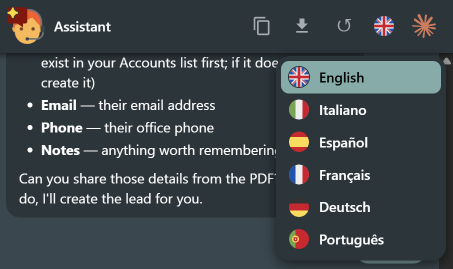
Picking one reloads the panel in it - with the question that was being written still in its box, and the documentation page that was open still open. The conversation lives in the engine, so it comes back as it was; the questions already answered stay in the language they were written in, and the next answers come in the new one.
The choice is remembered per user in helpchatai-state.json (with the profile in its name, for an assistant that has one), next to the saved conversation and with the model in use, and wins at the next start as long as the language is still offered. Nothing is remembered until the user actually picks a language: a state file never freezes a language nobody chose, so a configuration that changes Language later is still obeyed.
With several assistants the language belongs to the engine, and there is one engine per profile. Two components of the same profile share it, so they speak the same language and a choice made in one is the choice of both. Two assistants of different profiles each have their own: picking German in the panel of one does not move the chat of the other, and an assistant whose Language is hclAuto keeps following the locale of the Windows user - its panel and its answers do not follow a language picked elsewhere. What does follow the last choice made in any panel is the process-wide default (HelpChatDefaultLanguage), which is what a string asked with hclAuto resolves to: the few captions such an assistant writes outside the page - the title of its own window, the tooltip of its bubble, its message boxes - can therefore appear in the language chosen last in another panel. Give each assistant a concrete Language when that matters.
From the keyboard, /lang does the same:
| Typed | What happens |
|---|---|
/lang | The languages offered, with their flags, the one in use in bold |
/lang de | Switches to German. The code, the name in the language itself (/lang Deutsch) or in English (/lang german) all work, and so does the beginning of a name |
A manual in another language
This is the case DocLanguage is for. Translating the manual is the obvious answer, and often the wrong one: the application itself shows the words of its manual - a button called Save Proposal stays Save Proposal on the screen whatever the language of the chat - and a model that translates the button sends the user looking for a word that is not there.
So when DocLanguage is set and differs from the language of the chat, the system prompt gets one more rule: write the explanation in the language of the user, but write the names of screens, menus, buttons, fields and options exactly as the documentation spells them, adding a translation in brackets the first time when it helps. With an English manual and the Italian flag, the answer reads:
Apri la scheda del lead e premi Save Proposal (Salva proposta): la proposta compare nella pagina Sales.
Leave DocLanguage at hclAuto when the application and its manual are translated into every language you offer: then there is nothing to keep apart, and no rule is added.
The question is translated for the search
The pages that ground an answer are chosen by the documentation index, which compares the words of the question with the words of the pages. "Inserisci una società" shares no word with an English manual that talks about companies and accounts.
So, when DocLanguage is set and differs from the language of the chat, the model in use is asked first for one line of search terms in the language of the manual - the translation of the question plus the synonyms the manual may use (company, account). With a follow-up question ("e come la cancello?") the previous question is sent too, so the terms know what la is. The index then searches the question together with those terms, and without the screen as a hint: measured, the hint dragged the page of the screen over the page the terms had found.
| Measured on the manual of the CRM demo, 21 Italian questions | The right page among the 3 sent |
|---|---|
| The question alone | 12 |
With the terms of claude-haiku-5-5 | 20 |
With the terms of gemma4:12b on Ollama | 19 |
It costs one short request before the answer: well under a second on the services measured (about 0.7 s for Haiku, Gemini Flash Lite and a local gemma4), a little more on the reasoning models of OpenAI. If the request fails, the search runs on the question alone and the answer goes ahead. The prompt of that request is SearchTermsPrompt (%0:s the language of the manual); TranslateSearch = false turns it off. /prompt shows the terms the last question was searched with.
A provider with no model behind it (stub, docsearch) translates nothing, and neither does a provider of the application that does not override CompleteText.
What is translated
| Translated | Not translated |
|---|---|
| The panel: buttons, tooltips, placeholder, error messages | The system prompt: it is an instruction to the model, written in English, which tells the model the language to reply in |
The greeting, unless Greeting is set | A Greeting, Caption or AssistantName you wrote: they stay as you wrote them |
| The answers and headings of the commands | The documentation |
| The texts of the confirmation of an action, its Yes and No buttons included | |
| The names of your actions and their descriptions: they are yours | |
The default Caption (Help, Aiuto, Ayuda...) and AssistantName (Assistant, Assistente, Asistente...) | |
| The PDF: titles and the labels of question and answer |
The strings live in HelpChatAI.Messages, one resourcestring table per language, so the classic resource-DLL translation path of Delphi works on them too.
Changing a message
To change one string - the placeholder of the question box, a tooltip, a heading - there is no need of a resource DLL: HelpChatSetMsg replaces it for the whole process, in one language or in all of them.
uses
  HelpChatAI.Messages;

HelpChatSetMsg(hcmUiPlaceholder, 'Ask me anything about Acme CRM...');      // every language
HelpChatSetMsg(hcmUiPlaceholder, 'Chiedimi qualcosa su Acme CRM...', hclItalian);
A text for one language wins over one for all; an empty text takes the replacement away, and HelpChatClearMsgs takes them all away. Everything reads the strings through HelpChatMsg, so the panel, the commands and the labels that go into the prompt (the screen, the excerpts of the manual) follow. The identifiers are the members of THelpChatMsgId. A string with placeholders must keep them: Format raises where the string is used if a %s is lost or added. Call it before the components activate, or reopen the panel: its labels are written into the page when it loads.
From code
var
  L: THelpChatLanguage;
begin
  for L in HelpChatAI.Languages do                          // what the flag offers
    Memo.Lines.Add(HelpChatLanguageNativeName(L) + ' - ' + HelpChatLanguageCode(L));
  if HelpChatAI.ActiveLanguage <> hclGerman then            // never hclAuto
    HelpChatAI.SelectLanguage(hclGerman);                   // False if not offered, or remote
end;
SelectLanguage does what the list of the flag does - it reloads the panel when it is open, updates the title of the window and the tooltip of the bubble, and is remembered. Setting Settings.Language before Active is the way to choose the starting language instead.
HelpChatAI.Messages has the functions to go from one form to the other: HelpChatLanguageCode ('de'), HelpChatLanguageName ('German', the form the model is told), HelpChatLanguageNativeName ('Deutsch'), HelpChatLanguageFromCode (any of the three back to hclGerman), and HelpChatMsg(AId, ALanguage) for a string of the library in a given language.
With a remote engine
The language belongs to the settings of the engine, and a server has one engine per profile, shared by every session of that profile: a user switching it would switch it for every other session. So the flag is not shown, /lang only lists the languages, and POST /api/language/select answers 403. The server speaks the language of its own configuration, or of --lang on the command line of the server.
Adding a language
A new member at the end of THelpChatLanguage (a DFM stores the identifier, a configuration file the code, so the order is free to grow but not to change), its code and names in the tables of HelpChatAI.Messages, a resourcestring table with every string and its case function, and its flag in resources\HelpChatAI.Providers.rc. The tests check that every language has every string, with the same %s placeholders as the English one - a translation that loses one fails at the moment the string is shown, which is the worst moment to find out. Translations are welcome as pull requests.