
What HelpChatAI is
HelpChatAI is a component library that puts an AI help assistant inside your Delphi application, VCL or FireMonkey. The end user opens a chat and asks how to use the application — "how do I export this grid?", "what is this screen for?", "come configuro il server SMTP?" — and gets an answer built from your own documentation, with the link to the page that explains it.
It is not a generic chatbot bolted onto a form. Three things make it help your application:
- it knows which screen the user is on when they ask;
- it answers from your manual, and says where it read it;
- it can do things in your application, but only what you registered.
What the user sees
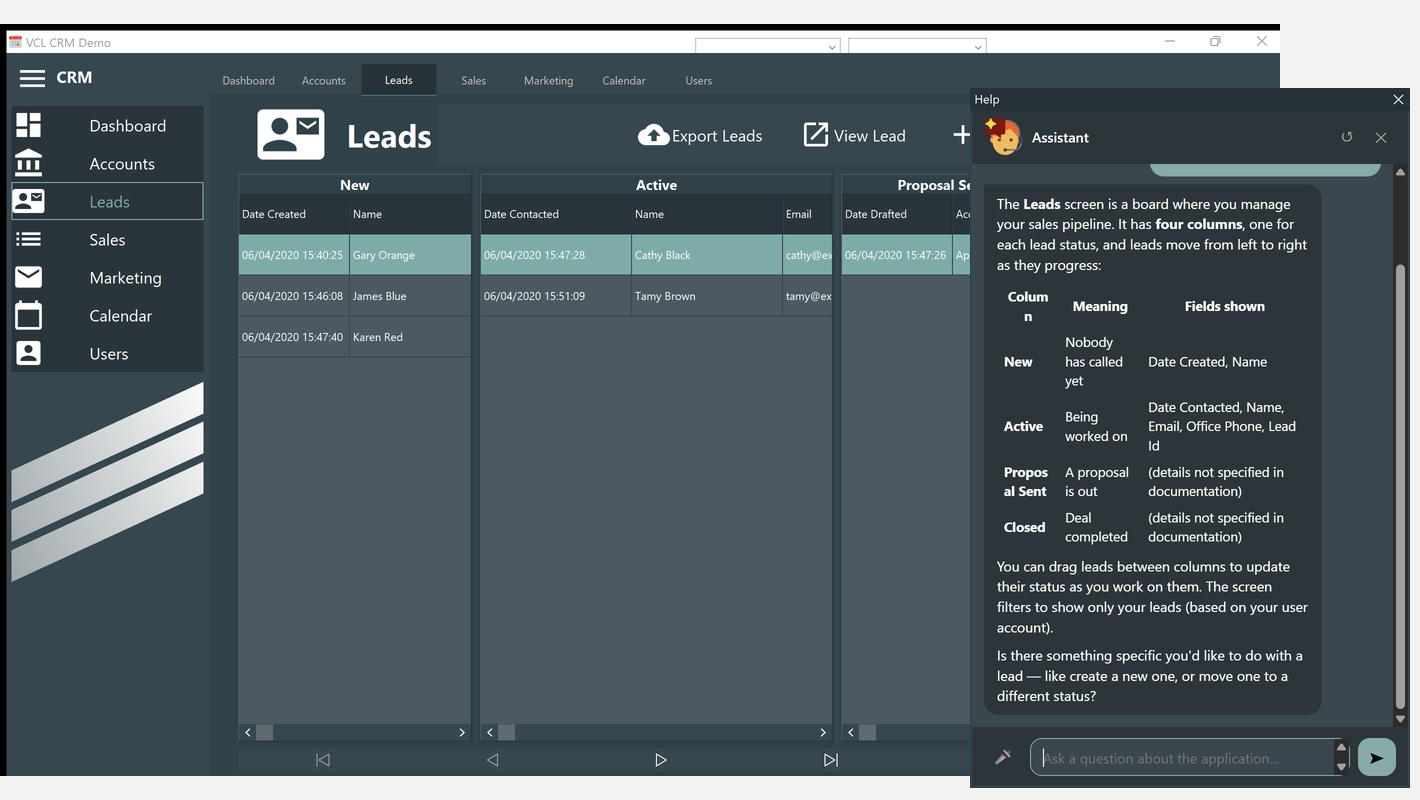
A round "?" bubble in the corner of the window, and F1 anywhere. The chat opens as a small tool window next to the application — or docked in a side panel of your own form, the way recent Office versions do it, if you prefer. Replies arrive while they are being written, can be stopped halfway, and survive closing and reopening the panel.
Everything the user sees is an HTML page rendered by an embedded browser (WebView2 in the VCL, TWebBrowser in FMX): bubbles, Markdown formatting, links, the typing indicator. That is why the same chat looks and behaves identically in VCL and FMX, and why it follows your VCL style without you drawing anything.
What you have to do
At a minimum: drop the component, set Active := True, and give your screens a HelpKeyword matching the title of a page of your manual. That is a working contextual assistant, offline, with no API key — see the Quick Start.
From there you decide how far to go:
| You want | You do |
|---|---|
| Answers from your manual | Build the documentation index from your Markdown pages |
| Real conversation, not just page lookup | Use the claude, openai or gemini provider with an API key |
| A model that runs on your own machine | The openai provider pointed at Ollama or LM Studio: no key, nothing leaves the PC |
| To try it before building the application | Test HelpChatAI... in the component editor |
| The chat inside your own panel | Set Container or handle OnBeforeShowHelp |
| The manual readable inside the chat | Point Settings.DocFolder at your folder of pages |
| The user to dictate instead of typing | Leave VoiceEngine alone, or pick the engine |
| The assistant to do things | Register actions |
| The API key off the user's machine | Point the clients to a HelpChatAI server |
What it is made of
| Layer | What it does | Depends on |
|---|---|---|
| Engine | Conversation store, worker pool, documentation index, providers, safe Markdown → HTML | RTL only |
| Transport | Serves the chat page and its API: a local HTTP server on 127.0.0.1, or a remote HelpChatAI server | Indy |
| Components | TVclHelpChatAI, TFmxHelpChatAI: bubble, F1, screen context, the panel, theming | VCL / FMX |
The engine knows nothing about the UI or the web, which is why the same code serves a VCL application, an FMX one, a console program and a server. If you are curious about how the pieces fit — and why a chat panel talks to its host over HTTP — see Architecture.
Supported Delphi versions
| Framework | Versions |
|---|---|
| Engine (RTL only) | Delphi 10.4 Sydney → 13 Florence |
VCL (TEdgeBrowser, WebView2) | Delphi 10.4 → 13 |
FMX (TWebBrowser) | Delphi 12 → 13 |
Packages are provided for Delphi 10.4, 11, 12 and 13, and are built with each of those compilers, not only generated. See Installation.
Licence
Apache License 2.0 — you can use it in commercial applications. The MarkdownProcessor of Ethea, which the engine package requires, keeps its own licence.