
Inside the panel
The chat the user sees is not a Delphi control drawing bubbles: it is one HTML page inside an embedded browser - WebView2 (TEdgeBrowser) in the VCL, TWebBrowser in FireMonkey. This page explains how that page is made, how it talks to the engine with htmx and a little JavaScript, how its buttons reach the events of your Delphi component (and how the component reaches the page), how it is light or dark, and how to change its look with CSS of your own without rebuilding anything.
You do not need any of this to use the component. You need it when you want the chat to look like your application, or when you want to know why it behaves as it does.
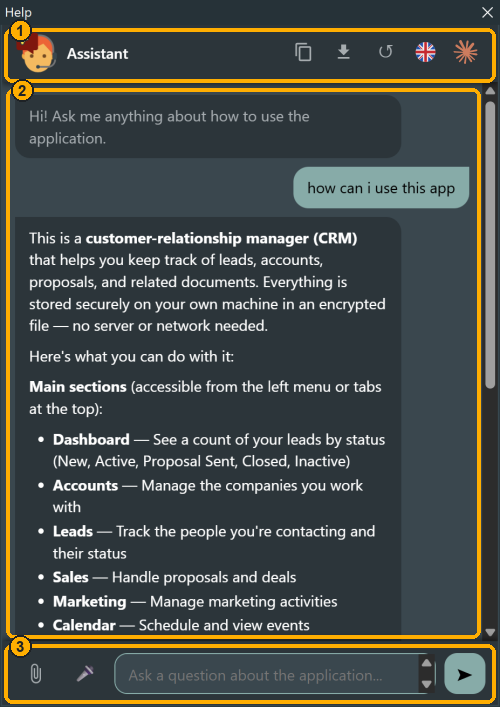
The page has three parts, and the rest of this page refers to them:
- The header (
.hc-chat-header): the name and icon of the assistant, and the buttons that act on the whole conversation - copy, PDF, clear, language, model. - The conversation (
#hc-body): the bubbles, rendered by the engine and put in place by htmx. The documentation view (#hc-doc) takes its place when the user opens a page of the manual. - The footer (
.hc-chat-footer): the attached files, the clip, the microphone, the question box and the send button.
One page, nothing to deploy
The page is four files of the repository, compiled into the library as resources:
| File | What it is |
|---|---|
resources/panel.html | The skeleton: header, conversation, documentation view, footer |
resources/panel.css | Every rule of the page, written only in terms of --hc-* variables |
resources/panel.js | What htmx does not do: polling, commands, menus, clipboard, attachments |
resources/htmx.min.js | htmx 2, about 50 KB |
Tools\BuildResources.cmd compiles them into source/HelpChatAI.Panel.res, which is linked into your executable. When the panel is opened, the server builds the page by filling the placeholders of panel.html (THelpChatPanel.RenderPage): the language and the labels, the name and the icon of the assistant, the address of the API, a window.HC object with the configuration and the token, the CSS, the theme and the scripts - all inline. There is no external file, no CDN, no font to download: the page works on a machine with no Internet access, and there is nothing to copy next to your executable except WebView2Loader.dll.
The Content Security Policy
The page carries a strict policy of its own:
default-src 'none'; script-src 'unsafe-inline'; style-src 'unsafe-inline';
connect-src 'self' <api> <ui>; img-src 'self' data:; form-action 'self' <api>; base-uri 'none';
It is what makes the panel safe to fill with text a model wrote, and it has consequences you meet as soon as you customize it: the page can only talk to its own server, an image must be a data: URI, and a stylesheet cannot load anything from outside - no @import of a URL, no web font from Google Fonts. A call to an address the policy does not name is dropped by the browser before it reaches the network, without an error.
Where the page comes from
With a local engine (the normal case) the component starts a small HTTP server inside your process (Indy), bound to 127.0.0.1 on a random port, and the browser navigates to http://127.0.0.1:<port>/?t=<token>. The token is a secret generated at every start: every request of the page carries it in the X-HelpChat-Token header, so another program on the same machine cannot read the conversation even if it finds the port.
With a remote engine the page is served by that server instead, and the requests meant for the application (close the window, start the microphone) go to a second, loopback channel that the component opens on the client (HC.uiBase). The page does not know the difference: it calls the addresses window.HC gives it.
htmx: the server renders, the page swaps
The page has almost no rendering code, because the server sends HTML, not data. Every bubble is produced in Delphi (HelpChatAI.Html): the answer of the model goes through the safe Markdown converter (GFM, raw HTML stripped, URLs checked), the text of the user is escaped, and what reaches the page is a finished fragment:
<div class="hc-chat-msg hc-chat-assistant" data-msgid="m12" data-pending="1">
  <div class="hc-chat-bubble"><p>The <strong>Leads</strong> board shows...</p></div>
</div>
That is the whole answer once it is complete: paragraphs, bold, the table the model wrote in Markdown - GFM, because a model answers with tables all the time and CommonMark would print one as a line full of pipes.
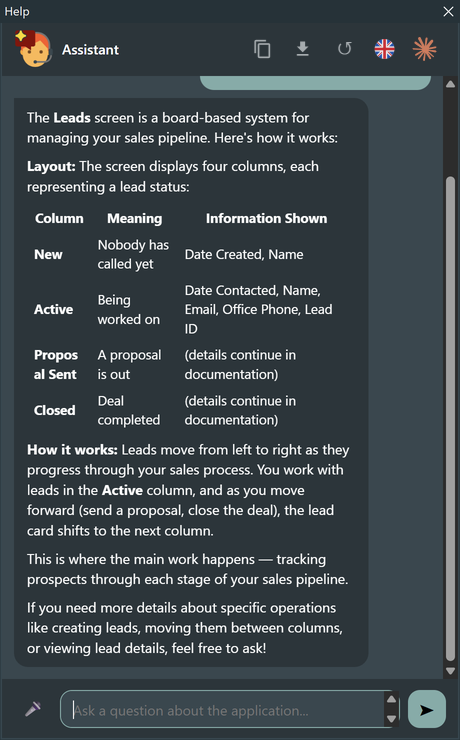
htmx puts those fragments in place, declared by attributes in panel.html. Only three elements are htmx's - the ones whose answer is a piece of conversation; every other button of the panel is wired by panel.js (see every button, and who answers it):
| Element | htmx attributes | What happens |
|---|---|---|
#hc-body (the conversation) | hx-get="/api/history" hx-trigger="load" hx-swap="innerHTML" | When the page loads, the whole conversation is asked for and replaces the body - so a reload (a VCL style change recreates the window) always shows what the engine has |
#hc-form (the question box) | hx-post="/api/send" hx-target="#hc-body" hx-swap="beforeend" | Enter posts the question; the server answers with two bubbles - the question and an empty, pending answer - appended at the end |
| the ↺ button | hx-post="/api/clear" hx-target="#hc-body" hx-swap="innerHTML" | The conversation is cleared and the body replaced by the greeting |
panel.js hooks four htmx events, and that is where the behaviour you notice lives:
htmx:configRequestadds the token to every request, and intercepts a line that starts with/: a slash command never reaches the model, so the request is cancelled and the command runs instead - a/wordthat is no command is said to be unknown and stays in its box. A question typed while a file is still going up waits there too, and leaves when the upload is over;htmx:beforeRequestempties the box as soon as the question has been taken (and stops the microphone, if it was listening);htmx:afterSwapscrolls to the end, starts watching any pending answer, adds the copy and PDF buttons beside each answer, and gives the caret back to the box;htmx:responseError/htmx:sendErrorshow the "could not send" notice; a 403 also posts the UI commandreload, once (see from the page to Delphi).
What only the page knows - the question being written, the open documentation page and the way back from it, the timing of the last answer - is kept in localStorage under hc-state, tied to the token of the session: a reload (a change of language, a VCL style change) loses nothing, and another run of the application finds nothing.
Streaming without a stream
A model answers in seconds, token after token. The engine never waits for it (a worker fills the pending message), and the page follows the answer by polling: while a message carries data-pending, panel.js asks GET /api/poll/<id> every HC.pollMs milliseconds and replaces the bubble with the fragment it gets back - the same message, a little longer each time. When the fragment comes back without data-pending, the answer is complete and the polling stops. The ■ button posts /api/cancel/<id>. A poll the server refuses turns the pending bubble into an error bubble (data-error, .hc-chat-msg-error) instead of leaving the dots there for ever - only a network error is tried again - and after HC.maxPolls polls (900 by default) the page cancels the reply and marks it failed. Polling is plain HTTP, so it works through the same server, the same token and the same policy as everything else, local or remote.
What JavaScript does
panel.js (one file, no framework, no build step) handles what is not "send something, swap the answer":
- the header: the flag of the language and the model in use, with their menus (
GET /api/languages,GET /api/assistants, and the twoselectposts - the paths say "assistant", which is what a model was called before 1.7); - the slash commands answered in the page (
/use,/lang,/retry,/stats...) and the system bubbles of every command, with the × that removes them; - the documentation view: a link to a page of the manual opens inside the panel (
GET /api/doc?page=), with its own back button; no link ever navigates the page itself; - the clipboard: copying an answer, the conversation or a documentation page puts both HTML and plain text on it, without involving Delphi at all;
- attachments: the clip, drag and drop anywhere on the panel, the bar of attached files;
- the question box: it grows with the text, Up/Down browse the previous questions, and every click on a button leaves the caret in the box.
Every button, and who answers it
What each button does, when the page shows it, and where the click ends up: in the page alone, in the engine, or in your application.
Header

| # | Button | Shown | Handled by | What happens |
|---|---|---|---|---|
| 1 | ⧉ Copy conversation (#hc-copy) | always | panel.js | The conversation goes to the clipboard as HTML and as text; nothing leaves the page |
| 2 | PDF of the conversation (#hc-pdf) | when a PDF can be written (HC.pdf, a listening host) | panel.js → POST /api/pdf (kind=conversation) | The engine builds the document, the component asks where to save it (OnPdfInfo) and prints it; a remote engine answers 501 and the page says so |
| 3 | ↺ Clear | always | htmx → POST /api/clear | The engine drops the conversation and its attachments; the body is replaced by the greeting |
| 4 | The flag (#hc-lang) | with two or more Settings.Languages | panel.js → GET /api/languages, POST /api/language/select | The engine switches language and the page reloads in it; the component rewrites its own captions. A remote engine answers 403 |
| 5 | The model in use (#hc-agent) | when it has an icon or Settings.Models lists more than one | panel.js → GET /api/assistants, POST /api/assistant/select | With more than one, the tooltip adds "Change model", the click opens the list and the choice switches provider and model - for every panel on the same engine. A remote engine answers 403 |
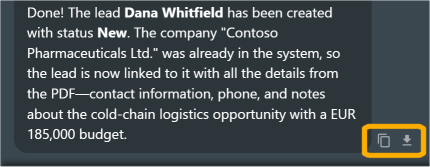
Beside each answer (.hc-chat-mbtn, added by panel.js once the answer is complete; visible while the pointer or the keyboard focus is on that answer, always on a touch screen)
| Button | Shown | Handled by | What happens |
|---|---|---|---|
| ⧉ Copy answer | on hover or focus | panel.js | That answer to the clipboard, HTML and text |
| PDF of the answer | on hover or focus, when a PDF can be written | panel.js → POST /api/pdf (kind=answer) | As for the conversation, one answer only |
In the conversation
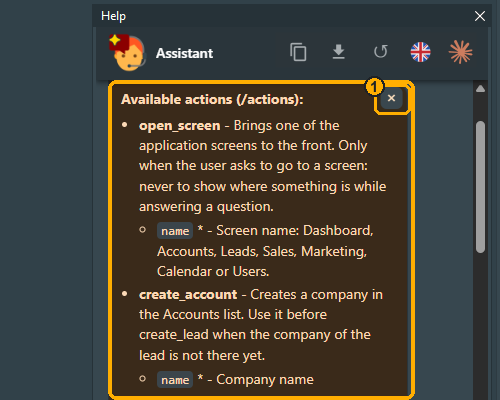
The answer of a command and every notice of the page are system bubbles, with their own colours (--hc-system-bg, --hc-system-text) and, for a command, the heading of what they answer. They are created by panel.js, never stored, and carry a × of their own (1):
| Button | Shown | Handled by | What happens |
|---|---|---|---|
× on a system bubble (.hc-chat-dismiss) | on the answer of a command and on every notice | panel.js | The bubble is removed from the page; it was never stored |
Documentation view (#hc-doc, opened by a link to a page of the manual)
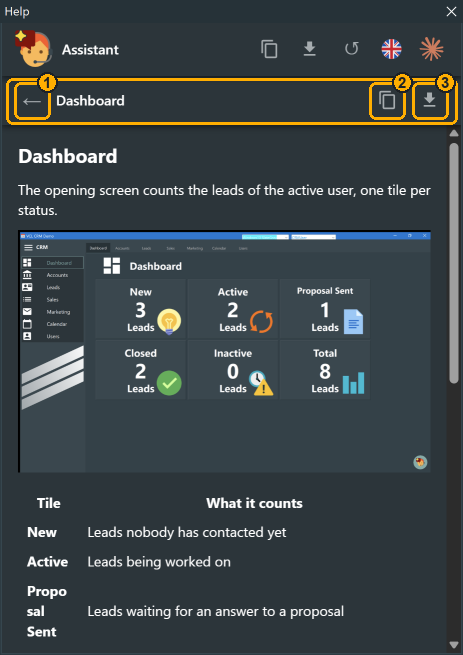
| # | Button | Shown | Handled by | What happens |
|---|---|---|---|---|
| 1 | ← Back (#hc-doc-back) | always | panel.js | The previous page of the manual, or back to the conversation |
| 2 | ⧉ Copy page (#hc-doc-copy) | always | panel.js | The page to the clipboard, HTML and text |
| 3 | PDF of the page (#hc-doc-pdf) | when a PDF can be written | panel.js → POST /api/pdf (kind=page) | As for the conversation, the page of the manual |
Footer
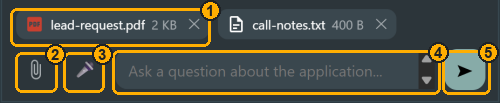
| # | Button | Shown | Handled by | What happens |
|---|---|---|---|---|
| 1 | × of an attached file (.hc-chat-attachments) | when files are attached | panel.js → POST /api/attach/remove | The file leaves the conversation: it is not sent with the next questions |
| 2 | 📎 Attach (#hc-clip) | when Settings.Attachments.Enabled and the provider reads documents | panel.js → POST /api/attach | The file dialog of the browser (or a file dropped anywhere on the panel); the engine keeps the file with the conversation and sends it with every question |
| 3 | 🎤 Microphone (#hc-mic) | only when the host can listen (window.hcVoiceEnable) | panel.js → POST /api/ui/mic-start / mic-stop | The component starts the dictation and pushes the text back with window.hcVoiceText |
| 4 | The question box (#hc-input) | always | panel.js | It grows with the text; Enter sends, Shift+Enter starts a new line, Up/Down browse the previous questions |
| 5 | ➤ Send (#hc-send, or Enter) | while nothing is being written | htmx → POST /api/send | The question goes to the engine - unless it starts with /: then it is a command, run by the page or by POST /api/command |
| 5 | ■ Stop (#hc-stop), in place of Send | while an answer is being written | panel.js → POST /api/cancel/{id} | The worker stops the request to the model; what was written so far stays |
From the page to Delphi
The page has no message bridge to its host - FireMonkey's TWebBrowser offers none, and a remote page has no native side at all. What the page asks of the application is an HTTP call:
POST /api/ui/<command> X-HelpChat-Token: ...The server hands the command to the component with TThread.Queue, so it is executed on the main thread, where your event handlers expect to be.
| In the page | Request | In the component |
|---|---|---|
| Escape | POST /api/ui/close | Close: OnBeforeHideHelp, the window hides, OnAfterHideHelp |
| 🎤 | POST /api/ui/mic-start / mic-stop | The dictation starts or stops; OnVoiceConsentNeeded the first time, OnVoiceText with what it hears |
| a language chosen | POST /api/language/select (the server then raises the UI command language by itself) | The engine switches language; the component rewrites the captions it owns (window, bubble hint); the page reloads |
| a model chosen | POST /api/assistant/select (the server raises model) | OnModelChanged |
| the server answers 403 (a remote session expired) | POST /api/ui/reload | The component asks its transport for the URL of the panel again and loads the page on the new session |
PDF button, /pdf | POST /api/pdf | The engine builds the document, the component asks where to save it (OnPdfInfo fills the bands) and prints it |
| a link outside the panel | (a navigation) | The browser control cancels whatever leaves the exact origin of the panel and calls OnOpenLink; unhandled, it opens in the system browser |
| a request for an action | (the model, not the page) | OnActionConfirm before it runs, OnActionExecuted after |
Two more events are not commands of the page but moments of its life: when the page has loaded (the control's OnPageReady) the component pushes the current theme and the state of the microphone, and gives it the focus if the panel is visible; when the VCL style changes (CM_STYLECHANGED) it pushes the new theme.
From Delphi to the page
The other way round, the component runs a line of script in the browser (ExecuteScript of TEdgeBrowser in the VCL, EvaluateJavaScript of TWebBrowser in FireMonkey): the page exposes a handful of window.hc* functions for that, and each method of the component that changes what the user sees goes through one of them.
| Component | In the page |
|---|---|
OpenWithQuestion(question, send), F1 with a question | window.hcAsk(text, send) |
ExecuteCommand(cmd, args) | window.hcCommand(line, true) |
OpenDocPage(page) | window.hcOpenDoc(page) |
ClearConversation | window.hcRefresh() |
SelectModel(name) | window.hcRefreshAssistants() |
AttachFile(file) | window.hcRefreshAttachments() |
EnabledCommands := ... | window.hcRefreshCommands() |
AssistantName, the icon | window.hcSetAssistant(name, icon) |
the theme (style change, OnGetTheme) | window.hcApplyTheme({...}) |
SelectLanguage(language) | window.location.reload(): the labels are written into the page when it is rendered |
| the microphone (VCL only) | window.hcVoiceEnable, hcVoiceState, hcVoiceText |
| a notice, which is a voice error (VCL only) | window.hcSystem(text) |
| focus | window.hcFocus() |
Whatever the user can do in the panel, code can do on the component: that is the rule these functions exist for.
Light and dark
Colours are the one thing the page never hard-codes: panel.css uses only --hc-* variables, and three layers decide their values, each overriding the previous one.
- The defaults of the page.
panel.cssdefines a light set in:rootand a dark set inside@media (prefers-color-scheme: dark), and<meta name="color-scheme" content="light dark">tells the browser that both are supported (scroll bars, form controls). With no theme from the application, the chat follows the light/dark setting of Windows. - The theme of the application, at load. The component builds a
THelpChatTheme- in the VCL from the active VCL style (FollowVclStyle), in FMX fromThemeMode- lets you adjust it inOnGetTheme, and the server writes it into the page as a:root{ --hc-bg: ...; color-scheme: dark; }rule in<style id="hc-theme">, afterpanel.css. The page is born with the right colours: no flash of white before a dark theme. - The theme at runtime. When the style changes while the chat is open, the component calls
window.hcApplyTheme({...}), which sets the variables on the root element - no reload.
The same panel, light and dark - every colour comes from the --hc-* variables, nothing else changes:
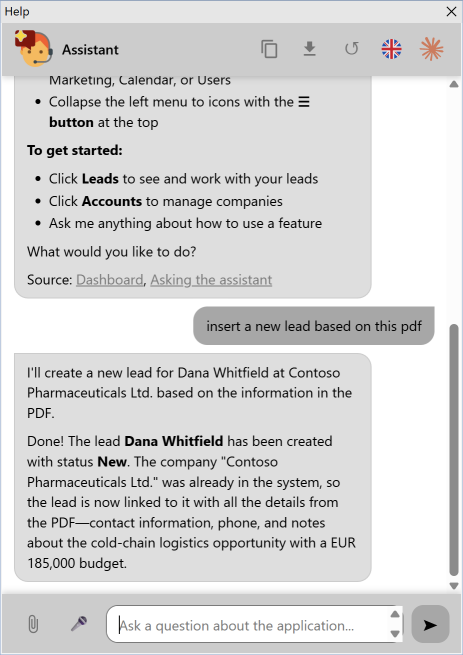
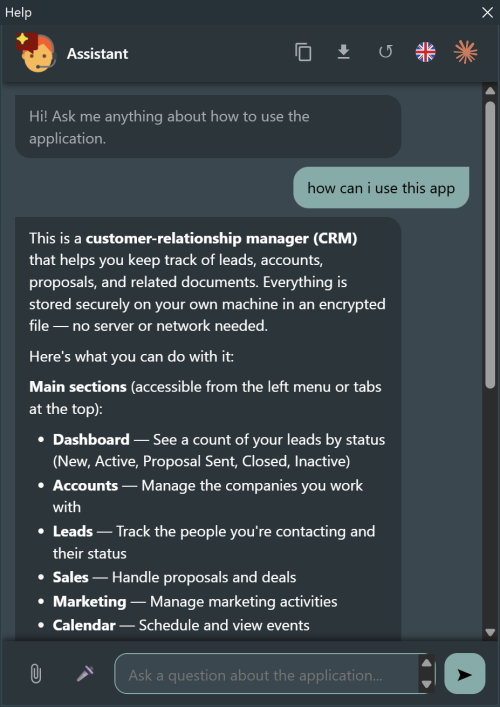
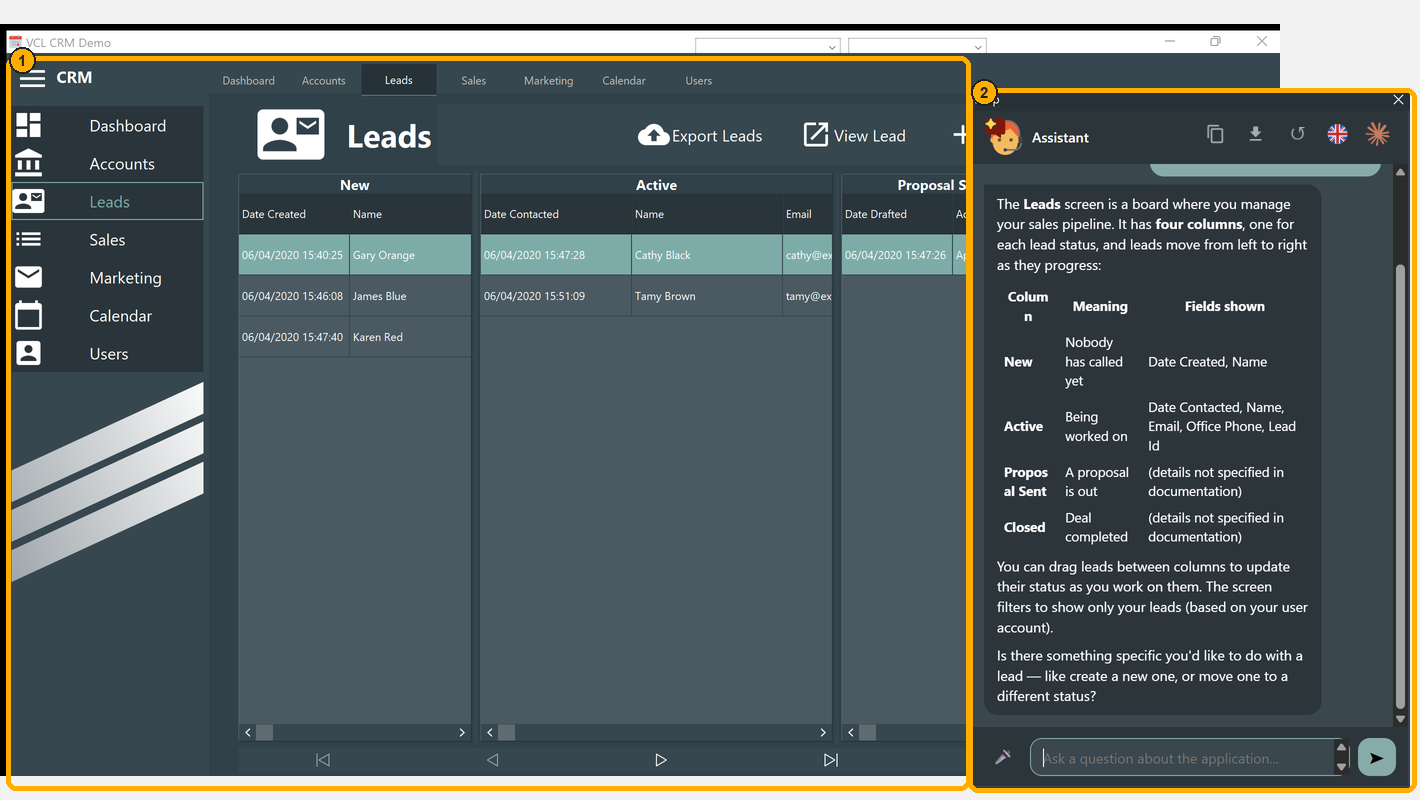
In the VCL the chat (2) takes its colours from the VCL style of the application (1), and follows it when the style changes while the chat is open:
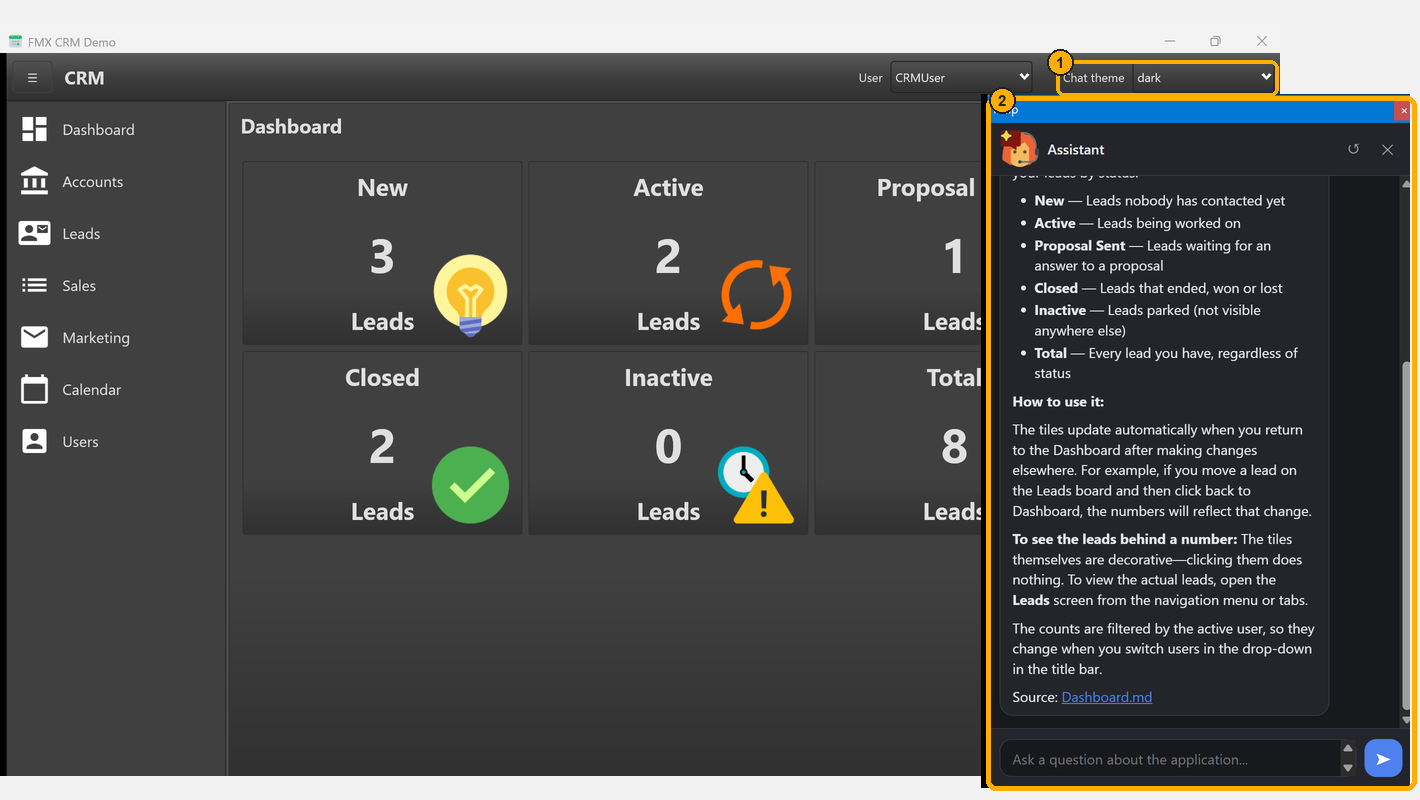
In FireMonkey there is no style to follow, so the application chooses: the FMX demo offers ThemeMode in a combo box (1), and the chat (2) is light, dark or as Windows says:
The details of how a VCL style becomes seven base colours, and how the rest is derived, are in Colours and theming.
Customizing the look with CSS
Colours belong to the theme. Everything else a stylesheet can say - a radius, a spacing, the width of a bubble, a button you do not want - goes in a stylesheet of your application, added to the page after its own:
HelpChat.PanelStyleSheet := 'helpchat.css'; // next to the executablePanelStyleSheet is a property of both components, next to PdfStyleSheet. A relative path resolves against the executable; the file is read once, when the component activates, and a named file that is not there stops the activation with EHelpChatConfigError - an application that asked for a look and would run with another is shipped wrong.
The same CSS reaches OnGetTheme as ATheme.StyleSheet, which is also where code writes CSS of its own - built at run time, taken from a resource, or chosen by the user:
procedure TMainForm.HelpChatGetTheme(Sender: TObject; var ATheme: THelpChatTheme);
begin
  // what the file said, plus a rule decided here
  ATheme.StyleSheet := ATheme.StyleSheet +
    '.hc-chat-bubble { max-width: 95%; }';
end;
It travels with the theme, so it reaches the page at load and at every theme change, and it works with a remote engine too: the client posts it with the colours.
What goes where
- Colours: in the theme. The stylesheet is written before the
:rootrule of the colours, so a--hc-bgset in it is overridden as soon as the theme sets one. UseOnGetTheme(ATheme.Accent := '#c8102e') for colours: it also derives the matching ones. --hc-radiusis yours. The corner radius of the bubbles is a variable the theme never sets::root { --hc-radius: 4px; }in your stylesheet changes every bubble at once.- Everything else: rules on the classes of the page. They are listed below and they are the contract: a class may gain rules from a release to the next, but it is not renamed silently.
- The policy still applies: no
@import url(...), no web fonts from a URL, images only asdata:URIs. A font installed on the machine is fine (ATheme.FontFamily, orfont-familyin a rule).
Examples
/* Square bubbles, without the hairline */
:root { --hc-radius: 4px; }
.hc-chat-bubble { border-color: transparent; }

/* Use the whole width of a narrow docked panel */
.hc-chat-bubble { max-width: 96%; }
.hc-chat-body { padding: 8px; gap: 6px; }

/* A smaller text, for a dense application */
.hc-chat-app { font-size: 13px; }

/* No copy button in the header: our users must not take the text away */
#hc-copy { display: none; }

/* The answer of a command in italics */
.hc-chat-system .hc-chat-bubble { font-style: italic; }
The classes of the page
| Selector | What it is |
|---|---|
.hc-chat-app | The whole panel |
.hc-chat-header, .hc-chat-brand, .hc-chat-title, .hc-chat-icon | The header, the name and icon of the assistant |
.hc-chat-hbtn | Every button of the header (#hc-copy, #hc-pdf, #hc-lang, #hc-agent, ↺) |
.hc-chat-agents | The drop-down lists of models (#hc-agents) and languages (#hc-langs) |
.hc-chat-body (#hc-body) | The conversation |
.hc-chat-msg | One message (row); with .hc-chat-user, .hc-chat-assistant, .hc-chat-system, .hc-chat-greeting, .hc-chat-msg-error |
.hc-chat-bubble | The bubble inside a message |
.hc-chat-mbtn | The copy and PDF buttons under an answer |
[data-pending] | A message still being written |
.hc-chat-dismiss | The × of a system bubble |
.hc-chat-cmd-title | The heading of the answer of a command |
.hc-chat-prompt | The system prompt shown by /prompt |
.hc-chat-doc, .hc-chat-doc-bar, .hc-chat-doc-body | The documentation view |
.hc-chat-footer, #hc-form | The footer and the question form |
.hc-chat-input (#hc-input) | The question box |
.hc-chat-send (#hc-send, #hc-stop) | Send and stop |
.hc-chat-mic (#hc-mic, #hc-clip) | Microphone and attachments |
.hc-chat-attachments | The bar of attached files |
The variables, all set by the theme except --hc-radius: --hc-bg, --hc-surface, --hc-text, --hc-muted, --hc-border, --hc-accent, --hc-accent-text, --hc-user-bg, --hc-user-text, --hc-assistant-bg, --hc-assistant-text, --hc-system-bg, --hc-system-text, --hc-error-bg, --hc-error-text, --hc-code-bg, --hc-link (links and focus rings), --hc-shadow, --hc-font, --hc-radius.
Changing the page itself
When a stylesheet is not enough - a different layout of the header, a new element - the page can be changed at the source: edit resources/panel.html, panel.css or panel.js, run Tools\BuildResources.cmd and rebuild. You then own a fork of the page, to merge at every release. Two rules keep it working: never write a colour outside the --hc-* definitions, and name every new outbound address in the Content Security Policy.