
Assistants
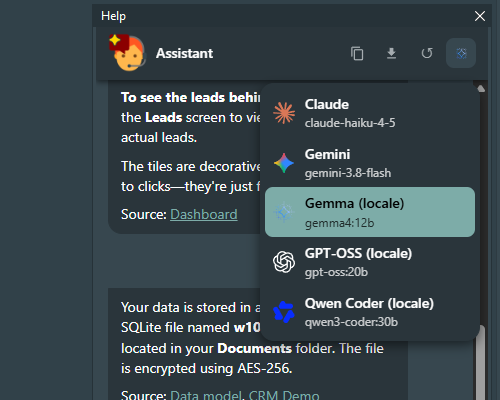
One application can offer more than one assistant, and the user picks the one that answers from the header of the panel: the cloud service of Anthropic, Google's Gemini, a model running on the user's own PC. An assistant is a name over a provider, with the model, endpoint and key it adds to that provider's settings when they differ.
Configuring them
Assistants in helpchatai.json is the list, Assistant names the one in use at start:
{
  "Assistant": "Claude",
  "Assistants": [
    { "Name": "Claude",              "Provider": "claude", "Model": "claude-haiku-4-5" },
    { "Name": "Gemini",              "Provider": "gemini", "Model": "gemini-3.8-flash" },
    { "Name": "Gemma (local)",       "Provider": "openai", "Model": "gemma4:12b" },
    { "Name": "GPT-OSS (local)",     "Provider": "openai", "Model": "gpt-oss:20b" },
    { "Name": "Qwen Coder (local)",  "Provider": "openai", "Model": "qwen3-coder:30b" }
  ],
  "Claude": { "ApiKey": "sk-ant-..." },
  "Gemini": { "ApiKey": "..." },
  "OpenAI": { "BaseUrl": "http://localhost:11434/v1" }
}| Key | Description |
|---|---|
Name | What the panel calls it. Unique in the list |
Provider | claude, openai, gemini, or a provider of yours |
Model | Empty = the model of the provider's section |
BaseUrl | Empty = the endpoint of the provider's section |
ApiKey | Empty = the key of the provider's section |
Icon | Empty = deduced (see below); otherwise one of the icon ids |
The keys and the endpoints stay in the sections Claude, OpenAI and Gemini: an assistant repeats them only when it needs a different one. One section per provider would not have been enough - three local models on one Ollama are three assistants on openai.
A file that names Assistants replaces the list of the files read before it; one that does not leaves it alone. With no list nothing changes: Provider is the one assistant, and the user cannot switch.
What the user sees
The icon of the assistant in use is the last button on the right of the header. Resting the mouse on it shows the name and the model; with more than one assistant a click opens the list, each with its icon, name and model, and the one picked answers from the next question on. A reply that is being written keeps the assistant it started with.
The choice is remembered per user in helpchatai-state.json, next to the saved conversation - never in a configuration file, so the file with the keys is never rewritten. At the next start the remembered assistant wins, if it is still in the list.
The icons
The icon is deduced from the model first, then from the endpoint, then from the provider: a gemma4 served through openai by Ollama shows the Gemma icon, not the OpenAI one, and an unknown model on Ollama shows the Ollama llama.
| Icon id | Shown for |
|---|---|
claude | claude-*, or the claude provider |
gemini | gemini-*, or the gemini provider |
openai | gpt-*, o1/o3/o4, or the openai provider on its own endpoint |
gemma, qwen, mistral, deepseek, llama, cohere | the model families |
ollama, lmstudio, openrouter, groq, azure | a model nobody recognises, by the service that serves it |
docsearch and stub have no icon, and the header shows none for them when they are alone. The icons are the SVG files of lobe-icons (MIT), compiled into the library; the logos themselves are trademarks of their owners. The monochrome ones take the colour of the text, so they follow the theme of the panel.
From code
Everything the list does, the component does too:
var
  LInfo: THelpChatAssistantInfo;
begin
  for LInfo in HelpChatAI.Assistants do
    Memo.Lines.Add(Format('%s - %s %s', [LInfo.Name, LInfo.Model,
      IfThen(LInfo.Active, '(in use)', '')]));
  HelpChatAI.SelectAssistant('Gemini');          // False if there is no such assistant
  HelpChatAI.RetryLastQuestion('Claude');        // the last question again, to Claude
end;
THelpChatSettings has the same at the engine level: ResolveAssistants, ActiveAssistantName and ApplyAssistant(AName), which sets Provider and puts the model, endpoint and key of that assistant on top of the provider's section without rewriting it - what the Object Inspector and the file show stays what you configured.
Checking them
The configuration check of the component editor (and /check in the panel) tests every assistant of the list, as if it were the one in use: a missing key or a provider whose unit is not linked shows up before the user picks it.
With a remote engine
The list comes from the server, and the server is everybody's: the panel shows it, but a client cannot switch the assistant for every other user. The selection answers 403.
Comparing them
Test\LLMBench in the repository is a console program that asks every assistant the same questions about the manual of the CRM demo, one model after the other (local models share one GPU), and writes a Markdown report: time to the first token and to the end, whether the answer cites the right page, whether it calls the right action. It is how the system prompt of 1.5.0 was tuned:
| Assistant | Average time | Right citations | Right actions |
|---|---|---|---|
| claude-haiku-4-5 | 1.9 s | 8/8 | 8/8 |
| gemini-3.8-flash | 4.5 s | 8/8 | 8/8 |
| gemma4:12b (local) | 5.3 s | 8/8 | 8/8 |
| gpt-oss:20b (local) | 3.5 s | 8/8 | 7/8 |
| qwen3-coder:30b (local) | 4.9 s | 4/8 | 6/8 |
Measured on one machine with an RTX 5060 Ti 16 GB: take the shape, not the numbers.