
Slash commands
A line that starts with / in the question box is a command, not a question: it never reaches the model, and its answer is a system bubble that is shown but not kept in the conversation, so it does not end up in the next prompt either. Commands give the answers a model cannot give for certain - who is answering, which pages the answer would be based on, what the application lets the assistant do - and put the buttons of the panel under the keyboard.
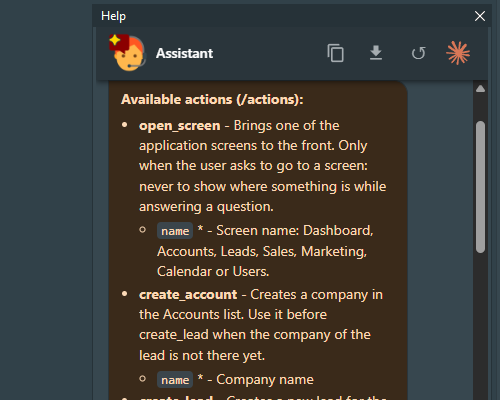
Every answer starts with what it answers - "Available actions (/actions):" - so a bubble read later, or a text pasted into a message to the developer, says what it is. An answer taller than the panel is shown from that first line.
The commands
| Command | What it does |
|---|---|
/help | The commands you can type |
/who | The assistant in use: name, model, provider, endpoint |
/use name | Switches to the named assistant (a prefix is enough) |
/retry [name] | Asks the last question again, to another assistant if named |
/search words | The documentation pages the answer would be grounded on; without words, those of the last question |
/pages | The pages of the documentation index |
/doc page | Opens a page of the documentation in the panel |
/context | The screen context the application sent - what F1 knows |
/actions | The actions the application registered, with their parameters (* = required) |
/check | The configuration check, every assistant included |
/stats | Time to the first token and to the end of the last answer |
/clear, /pdf, /copy, /attach | The buttons of the panel |
/prompt | The system prompt the last question went with, documentation excerpts included |
/run action name=value | Runs a registered action by hand, with the usual confirmation |
/search is the one to reach for when an answer ignores a page that has it: if the page is not in the list, the model never saw it, and the fix is in the index or in the words of the page, not in the prompt.
Which ones the user may type
EnabledCommands on TVclHelpChatAI and TFmxHelpChatAI is a set of THelpChatCommand, edited in the Object Inspector with a check box each. The default is every command but prompt and run: the first shows the instructions and the excerpts of a request, the second runs an action without the model. Enable them in a build for support or testing:
HelpChatAI.EnabledCommands := HELPCHAT_DEF_COMMANDS + [hccPrompt, hccRun];The set is enforced by the server of the panel, not only by the page: a command that is not enabled is answered 403. A remote session starts without run, because the actions are not on the server.
From code
Whatever the user can do in the panel, the application can do on the component - and from code any command runs, enabled or not: EnabledCommands is what the user may type, not what the application may do.
HelpChatAI.ExecuteCommand(hccActions);            // opens the panel and shows the answer
HelpChatAI.ExecuteCommand(hccSearch, 'export');   // with its arguments

ShowMessage(HelpChatAI.ExplainCommand(hccWho));   // the same answer as text, no panel:
// Assistant in use (/who):
// Claude · claude-haiku-4-5
// Provider: claude
// Endpoint: https://api.anthropic.com| Method | What it does |
|---|---|
ExecuteCommand(ACommand, AArgs) | Runs the command in the panel as if typed, opening it when it is closed |
ExplainCommand(ACommand, AArgs): string | The answer as plain text, without the panel. run is not run here - the action would wait for the very thread that is asking - and answers with its usage |
ClearConversation | The ↺ button |
Assistants, SelectAssistant(AName) | The list of the assistants |
RetryLastQuestion(AAssistant) | /retry |
SaveConversationPdf | The PDF button |
CopyLastAnswer | The copy button of the last answer |
AttachFile(AFileName, out AError) | The clip |
With a remote engine ExplainCommand answers empty and the server refuses the commands it does not enable even from code: there the page talks to a server shared by everybody, which cannot take a page's word that the application asked.
Adding a command
THelpChatCommand lives in HelpChatAI.Commands. A new one is a member of the enumeration, its name, its title and description in both languages of HelpChatAI.Messages, and its answer - a case in HelpChatRunCommand when the engine answers it, a branch in panel.js when the page does. The components, the server and the page read the set, so nothing else changes.