
SVGIconImageList




Four engines to render SVG (Delphi Image32, SVGMagic, Skia4Delphi, Direct2D wrapper) and four components to simplify use of SVG images (resize, fixedcolor, grayscale...)
| Component | Description |
|---|---|
 | TSVGIconImageCollection is collection of SVG Images for Delphi to provide a centralized list of images for SVGIconVirtualImageLists (only for VCL) |
 | TSVGIconVirtualImageList is a special "virtual" ImageList for Delphi linked to an SVGIconImageCollection (only for VCL) to simplify use of SVG Icons (resize, opacity, grayscale and more...) |
 | TSVGIconImage is an extended Image component for Delphi (VCL+FMX) to show any SVG image directly or included into a an SVGIconImageList with all functionality (stretch, opacity, grayscale and more...) |
 | TSVGIconImageList is an extended ImageList for Delphi (VCL+FMX) with an embedded SVG image collection. Use this component to simplify replace of ImageList for older Delphi Apps and obtain auto-scaling of Icons! |
New integration with SVGMagic Library for Animated SVG
Starting with version 4.6.0, a new Delphi/Native library has been added to the project.
This library contains a unique feature: the ability to display animated SVG files. In the current implementation, the library is used as a new available rendering engine for the standard SvgIconImageList components, but other components are available for displaying animated SVGs, as shown in the SVGMagic-specific demo.
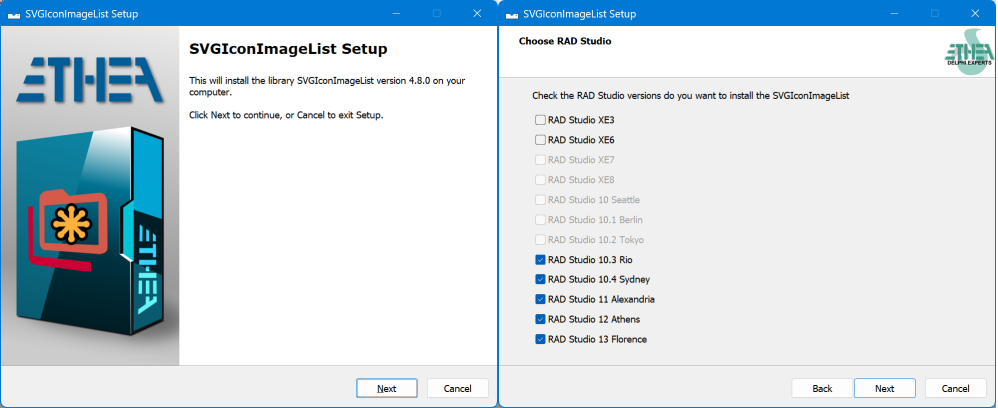
New Setup for automatic installation of components
An "Installer" read-to-use is located in the Release area: Download the Installer.
The Installer automatically detect your Delphi versions, install sources, build and install packages and add source paths.
Documentation
Follow the Project Site to known how to use those components to modernize your Delphi VCL or FMX applications with scalable, colored and beautiful icons.
Automated Test Suite
From version 4.8.0 the project includes a Test Suite (DUnitX, Delphi 13) in the Test folder: the ISVG contract is checked against every rendering engine (Image32, SVGMagic, Skia4Delphi, Direct2D) and the VCL and FMX components are tested too, rendering the icons and checking the pixels. Run Test\run_tests.cmd [Win32|Win64] [Debug|Release] to build and execute all the tests.
You can search and download Icons directly from the WEB!
From version 4.3 an integrated service is now available in the component editor to download SVG icons from the WEB, via the API provided by iconify.design.
Now you can select "Add from WEB" in the Component Editor: a new form to search and Download from the WEB is available for both VCL and FMX Platforms.
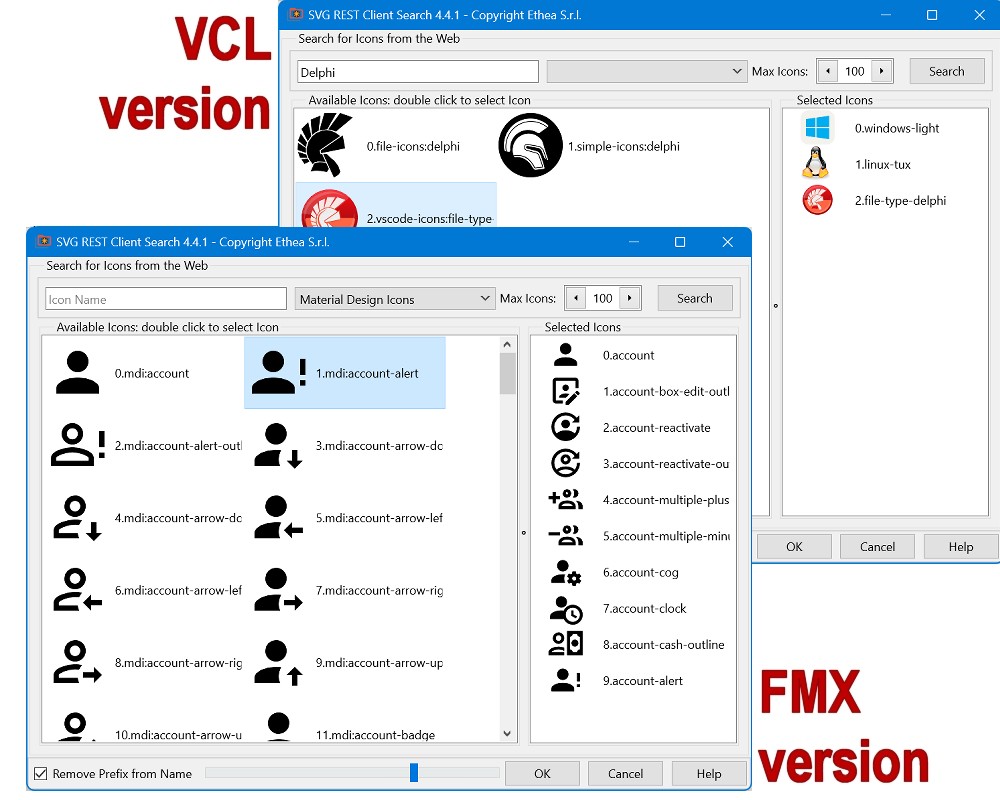
Read this page to understand how to easily download SVG icons from the WEB and include them in the SVGIconImageList or SVGIconImageCollection.
Important notice
From version 4.0, TSVGIconVirtualImageList inherits from TVirtualImageList (using Delphi 10.3 to latest). For previous Delphi versions TSVGIconVirtualImageList inherits from TSVGIconImageListBase.
An important difference is that a TVirtualImageList may use and create only a subset of the images in the collection.
Although, the standard TVirtualImageList does not have the FixedColor, GrayScale, ApplyToRootOnly and Opacity properties, these properties exist at the TSVGIconImageCollection and they would be reflected on the linked TVirtualImageList, but if you change those properties at collection level, all the VirtualImageList linked changes!
For this reasons, now TSVGIconVirtualImageList have also FixedColor, GrayScale, ApplyToRootOnly and Opacity properties, so you can setup those properties only at VirtualImageList level, and you can share the same TSVGIconImageCollection from many VirtualImageList with different poperties, as you can see in the new SVGIconVirtualImageListDemo.
For this reason, if you are using those components from Delphi 10.3, the recommended combination should be TSVGIconImageCollection + TSVGIconVirtualImageList.
Don't forget also the importance of PreserveItems when you have a large ImageCollection with many linked Actions. Without setting this property to "True", everytime you add or remove an icon in the collection, you have to check and change the ImageIndex of all the Actions.
Another feature available from Delphi 10.4 version, is that TSVGIconImageCollection inherits from TCustomImageCollection, so you can also use it with the TVirtualImage component and place SVG icons into the TControlList component, as explained here...
Choose your preferred SVG engine!
There are four implementations for VCL (three for FMX):
Native Delphi Image32 (default), uses Image32 library by Angus Johnson (VCL + FMX)
SVGMagic, advanced SVG engine by Ursa Minor Ltd. with unique support for animated SVG files (VCL only)
Using Skia4Delphi library, a cross-platform 2D graphics API based on Google's Skia Graphics Library (VCL + FMX)
A wrapper to the native Windows Direct2D implementation (VCL only)
To choose your preferred Engine, you must edit SVGIconImageList.inc in the correct section:
for VCL, enabling: {$DEFINE Image32_SVGEngine}, {$DEFINE SVGMagic_Engine}, or {$DEFINE Skia_SVGEngine}
for FMX, enabling: {$DEFINE FMX_Image32_SVGEngine} or {$DEFINE FMX_Skia_SVGEngine}
By Default Image32_SVGEngine is Enabled.
Note: SVGMagic is the only engine that fully supports animated SVG files, making it the ideal choice for applications requiring SVG animations.
Performance comparison
This table shows the performance of the three rendering engines tested with SVGExplorer, using a significant amount of icons from different sets, rendered at 128x128 pixels.
| Count | Icon set | Image32 | D2D | Skia4Delphi |
|---|---|---|---|---|
| 997 | Font-Awesome | 1265ms | 1453ms | 1172ms |
| 654 | Papirus | 2750ms(1) | 937ms | 1266ms(1) |
| 5366 | Material-Design | 11015ms | 12001ms | 10688ms |
As you can see, the engines perform differently depending on the icons and their complexity.
(1)Notice that Image32 and Skia4Delphi are the only engines capable of rendering blur effect (that is always slow to calculate): this is the reason of "slow" performance to render Papirus icons that contains blur effect.
Sample image of VCL version

Sample image of FMX (Windows) version

Sample images of the VCL SVGText-property editor (VCL and FMX)


UTILITIES
The SVG Viewer Demo is useful to check the rendering quality of the engines available, including the new SVGMagic engine.
The SVG Icon Explorer utility utility is useful to explore and preview your svg image collections.
All demo applications have been updated to support and test the new SVGMagic engine, including its unique capability to render animated SVG files.
Animated SVG
The SVGMagic Demo located in Demo\SVGMagic folder showcases the SVGMagic library components with a comprehensive demonstration for animated SVG including:
- TWSVGImage, TWSVGImageButton, TWSVGImageList components
- Styled checkboxes and radio buttons with SVG graphics
- SVG browser with animation support and real-time control
- Real-world UI examples (banking and payment forms)
- Full demonstration of animated SVG rendering capabilities Notice that those components are "specific" of SVGMagic Library, because they manage SVG animations.
SVG Shell Extensions Project
You can use SVG Shell Extensions if you want to see your icons directly into Windows Explorer or you want to edit them using a powerful SVG Text Editor.
Other similar library
A similar project made by Ethea for Icon Fonts: https://github.com/EtheaDev/IconFontsImageList
Available from Delphi XE3 to Delphi 13 (VCL and FMX Platforms)

Related links: embarcadero.com - learndelphi.org
RELEASE NOTES
02 Nov 2026 - version 4.8.1
- Fixed "Search icons from WEB": icons downloaded as prefix/name.svg (the iconify.design API no longer accepts prefix:name.svg), search query and prefix URL-encoded
- Fixed ImageList Editor (VCL and FMX): the maximized state of the window is restored when the editor is reopened
- Added "Export all" button to FMX ImageList Editor: saves every icon as [index].[name].svg into the selected folder
- Setup: ReadMe added to the Start menu group
- New product logo and setup wizard images
All the release notes: README on GitHub
THANKS TO
These components uses the following libraries:
Image32 library by Angus Johnson
These files are included in the Image32/Source folders
Copyright Boost Software License Version 1
SVGMagic library by Ursa Minor Ltd.
These files are included in the SVGMagic/source folder
Advanced SVG 1.1 rendering engine with full support for animated SVG files
Skia4Delphi Library by the authors
Copyright MIT-License
Many thanks to Vincent Parrett and Kiriakos Vlahos for their great contribution.
Thanks to George Birbilis for Package updates, build and test with Android, iOS and OSX platform
License
Copyright (c) 2019-2026 Ethea S.r.l.
Licensed under the Apache License, Version 2.0 (the "License"): you may not use this software except in compliance with the License. Unless required by applicable law or agreed to in writing, software distributed under the License is distributed on an "AS IS" BASIS, WITHOUT WARRANTIES OR CONDITIONS OF ANY KIND, either express or implied. See the License for the specific language governing permissions and limitations under the License.