
IconFontsImageList




Four advanced components to simplify use of Icon Fonts as images and ImageList (for VCL and FMX). Full support for High-DPI apps. Rendering optimized with GDI+
| Component | Description |
|---|---|
 | TIconFontsImageCollection is collection of "Icon Fonts" for Delphi to provide a centralized list of images for IconFontsVirtualImageList (only for VCL) |
 | TIconFontsVirtualImageList is a special "virtual" ImageList for Delphi linked to an IconFontsImageCollection (only for VCL) to simplify use of "Font Icons" (resize, color and more...) |
 | TIconFontImage is an extended Image component for Delphi (VCL+FMX) to show any Icon Font directly or included into a an IconFontsImageList with all functionality (stretch, color, opacity and more...) |
 | TIconFontsImageList is an extended ImageList for Delphi (VCL+FMX) to simplify use of Icon Fonts (resize, color and more...). Use only for simple application with one form. |
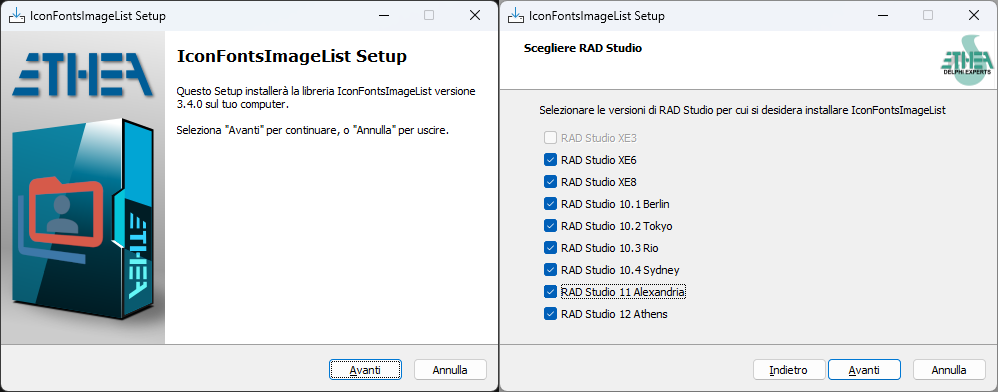
New Setup for automatic installation of components
An "Installer" read-to-use is located in the Release area: Download the Installer.
The Installer automatically detect your Delphi versions, install sources, build and install packages and add source paths.
Installation with DPM (Delphi Package Manager)
The library is also published on delphi.dev as the package EtheaDev.IconFontsImageList (Delphi XE3 to 13, Win32 and Win64): you can install it with DPM, the Delphi Package Manager, as an alternative to the Setup. From the IDE, right click on your project in the Project Manager and choose Manage DPM Packages, or from the command line:
dpm install EtheaDev.IconFontsImageList <path of your project>.dprojDPM downloads the package, builds it for the Delphi version and the platforms of your project and adds it to the project.
Documentation
Follow the Project Site to known how to use those components to modernize your Delphi VCL or FMX applications with scalable, colored and beautiful icons.
Available from Delphi 7 to Delphi 13 (32bit and 64bit platforms)
Notice: the Installer is not able to automatic compile and install for Delphi 7: you must install it manually as explained here

Related links: https://www.embarcadero.com/ - https://learndelphi.org/
Sample image of VCL version
Sample image of FMX version
Very important notice:
TVirtualImageList (available from D10.3) and TIconFontsVirtualImageList both use images from TIconFontsImageCollection. An important difference is that TVirtualImageList may use and create only a subset of the images in the collection, whereas TIconFontsVirtualImageList creates all images of the collection everytime it is needed (e,g. DPI change), which is slower and consumes more memory.
We advise that TIconFontsVirtualImageList should be used only for versions of Delphi before 10.3. For recent versions of Delphi the recommended combination should be TIconFontsImageCollection + TVirtualImageList. Don't forget also the importance of TVirtualImageList.PreserveItems when you have a large ImageCollection with many linked Actions. Without setting this property to "True", everytime you add or remove an icon in the collection, you have to check and change the ImageIndex of all the Actions.
Demos uses Material Design Icon Fonts
All demos included in this repo uses the Material Design Font available here. (the file "materialdesignicons-webfont.ttf" is renamed to "Material Design Icons.ttf" and included into Demo\Fonts folder)
Warning: "Material Font" has changed again
Take care of changed Font file used in the Demos starting from v3.3.2 release, as explained here.
RELEASE NOTES: 15 Oct 2026: version 3.4.3 (VCL+FMX)
- Added support for Delphi 13.2
- Fixed TIconFontsImageListBase.GetNameByIndex
- Added demo for Delphi 13
All the release notes: README on GitHub
License
Copyright (c) 2019-2026 Ethea S.r.l.
Licensed under the Apache License, Version 2.0 (the "License"): you may not use this software except in compliance with the License. Unless required by applicable law or agreed to in writing, software distributed under the License is distributed on an "AS IS" BASIS, WITHOUT WARRANTIES OR CONDITIONS OF ANY KIND, either express or implied. See the License for the specific language governing permissions and limitations under the License.