
HelpChatAI for Delphi






Related links: https://www.embarcadero.com/ - https://learndelphi.org/
An in-app AI help assistant for your VCL and FireMonkey applications
Your users do not read the manual: they ask. HelpChatAI puts a chat bubble in the corner of your application, answers "how do I export this grid?" from your own documentation, and knows which screen the user is on while answering. F1 opens it, through the standard Delphi help system, so the HelpKeyword you already wrote keeps working.
| Component | Description |
|---|---|
 | TVclHelpChatAI is the VCL component: drop it on the main form, set Active, and you have the bubble, F1 contextual help and the chat panel (a WebView2 TEdgeBrowser), either in its own tool window or embedded in a container of yours. Colours follow the active VCL style |
 | TFmxHelpChatAI is the FireMonkey twin (Delphi 12+): same settings, same engine, the chat in a TWebBrowser. F1 through the host form's OnKeyDown, light/dark theme instead of VCL styles. Available only for Delphi 12 and 13 |
How it works
- You build a documentation index (
help-index.json) from the Markdown pages of your manual, with theHelpIndexBuildertool. - The user asks. The component adds the screen context — the active form, its caption, the
HelpKeyword/HelpContextof the focused control, the active tab. - A provider answers.
docsearchfinds the right page offline and quotes it, with no API key at all;claude,openaiandgeminiread the pages the retriever found and answer from those, citing the source and saying when they do not know. - The reply streams into the panel token by token, rendered as safe HTML. Nothing ever runs on the UI thread, and the user can stop it.
- If you let it, the assistant can also act: you register the actions your application allows, and it calls them on the main thread, asking the user first when they change data.
- And it can read a document the user hands it: a paper clip next to the question box takes a PDF, an image or a text file. Together with an action, that is a PDF filling a form without anybody retyping it. Off until you turn it on, because an attachment leaves the machine.
- What it answered does not stay in the panel. Every answer, the whole conversation and every page of the manual can be copied — as text and as HTML, so a table pasted into Word is still a table — or saved as a PDF, laid out by a stylesheet of yours and headed with the name of your application, the user and the page number.
The engine knows nothing about the UI: it runs inside your application or on a HelpChatAI server, chosen in a configuration file, so the model API key never has to reach the user's machine. When it has to, OnDecryptSecret lets you keep it encrypted in the configuration and decrypt it the way your application sees fit.
Providers
Provider | Needs | Streams | Actions |
|---|---|---|---|
docsearch | the documentation index, no key | no | no |
claude | ANTHROPIC_API_KEY | yes | yes |
openai | OPENAI_API_KEY, nothing for a local model | yes | yes |
gemini | GEMINI_API_KEY | yes | yes |
openai is wider than its name: Chat Completions is the API that Azure OpenAI, Groq, OpenRouter, Mistral, DeepSeek, Ollama and LM Studio also speak, so BaseUrl and Model are enough to point the same provider at any of them — including a model running on the user's own machine, where nothing leaves the PC.
More than one assistant
Assistants in helpchatai.json lists the assistants the user may switch between from the panel: each one has a name, a provider, and the model, endpoint and key it adds to that provider's section when they differ — three local models on one Ollama are three entries on openai. Assistant names the one in use at start; the choice made in the panel is remembered per user. The header shows the icon of the model in use (deduced from the model name, then from the endpoint, then from the provider; Icon overrides it), with name and model as the tooltip, and with more than one assistant a click on it opens the list. With no list, Provider alone is the one assistant and nothing can be switched.
{
  "Assistant": "Claude",
  "Assistants": [
    { "Name": "Claude", "Provider": "claude", "Model": "claude-haiku-4-5" },
    { "Name": "Gemini", "Provider": "gemini", "Model": "gemini-3.8-flash" },
    { "Name": "Gemma (local)", "Provider": "openai", "Model": "gemma4:12b", "BaseUrl": "http://localhost:11434/v1" }
  ]
}
The icons of the providers and models are those of lobe-icons (MIT); the logos themselves are trademarks of their respective owners.
Commands
A line that starts with / in the question box is a command, answered without the model: /who (assistant, model, provider, endpoint), /use name and /retry [name] (switch, ask again), /search words (the pages the answer would be grounded on), /pages and /doc page, /context (the screen F1 knows), /actions (what the assistant can do here), /check (the configuration check), /stats, /clear, /pdf, /copy, /attach, /help. EnabledCommands on the component is the set the panel accepts: all of them by default except /prompt, which shows the instructions and excerpts the last question went with, and /run action name=value, which runs a registered action by hand (with the usual confirmation). Every answer starts with what it answers, e.g. "Available actions (/actions):".
Everything the panel does can be done from code on the component: ExecuteCommand(hccActions) shows an answer in the panel (any command, enabled or not), ExplainCommand(hccActions) returns it as text without opening anything, and ClearConversation, SelectAssistant, Assistants, RetryLastQuestion, SaveConversationPdf, CopyLastAnswer and AttachFile do what their buttons do.
Setup for automatic installation of components
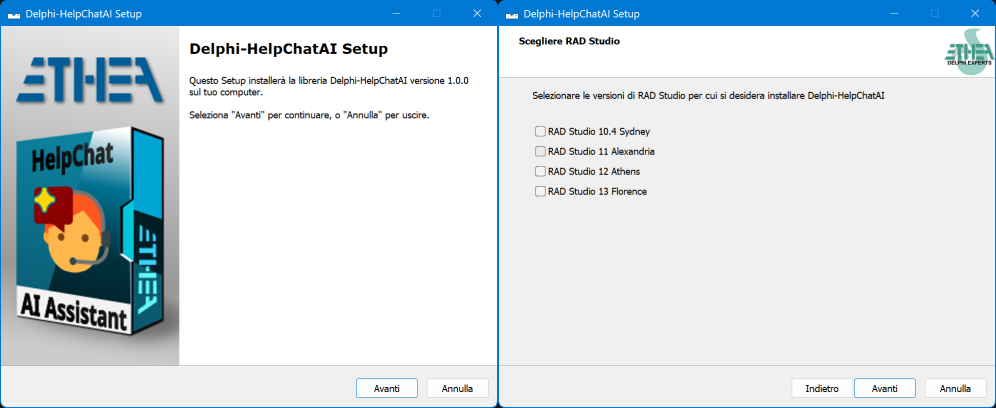
An "Installer" ready to use is located in the Release area: Download the Installer.
The Installer automatically detects your Delphi versions, installs sources, builds and installs packages and adds source paths.
To do it by hand instead:
- open the group project of your version under
packages/—Delphi13,Delphi12,Delphi11orDelphi10.4 - build it and install
dclHelpChatAIVcl(anddclHelpChatAIFmx, then addsourceandExt/MarkdownProcessor/sourceto the library path.
packages/BuildAllPackages.ps1 builds them from a command line, every installed version or the ones named with -DelphiVersion D13,D12; BuildAllPackagesD13.ps1 (and D12, D11, D10.4) does one version.
Ship WebView2Loader.dll (Redist/WebView2/x86|x64) next to your executable; the WebView2 runtime itself is already part of Windows 11 and of every machine with Edge.
Installation with DPM (Delphi Package Manager)
The library is also published on delphi.dev as the package EtheaDev.HelpChatAI (Delphi 10.4 to 13, Win32 and Win64): you can install it with DPM, the Delphi Package Manager, as an alternative to the Setup. From the IDE, right click on your project in the Project Manager and choose Manage DPM Packages, or from the command line:
dpm install EtheaDev.HelpChatAI <path of your project>.dprojDPM downloads the package, builds it for the Delphi version and the platforms of your project and adds it to the project. Its dependencies are installed automatically: EtheaDev.MarkdownProcessor from delphi.dev and Indy from your Delphi installation.
Documentation
Follow the Project Site to learn how to add an AI help assistant to your Delphi application, and how to make its answers good.
| Page | What you find |
|---|---|
| Quick Start | From an empty form to a working chat |
| The VCL component | Bubble, F1, embedding, dictation, the design-time preview |
| The FMX component | What FireMonkey does differently |
| Providers | The five of them, their settings, writing your own |
| Assistants | Several providers and models in one panel, and the switch between them |
| Slash commands | /who, /search, /actions... and everything the panel does, from code |
| The documentation index | Building help-index.json, and the pages shown inside the panel |
| Actions | An assistant that does things, safely |
| Attaching documents | Handing the assistant a PDF, an image or a text file |
| Saving and copying | The PDF of an answer, its header and footer, and the clipboard |
| Running the engine on a server | When the API key must not be on the user's machine |
| Configuration | helpchatai.json, and checking a configuration |
| Security and privacy | What travels, where, and what never does |
Supported Delphi versions
| Framework | Versions | Verified |
|---|---|---|
| Engine (RTL only) | Delphi 10.4 Sydney → 13 Florence | packages built with each compiler |
VCL (TEdgeBrowser) | Delphi 10.4 → 13 | built on all four, run on 13 |
FMX (TWebBrowser) | Delphi 12 → 13 | built on both, run on Windows |
FireMonkey compiles for macOS, iOS and Android, but only Windows has been tried so far.
Packages
One folder per Delphi version, the same .dpk for all of them.
| Package | Requires | Contents |
|---|---|---|
HelpChatAI (runtime) | rtl, MarkdownProcessor | the engine, the index builder, the panel page |
HelpChatAIServer (runtime) | HelpChatAI, Indy | the transports: local server, remote server, remote client, host channel |
HelpChatAIVcl (runtime) | HelpChatAIServer, vcl, vcledge | TVclHelpChatAI, the chat control, VCL style theming |
dclHelpChatAIVcl (design-time) | HelpChatAIVcl, designide | palette, splash and About box, component editor with the live preview, property editors |
HelpChatAIFmx (runtime) | HelpChatAIServer, fmx | TFmxHelpChatAI and its chat control |
dclHelpChatAIFmx (design-time) | HelpChatAIFmx, designide | palette, component editor with the configuration check |
Demo and tests
CRM Demo is the Windows 10 CRM demo of Embarcadero with HelpChatAI in it: a real little application — leads, accounts, proposals — with a manual of sixteen pages in CRM Demo\Help and the assistant answering from it. Press F1 on any screen, or ask it to open a screen, create a lead or prepare a proposal.
It comes in both frameworks, sharing one data module, one database and one manual:
| Project | Delphi | What it is | |
|---|---|---|---|
| VCL | CRM Demo\VCL\project\VCL_CRMDemo.dproj | 10.4 → 13 | The whole application: seven pages, the lead and proposal windows, and all four actions |
| FMX | CRM Demo\FMX\project\FMX_CRMDemo.dproj | 12 → 13 | The same application: the seven pages, the lead, proposal and draft windows, and the same four actions |
Neither of them keeps the API key in clear: CRM Demo\common\uAppSecret.pas encrypts it with DCPcrypt (an svn:external of the demo, no package of the library requires it) and the License activation window asks for it the first time, when no key is found anywhere. Tools\ResetDemoKey.ps1 puts that back to "no key", to show it again.
CRM Demo\BuildAllDemos.ps1 builds both with every Delphi it finds, Win32 and Win64: twelve builds, and the FireMonkey ones are reported N/A below Delphi 12 rather than failed.
Test/Delphi13/HelpChatAITests.dproj is a DUnitX suite of 352 tests that runs without network: store, worker pool, cancellation, index scoring, Markdown safety, the SSE parsing and request building of each model provider, the configuration check, both transports over real HTTP, the actions from a real worker thread, the secrets of the settings and the printable document - the last two of which write a real PDF with the WebView2 runtime of the machine, and skip themselves where there is none.
Test\Bin\Win32\HelpChatAITests.exe --exitbehavior:ContinueRelease Notes
9 Nov 2026: ver. 1.6.0
- Six languages: Spanish, French, German and Portuguese join English and Italian (
THelpChatLanguage), every string of the library translated - the panel, the engine messages, the answers of the commands, the texts of the confirmation of an action, the PDF - The language of the chat is chosen in the panel: the flag of the language in use in the header, next to the icon of the assistant, and the list of the languages - each with its flag (circle-flags, MIT) and its own name - on a click. The panel reloads in the new language and keeps the conversation; the choice is remembered per user in
helpchatai-state.json, and only once the user has made one /langlists the languages,/lang de(orDeutsch, orgerman) switchesSettings.Languages: the languages the user may pick (all six by default; with fewer than two there is no flag).Settings.Languageis resolved among themSettings.DocLanguage: the language the documentation is written in. When it differs from the language of the chat, the model is told to explain in the language of the user and write the names of screens, buttons and fields exactly as the manual spells them, so that the user finds them on the screen. The CRM demos set it to English- The language rule of the system prompt now reads "The language of this chat is ...": it is the language the user chose, no longer necessarily the one of the application
Languages,ActiveLanguageandSelectLanguageon both components;GET /api/languagesandPOST /api/language/selecton the server (read-only on a remote one, where the engine is everybody's);HelpChatLanguageCode,HelpChatLanguageName,HelpChatLanguageNativeName,HelpChatLanguageFromCodeandHelpChatFlagSvgfor code of your own- An empty
AssistantNamereaches the page as it is, so the default name follows the language of the chat as well - The console server takes any language code in
--lang Test\LLMBench:--retrievalwrites the ranking of the documentation search for a set of questions, andTest\LLMBench\embeddingsmeasures a semantic search against it (Italian, English and paraphrased questions; four embedding models on Ollama). Nothing in the library changes yet: the report is inresults/embeddings-v1.md- 362 tests
All the release notes: README on GitHub
License
Apache License 2.0 — Copyright (c) 2026 Ethea S.r.l.
The Ethea MarkdownProcessor, which the engine package requires, keeps its own license (Apache 2.0 / BSD, see Delphi-MarkdownProcessor).