
Ethea SynEdit





Syntax highlighting edit control for Delphi VCL (10.4 to 13, Win32 and Win64), maintained by Ethea S.r.l.
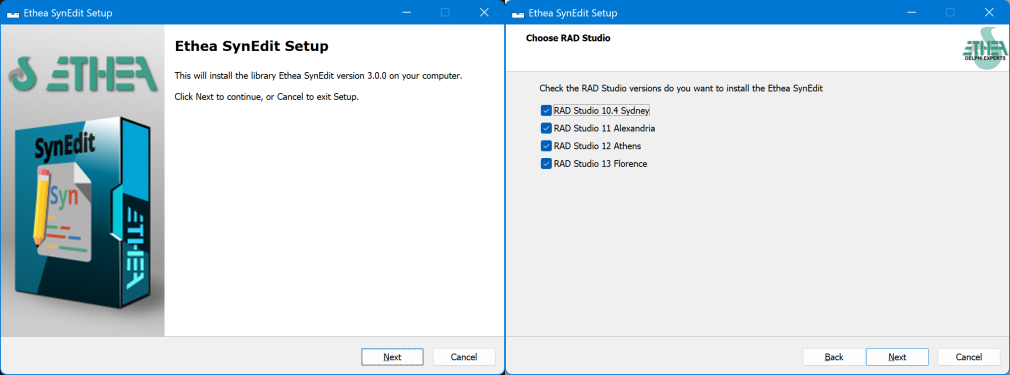
New Setup for automatic installation of components
An "Installer" read-to-use is located in the Release area: Download the Installer.
The Installer automatically detect your Delphi versions, install sources, build and install packages and add source paths.
Installation with DPM (Delphi Package Manager)
The library is also published on delphi.dev as the package EtheaDev.SynEdit (Delphi 10.4 to 13, Win32 and Win64): you can install it with DPM, the Delphi Package Manager, as an alternative to the Setup. From the IDE, right click on your project in the Project Manager and choose Manage DPM Packages, or from the command line:
dpm install EtheaDev.SynEdit <path of your project>.dprojDPM downloads the package, builds it for the Delphi version and the platforms of your project and adds it to the project. All the units are under the SynEdit. scope (see Migration to update a project that uses the original SynEdit).
Documentation
Follow the Project Site to know how to use Ethea SynEdit: components, highlighters, demos and the migration from the original SynEdit.
Table of contents
- Introduction
- Origin of the fork and credits
- Package names
- Installation
- Migrating from another SynEdit
- Unit names: old to new
- License
- Release Notes
Introduction
SynEdit is a syntax highlighting edit control, not based on the Windows common controls. Ethea SynEdit contains TSynEdit, TDBSynEdit, more than 50 highlighters, code completion proposal, search/replace, print and print preview, spell check, code folding and multi-caret editing. It is a source-only release, with runtime and design-time packages for Delphi 10.4, 11, 12 and 13.
Origin of the fork and credits
Ethea SynEdit is a fork of pyscripter/SynEdit, itself the continuation of TurboPack SynEdit and of the original mwEdit by Martin Waldenburg and the SynEdit project contributors. The upstream project is no longer maintained, so Ethea keeps its own copy, aligned to pyscripter/SynEdit up to the commit of 25 Nov 2025, with these differences:
- all units use the
SynEdit.unit scope, so they never conflict with other SynEdit copies (pyscripter, TurboPack/GetIt) that may be in the search path; - packages are named
EtheaSynEdit(runtime) anddclEtheaSynEdit(design time), organized per Delphi version inPackages\Delphi10_4|Delphi11|Delphi12|Delphi13; - Ethea additions: Markdown highlighter,
TSynEditHighlighter.Options, settings and print dialogs in the library, backward-compatibility properties for existing DFMs (FontSmoothing,IndentGuides,Width,IncPaintLock/DecPaintLock).
Every unit keeps its original MPL/GPL header with the original copyright. The authors and contributors of the SynEdit and mwEdit projects are listed in Doc/Contributors.txt.
Class, type and constant names are unchanged (TSynEdit, TSynEditSearch, ecXxx, ...), so the DFMs of existing applications keep working: only the uses clauses change. As a consequence, Ethea SynEdit cannot be installed in the IDE together with another SynEdit.
Package names
Packages are in Packages\Delphi10_4, Delphi11, Delphi12, Delphi13 (with {$LIBSUFFIX AUTO}):
EtheaSynEdit(runtime)dclEtheaSynEdit(design time, requiresEtheaSynEdit)
Each folder has a PackageGroup.groupproj.
Installation
- Get the sources (e.g.
d:\EtheaSynEdit). - Start RAD Studio and add the
Sourcefolder to the IDE library path (Win32 and Win64). - Open
Packages\Delphi<version>\PackageGroup.groupproj, buildEtheaSynEditand installdclEtheaSynEdit. Remove any other SynEdit package from the IDE first.
Migrating from another SynEdit
Applications written for pyscripter/TurboPack SynEdit only need the new unit names. Two ways:
- Script:
python Tools\SynEditRename.py migrate <project folder> [--apply]updatesuses,{$I},.dpkcontains/requires,DCCReferenceand runtime package names (dry-run by default). Qualified references (SynEditTypes.TBufferCoord) and strings with old names are only reported, to be fixed by hand. - Unit aliases: Project Options > Delphi Compiler > Unit aliases, using the output of
python Tools\SynEditRename.py aliases.
Behavior changes inherited from upstream (after July 2025): types moved from SynEdit to SynEdit.Types, and TSynEditorOptionsContainer from SynEditOptionsDialog to SynEdit.MiscClasses. IncPaintLock/DecPaintLock remain as aliases of BeginUpdate/EndUpdate.
Unit names: old to new
The full table is in Tools/SynEditRenames.json (python Tools\SynEditRename.py list). The rule:
| Original | Ethea SynEdit | Example |
|---|---|---|
SynEdit.pas | SynEdit.Core | TSynEdit, TCustomSynEdit |
SynHighlighterXxx | SynEdit.Highlighter.Xxx | SynEdit.Highlighter.Pas |
SynEditXxx | SynEdit.Xxx | SynEdit.Types, SynEdit.Highlighter |
SynXxx | SynEdit.Xxx | SynEdit.CompletionProposal, SynEdit.Unicode |
dlgXxx | SynEdit.dlgXxx | SynEdit.dlgSearchText |
SynEdit.inc, SynEditJedi.inc | SynEdit.Defines.inc, SynEdit.Jedi.inc |
Exception: SynHighlighterAsm is SynEdit.Highlighter.Assembler (Asm is a reserved word and cannot be a unit name segment in a package contains clause).
License
Dual license MPL 1.1 / GPL 2, as the original SynEdit: see the header of each source file.
Release Notes
03 Nov 2026: ver. 3.0.0
- First release of Ethea SynEdit, fork of pyscripter/SynEdit aligned to its commit of 25 Nov 2025.
- All units renamed with the
SynEdit.unit scope (SynEdit.pasis nowSynEdit.Core.pas); class names are unchanged. - New packages
EtheaSynEdit/dclEtheaSynEditfor Delphi 10.4, 11, 12 and 13, Win32 and Win64. - Added
Tools\SynEditRename.pyto migrate existing projects (migrate,aliases). - Added the Markdown highlighter and the search/replace, print and highlighter settings dialogs.
All the release notes: README on GitHub