
Choice of SVG Factories (Delphi Image32, SKIA4Delphi, Direct2D wrapper, SVGMagic)
SVGIconImageList provides four alternative rendering engines for parsing and displaying SVG files (VCL), and two for FMX applications:
VCL Engines
Delphi Image32 (default): Native Delphi implementation using Image32 library by Angus Johnson. Provides excellent SVG compliance with no external dependencies.
SKIA4Delphi: Cross-platform 2D graphics API based on Google's Skia Graphics Library. Offers the best rendering quality with hardware acceleration support.
Direct2D: Native Windows SVG support based on Direct2D, written by Kiriakos Vlahos. Available in Windows 10 with the Creators Update or later. Provides excellent performance using native OS features.
SVGMagic (NEW in v4.6.0): Advanced SVG rendering engine by Ursa Minor Ltd. with unique support for animated SVG files. Provides comprehensive SVG 1.1 support with excellent rendering quality.
FMX Engines
FMX Image32: Image32 library adapted for FireMonkey (Windows, Android, iOS, macOS)
FMX SKIA4Delphi: Skia4Delphi for FireMonkey cross-platform applications
Comparison of the four factories
If you want to compare the four factories you can use the SVG Viewer Demo and look at the resulting rendered images by the engines (now includes SVGMagic panel):
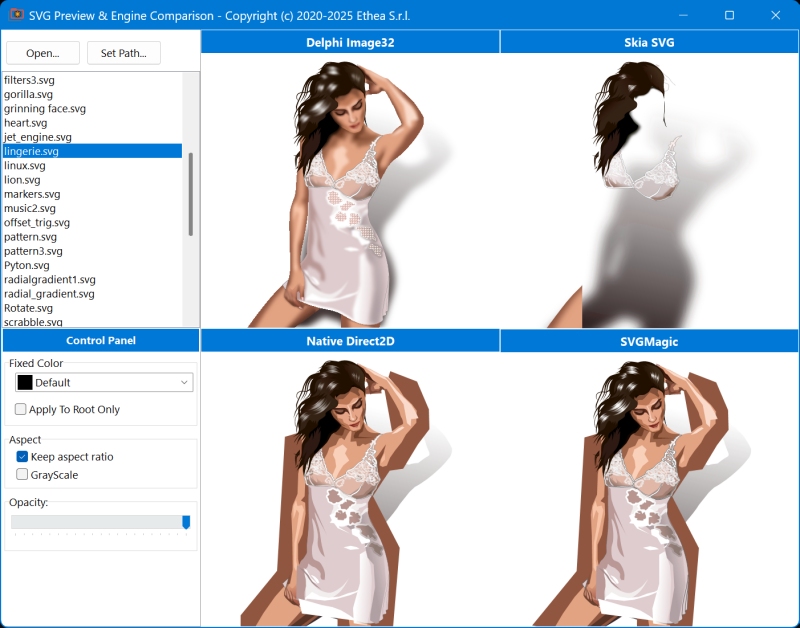
Support for SVG elements and presentation attributes
Image32 is the most complete library that supports advanced features like blur, gradient, merge, drop-shadow, markers, symbol, pattern, and subpixels rendering, making it the default choice.
Skia4Delphi provides the most comprehensive SVG 1.1 support with excellent rendering quality and supports complex effects including blur, filters, and advanced gradients.
Direct2D supports most common SVG features but has some notable omissions documented here:
- the text element - Work around by converting text to paths using Inkscape
- style sheets and the class attribute
- Some advanced filter effects
SVGMagic provides good compatibility with common SVG features. Some advanced features may have limitations:
- ApplyFixedColorToRootOnly is stored but functions the same as regular FixedColor (SVGMagic doesn't expose element-level manipulation)
- Good support for basic shapes, paths, fills, and strokes
- Opacity is applied via Windows AlphaBlend (post-rendering)
Performance
This table shows the performance of the four rendering engines tested with SVGExplorer, using a significant amount of icons from different sets, rendered at 32x32 pixels.
| Count | Icon set | Image32 | D2D | Skia4Delphi | SVGMagic |
|---|---|---|---|---|---|
| 997 | Font-Awesome | 610ms | 1313ms | 578ms | 735ms |
| 654 | Papirus | 2750ms(1) | 1031ms | 1266ms(1) | 1180ms |
| 5366 | Material-Design | 6937ms | 11219ms | 7125ms | 8450ms |
As you can see, the four engines perform differently depending on the icons and their complexity.
(1)Notice that Image32 and Skia4Delphi are the only engines capable of rendering blur effect (that is always slow to calculate): this is the reason of "slow" performance to render Papirus icons that contains blur effect.
Performance Characteristics
| Engine | Startup | Simple Icons | Complex Icons | Memory Usage | Platform |
|---|---|---|---|---|---|
| Image32 | Fast | Excellent | Good | Low | All |
| Skia4Delphi | Medium | Excellent | Excellent | Medium | All |
| Direct2D | Fast | Excellent | Excellent | Low | Windows 10+ |
| SVGMagic | Fast | Good | Good | Low | Windows |
Default SVG factory
Currently and if you take no action the Image32 factory is the preferred implementation, used also to build packages.
Specifying an SVG factory
You can override the default by calling SetGlobalSVGFactory at the initialization section of any unit or at application startup.
Examples
Use Skia4Delphi:
SetGlobalSVGFactory(GetSkiaSVGFactory);Use Direct2D:
SetGlobalSVGFactory(GetD2DSVGFactory);Use SVGMagic:
SetGlobalSVGFactory(GetSVGMagicFactory);Runtime Selection:
procedure TMainForm.FormCreate(Sender: TObject);
begin
  // Choose engine based on configuration or user preference
  case PreferredEngine of
    0: SetGlobalSVGFactory(GetImage32SVGFactory);
    1: SetGlobalSVGFactory(GetSkiaSVGFactory);
    2: SetGlobalSVGFactory(GetD2DSVGFactory);
    3: SetGlobalSVGFactory(GetSVGMagicFactory);
  end;

  // Reload icons with new factory
  SVGIconImageList1.RecreateBitmaps;
end;
Conditional Defines
For VCL you must activate one of these three engines:
{$DEFINE Image32_SVGEngine}  // default
{$DEFINE SVGMagic_Engine}
{$DEFINE Skia_SVGEngine}
PreferNativeSvgSupport is not an engine of its own: from version 4.8.0 it is added on top of the selected engine. Direct2D is used where Windows supports it (Windows 10 Creators Update or later), the selected engine everywhere else:
{$DEFINE PreferNativeSvgSupport}  // Direct2D if available...
{$DEFINE Image32_SVGEngine}       // ...otherwise Image32
Before version 4.8.0
With PreferNativeSvgSupport defined the library did not compile (Uses , D2DSVGFactory), and without a fallback engine GlobalSVGFactory was nil on Windows versions without native SVG support.
For FMX you must activate only one of these two:
{$DEFINE FMX_Image32_SVGEngine}
{$DEFINE FMX_Skia_SVGEngine}
NOTICE that Image32 is the default active used automatically by the Packages installed using the Installer...
In SVGIconImageList.inc under the Source directory you will find following section to define the Compiler Directive for VCL and FMX:
//***********************************************************************
// Start of VCL Directives
//***********************************************************************
  //Prefer Engine Direct2D by Kiriakos Vlahos
  //if supported by Windows Platform (from Windows Creators update)
  {.$DEFINE PreferNativeSvgSupport}
  {.$DEFINE GPUSupport}
  {$IFDEF PreferNativeSvgSupport}
    // Throw an exception if the SVG contains text elements or class attributes
    // which are not supported by Windows SVG. Since it costs some performance,
    // you should only turn it on during debugging or if it's absolutely necessary.
    {.$DEFINE CheckForUnsupportedSvg}
  {$ENDIF}

  //if PreferNativeSvgSupport not active or not available, will use predefined engine:
  //if XX_SVGEngine is not set at Compiler Options, one is defined here
  //(also with PreferNativeSvgSupport: it is the fallback engine used on Windows
  //versions without native SVG support)
  {$IF NOT DEFINED(Image32_SVGEngine) and NOT DEFINED(Skia_SVGEngine) and NOT DEFINED(SVGMagic_Engine)}
    //use Delphi Engine from Image32 library by Angus Johnson (included into Image32 folder)
    {$DEFINE Image32_SVGEngine}
    //or use Engine Skia with skia4delphi wrapper
    {.$DEFINE Skia_SVGEngine}
    //or use SVGMagic Engine with SVGMagicFactory
    {.$DEFINE SVGMagic_Engine}
  {$ENDIF}

  //Check correct defines for VCL Apps
  //PreferNativeSvgSupport is not an engine of its own: it goes together with
  //one of the engines below, used where Direct2D SVG support is not available
  {$IF NOT DEFINED(Image32_SVGEngine) and NOT DEFINED(Skia_SVGEngine) and NOT DEFINED(SVGMagic_Engine)}
    {$MESSAGE FATAL 'You must define at least one engine (Image32_SVGEngine or Skia_Engine or SVGMagic_Engine) at SVGIconImageList.inc or Compiler options)'}
  {$IFEND}

  {$IF (DEFINED(Image32_SVGEngine) and DEFINED(Skia_SVGEngine)) or
       (DEFINED(Image32_SVGEngine) and DEFINED(SVGMagic_Engine)) or
       (DEFINED(Skia_SVGEngine) and DEFINED(SVGMagic_Engine)) }
    {$MESSAGE FATAL 'You must define only one engine for VCL (Image32_SVGEngine or Skia_Engine or SVGMagic_Engine) at SVGIconImageList.inc or Compiler options)'}
  {$ENDIF}
//***********************************************************************
// End of VCL Directives
//***********************************************************************

//***********************************************************************
// Start of FMX Directives
//***********************************************************************
  //if FMX_XX_SVGEngine is not set at Compiler Options, one is defined here
  {$IF NOT (DEFINED(FMX_Image32_SVGEngine) or DEFINED(FMX_Skia_SVGEngine))}
    //use Delphi Engine from Image32 library by Angus Johnson (included into Image32 folder)
    {$DEFINE FMX_Image32_SVGEngine}
    //or use Engine Skia with skia4delphi wrapper
    {.$DEFINE FMX_Skia_SVGEngine}
  {$ENDIF}
//***********************************************************************
// End of FMX Directives
//***********************************************************************
For VCL, if you do not define PreferNativeSvgSupport and you do not call SetGlobalSVGFactory, the factory of the selected engine (Image32, SVGMagic or Skia4Delphi) is always used.
GPUSupport only applies to the Direct2D factory. If defined, Direct2D will use the GPU when possible. It's undefined by default because with some slower GPUs it may reduce performance. (Before version 4.8.0 a typo in the source, GPUSupprt, made this define ineffective.)
SVGMAGIC_LOG turns on the diagnostic log of the SVGMagic library (OutputDebugString, visible in the IDE Event Log): from version 4.8.0 it is off by default, also in Debug builds.
Choosing the Right Engine
Use Image32 when:
- ✅ You want the default, tested, and stable choice
- ✅ No external dependencies are desired
- ✅ Good balance of features and performance is needed
- ✅ Working with complex SVGs (blur, gradients, etc.)
- ✅ Cross-platform compatibility (VCL + FMX)
Use Skia4Delphi when:
- ✅ Highest rendering quality is required
- ✅ Building cross-platform applications (VCL + FMX)
- ✅ Hardware acceleration is beneficial
- ✅ Working with complex SVG effects
- ❌ Accept additional deployment requirements (Skia DLL)
Use Direct2D when:
- ✅ Building Windows-only applications (10+)
- ✅ Native OS integration is preferred
- ✅ GPU acceleration is available
- ✅ SVGs don't use text elements or advanced features
- ❌ Don't need cross-platform support
Use SVGMagic when:
- ✅ Animated SVG files are required (unique feature)
- ✅ Need comprehensive SVG 1.1 support
- ✅ Want excellent rendering quality
- ✅ Windows-only deployment (VCL)
- ✅ Working with complex SVG graphics
- ❌ Need cross-platform support (FMX)
Feature Comparison Matrix
| Feature | Image32 | Skia4Delphi | Direct2D | SVGMagic |
|---|---|---|---|---|
| No Dependencies | ✅ | ❌ Needs DLL | ✅ Native | ✅ Included |
| Cross-Platform | ✅ VCL+FMX | ✅ VCL+FMX | ❌ Windows | ❌ Windows VCL |
| Animated SVG | ❌ | ❌ | ❌ | ✅ Unique |
| Blur Effects | ✅ | ✅ | ⚠️ Limited | ⚠️ Limited |
| Text Elements | ✅ | ✅ | ❌ | ✅ |
| Gradients | ✅ | ✅ | ✅ | ✅ |
| Opacity Control | ✅ | ✅ | ✅ | ✅ |
| FixedColor | ✅ | ✅ | ✅ | ✅ |
| GrayScale | ✅ | ✅ | ✅ | ✅ |
| GPU Acceleration | ❌ | ✅ | ✅ | ❌ |
| Filters | ✅ Most | ✅ All | ⚠️ Limited | ✅ Most |
| Setup Complexity | Easy | Medium | Easy | Easy |
See Also
- Library Architecture - Detailed technical documentation
- SVG Viewer Demo - Visual comparison of all four engines
- Benchmark Demo - Performance testing
- FAQ Advanced - Engine-specific questions