
by Carlo Barazzetta — Ethea S.r.l.
Anyone who develops business applications in Delphi knows the dilemma well: the web has become the natural platform for distributing business software, but bringing the richness of a data-driven UI to the browser means — in the vast majority of frameworks — learning a second language, designing and maintaining a JSON API, integrating a client-side JavaScript framework that consumes those payloads, and keeping two completely separate codebases in sync.
KittoX solves this dilemma with a radical choice: the server doesn't expose data, it generates the user interface directly.
Previous versions of Kitto (1, 2 and 3) were based on ExtJS, a commercial library of ~1.5 MB that required a 1:1 correspondence between every client-side visual component and a server-side Delphi class. Every TKExtGridPanel, every TKExtFormPanel was the reflection of an ExtJS widget. The Delphi code emitted JavaScript and JSON code to instantiate those widgets in the browser.
It was a working architecture, but a rigid one:
KittoX 4.0 breaks completely with this model. The client is now composed of:
| Library | Size | Role |
|---|---|---|
| HTMX 2.0.4 | ~14 KB | Partial page update via HTML attributes |
| Alpine.js 3.14.8 | ~16 KB | Minimal local reactivity (dropdown, toggle) |
| SVG Icons | SVG inline | 2122 Material Design icons, 5 styles |
| jQuery (slim) | ~30 KB | Legacy plugin compatibility |
Total client stack: ~30 KB compared to 1.5 MB of ExtJS. But the change isn't just quantitative.
This is the most radical choice in KittoX, and it's worth dwelling on.
In the JSON API model that has dominated the last fifteen years the server exposes REST endpoints that return structured data in JSON. The client — a React, Angular or Vue application — receives that raw data and transforms it into HTML, manages state, handles client-side routing, token authentication, network errors. The server knows nothing about how the data will be displayed; the client knows nothing about the business logic.
With HTMX the server does something different: it responds directly with already-rendered HTML fragments. When the user clicks “next page” in a grid, HTMX sends a request to the server and the server responds with the markup of the new page of rows — not with a JSON array that the client will have to iterate and transform. The browser simply replaces a <div> with the received fragment.
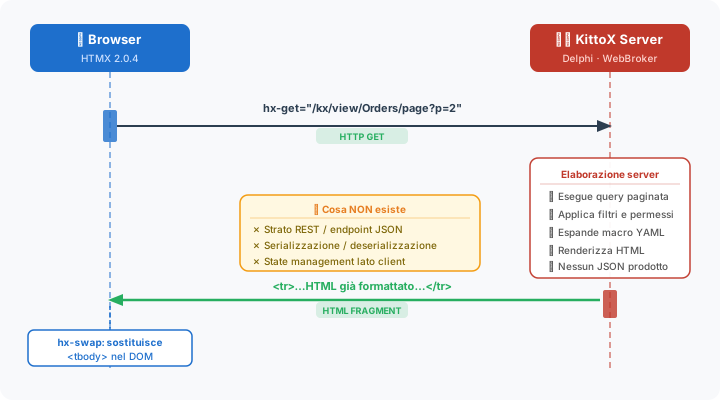
There is no intermediate JSON payload. There is no serialization/deserialization. There is no client-side application state to manage. The server knows the context (session, permissions, language, active database) and generates HTML that already includes that knowledge. The user always sees coherent information, not raw data to be interpreted.
🧠 REST doesn't disappear — it just becomes “purer”. Requests are HTTP, URLs identify resources, the server stays stateless. What changes is the response media-type: HTML instead of JSON — the HATEOAS principle described by Roy Fielding in 2000. KittoX doesn't remove REST: it collapses the double rendering (server → JSON → client → HTML) into a single step.
This approach requires zero JavaScript for 99% of features: pagination, sorting, filters, opening forms, submission, navigation — everything is handled by HTMX attributes (hx-get, hx-post, hx-target, hx-swap) declared in the markup generated by the server.
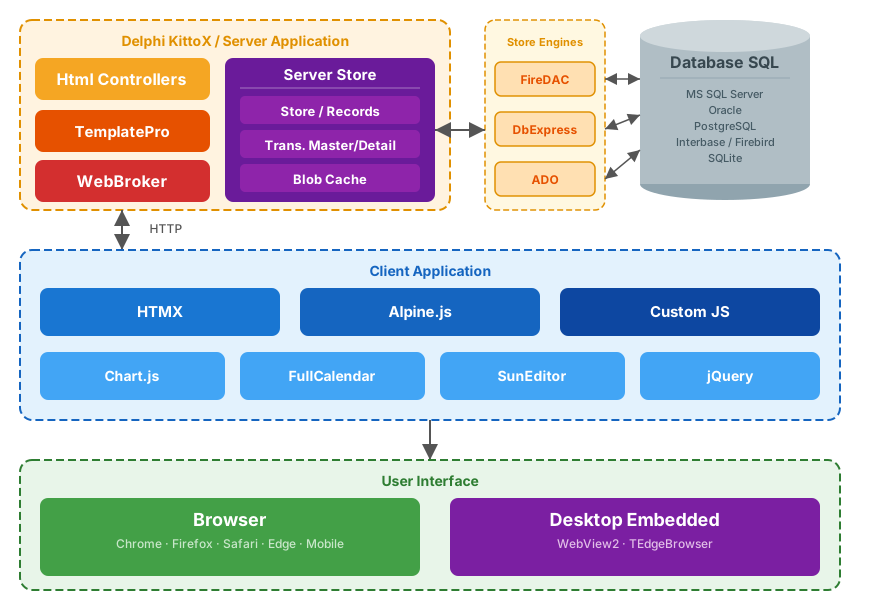
The picture shows the KittoX architecture diagram.
In a traditional ORM architecture you write Delphi classes that map the tables, you manage migrations, you serialize the record object graph into JSON, you deserialize it on the client. KittoX eliminates this entire layer.
The model in KittoX is a YAML file that directly describes the database structure, with three fundamental differences compared to what a SQL database natively expresses.
A field can be the result of any SQL expression, executed directly by the database without any intermediate Delphi code:
Party_Period: String(20)
  DisplayLabel: Period
  Expression: |
    case
      when %DB.CURRENT_DATE% - PARTY.PARTY_DATE < 0 then cast('Future' as varchar(10))
      when %DB.CURRENT_DATE% - PARTY.PARTY_DATE = 0 then cast('Today' as varchar(10))
      when %DB.CURRENT_DATE% - PARTY.PARTY_DATE between 2 and 7 then cast('Last Week' as varchar(10))
      else cast('Older' as varchar(10))
    end
The Party_Period field doesn't exist in the table: it's calculated on the SQL server with every query, with the logic expressed directly in YAML. No OnCalcFields, no intermediate classes, no partial deserialization.
A SQL foreign key only expresses a referential integrity constraint. It says nothing about the semantics of the relationship: is this FK a simple reference to a lookup table, or is it the key of a master-detail relationship that requires a separate editing tab?
KittoX explicitly distinguishes the two cases in the YAML model:
# The project "belongs to" a customer → Reference (lookup)
CUSTOMER: Reference(CUSTOMER) not null
  Fields:
    CUSTOMER_ID:

# The project "contains" phases → DetailReference (master-detail)
DetailReferences:
  PHASE: PHASE
This distinction automatically drives the rendering: a Reference generates a combo/lookup in the form; a DetailReference generates a tab with a CRUD grid inside the editing form. All automatic, without writing a single line of Delphi code.
KittoX applies the DRY principle at every level. If you don't specify a DisplayLabel for a field in the model, the framework synthesizes it from the field name. If you don't specify it in the view, it inherits the one from the model. If you don't specify a column width, it's calculated from the data type. If you don't specify a sort order, it uses the model's DefaultSorting.
The result is that a typical view for a medium-sized table is written in less than 10 lines of YAML:
Type: Data
Controller: List
MainTable:
  Model: CUSTOMER
  DetailTables:
    Table:
      Model: PROJECT
This definition automatically produces: grid with all visible columns, CRUD toolbar, full-text search, pagination (if the model is IsLarge: True), master-detail tab for the customer's projects, editing form with validation, FK handling read-only in the detail form.
Views in KittoX are combinations of Controllers — visual components configurable via YAML. Layout controllers (BorderPanel, TabPanel, FlexPanel) nest freely; data controllers (List, Form, ChartPanel) plug into the regions.
A typical home page layout:
Controller: BorderPanel
  NorthView:
    Controller: ToolBar
      ...
  WestView:
    Controller: TreePanel
      ...
  CenterView:
    Controller: TabPanel
      ...
You don't even write a TForm, you don't drag a component. The interface structure is declarative, readable, versionable on git, modifiable without recompiling.
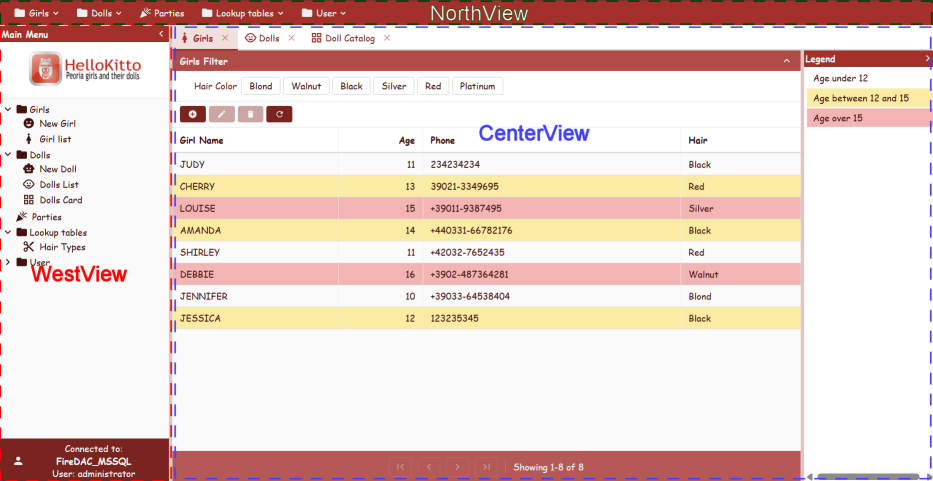
The picture shows the layout of the HelloKitto demo application.
The available controllers cover the entire range of needs for a business application:
| Category | Controller |
|---|---|
| Layout | BorderPanel, TabPanel, FlexPanel, TilePanel |
| Data | List, GroupingList, Form, Wizard, TemplateDataPanel |
| Navigation | TreePanel, ToolBar, HtmlPanel, StatusBar |
| Enterprise | ChartPanel, CalendarPanel, GoogleMap, Dashboard |
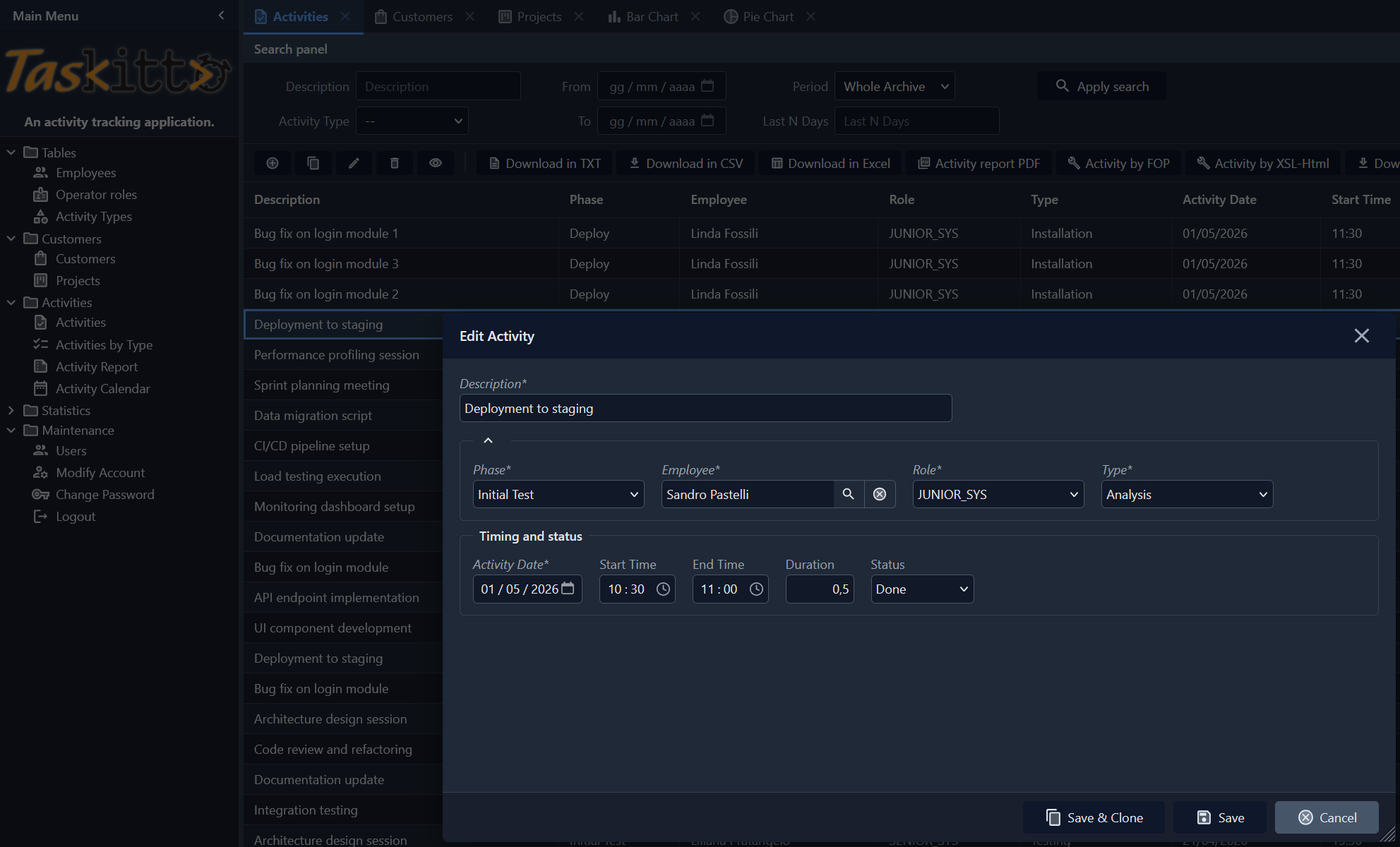
The picture shows the List/Grid controller for activities in the TasKitto demo. In the foreground, the editing form.
Macros are strings delimited by % expanded at runtime in any point of the YAML metadata. They allow you to make any part of the configuration dynamic without writing code:
# Current user in the title
DisplayLabel: Orders of %Auth:UserName%

# Current date as DefaultValue
DefaultValue: %DATE%

# Auto-generated primary key
DefaultValue: %COMPACT_GUID%

# Value from Config.yaml
DefaultValue: %Config:App/DefaultCurrency%

# Dialect-agnostic SQL expression
Expression: SELECT COUNT(*) FROM ORDERS WHERE %DB.CURRENT_DATE% - ORDER_DATE < 30
The DB.* macros are particularly powerful: they expand into the correct SQL function for the active database (current_date on PostgreSQL/Firebird, getdate() on SQL Server), allowing you to write a single expression that works on all supported databases.
KittoX natively supports multiple database connections in the same application. Each model can be routed to a specific database:
# Config.yaml
Databases:
  Main: FireDAC_SQLServer
    ...
  Reporting: FireDAC_PostgreSQL
    ...

# In a Model.yaml
DatabaseRouter: Static
  DatabaseName: Reporting
Routing is supported at the model level, view level and even at the authenticator level — you can have users on one database and data on another. Supported databases: SQL Server, PostgreSQL, Firebird, Oracle (and any other via FireDAC).
KittoX integrates GNU gettext (dxgettext) for localization. The strings of the interface generated by the server — labels, error messages, titles — are automatically translated based on the current session language. The user can change language from the login without restarting the application; each session maintains its own language independently.
The macro system %Auth:Environment% and %Auth:UserName% is already localized by default.
One of the most concrete advantages of KittoX is that the most requested GUI features in a business application are already implemented and require only YAML configuration.
The List controller offers out-of-the-box:
GroupingList controller) with collapsible headers and expand/collapse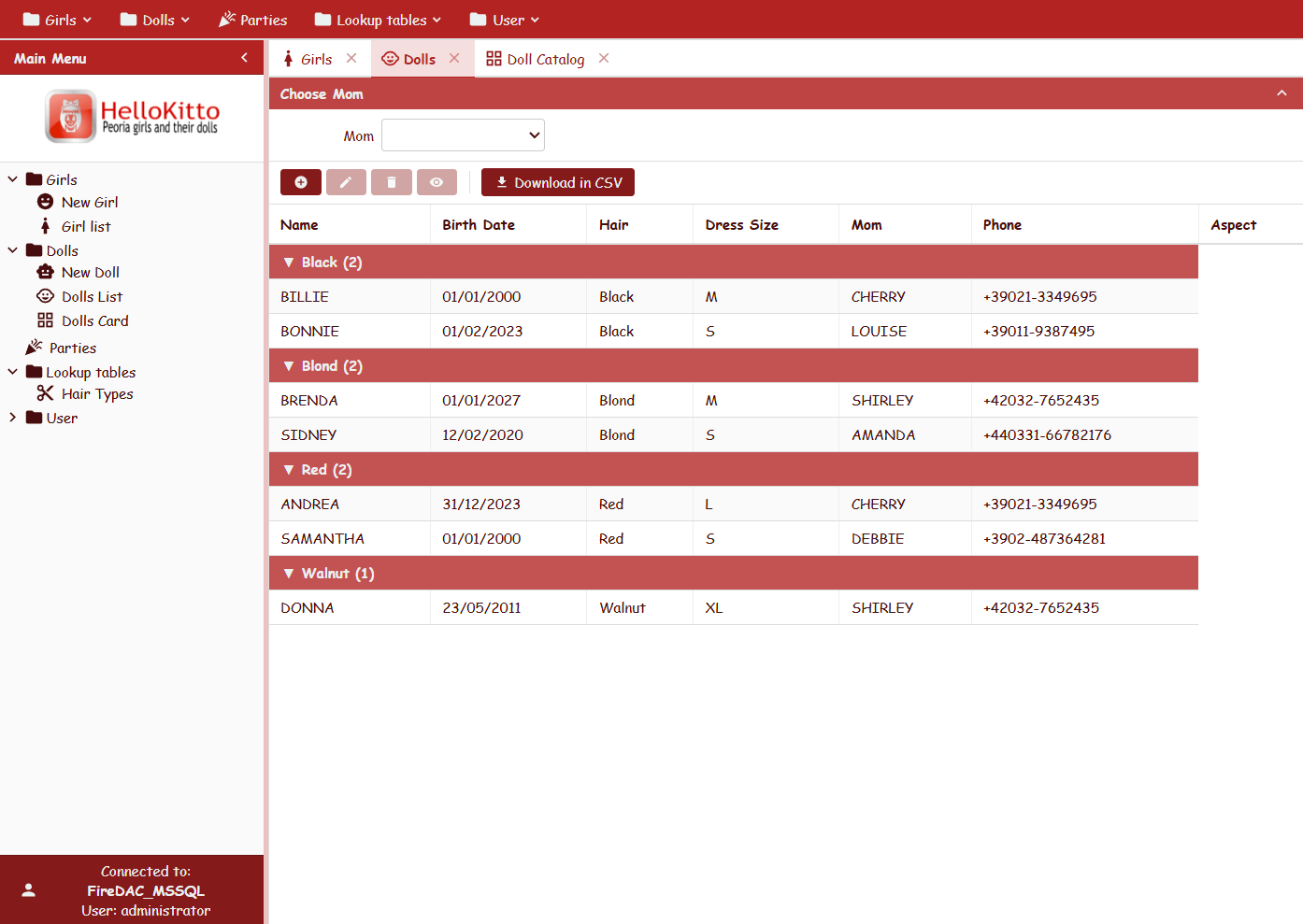
The picture shows the grid with “groups” in the HelloKitto demo.
Three ready-to-use menu styles, all configurable in YAML:
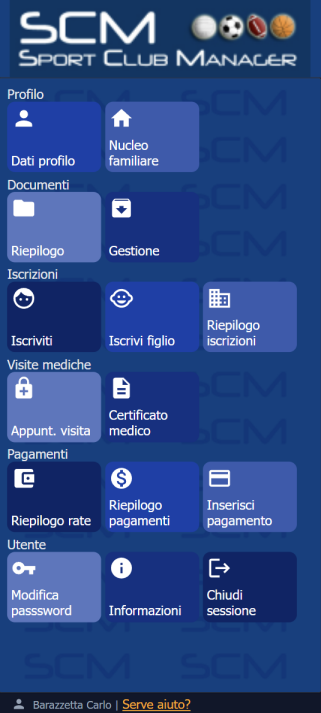
The picture shows a “TilePanel” menu of an application built with KittoX.
The TemplateDataPanel controller allows you to define custom HTML layouts to display read-only data, using templates with placeholders such as {Doll_Name}:
Controller: List
  TemplateFileName: DollsCard.html
The HTML template defines the layout for the grid.
<div class="kx-card-body" style="width:300px;height:150px">
  <div class="kx-card-photo">
    <img src="{Picture}" alt="Doll Picture"
         onerror="this.onerror=null;this.outerHTML='<span class=kx-no-pic>No Doll Picture</span>'">
  </div>
  <div class="kx-card-info">
    <span class="kx-card-name">{Doll_Name}</span>
    <span class="kx-card-detail">{Date_Bought:date}</span>
    <span class="kx-card-detail">{Hair} hair</span>
    <span class="kx-card-detail">Size: {Dress_Size}</span>
  </div>
</div>
The YAML template defines the editing form layout, even “multi-page”:
Row:
  Field: Doll_Name
    CharWidth: 20
  Field: Date_Bought
Row:
  Field: Mom
    CharWidth: 20
  Field: Mom_Phone
    CharWidth: 10
    DisplayLabel: _(Mom's Phone)
PageBreak: _(Characteristics)
Row:
  Field: Hair
  Field: Dress_Size
Row:
  Field: Aspect
    CharWidth: 16
    Lines: 14
  Field: Picture
No Delphi code, no JavaScript: an HTML template with placeholders and the controller does the rest.
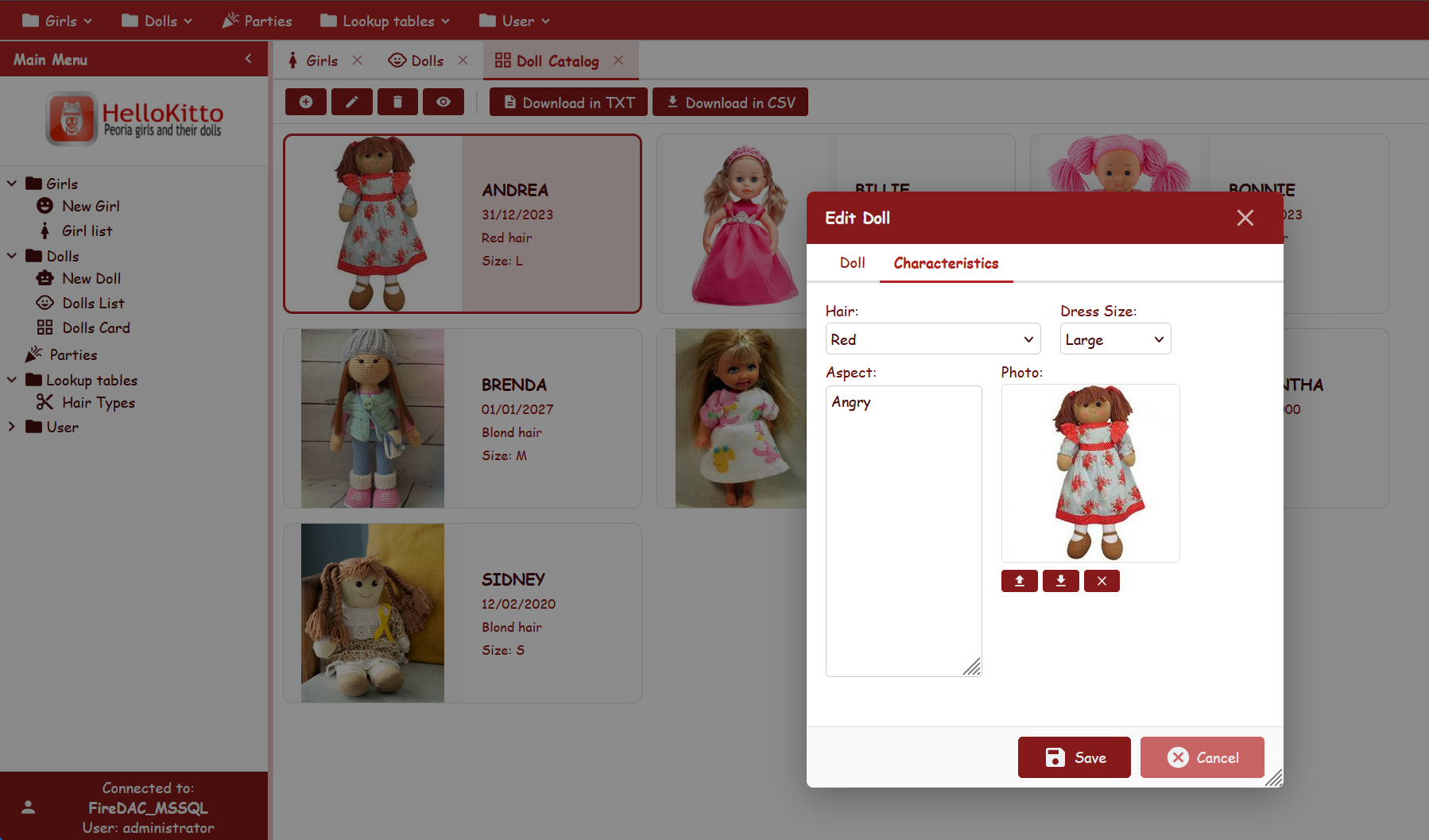 The picture shows the list in “TemplateDataPanel” mode of the “dolls” catalog in HelloKitto and the editing form with 2 pages.
For applications that require advanced visualizations, the Enterprise edition includes ready-to-use controllers:
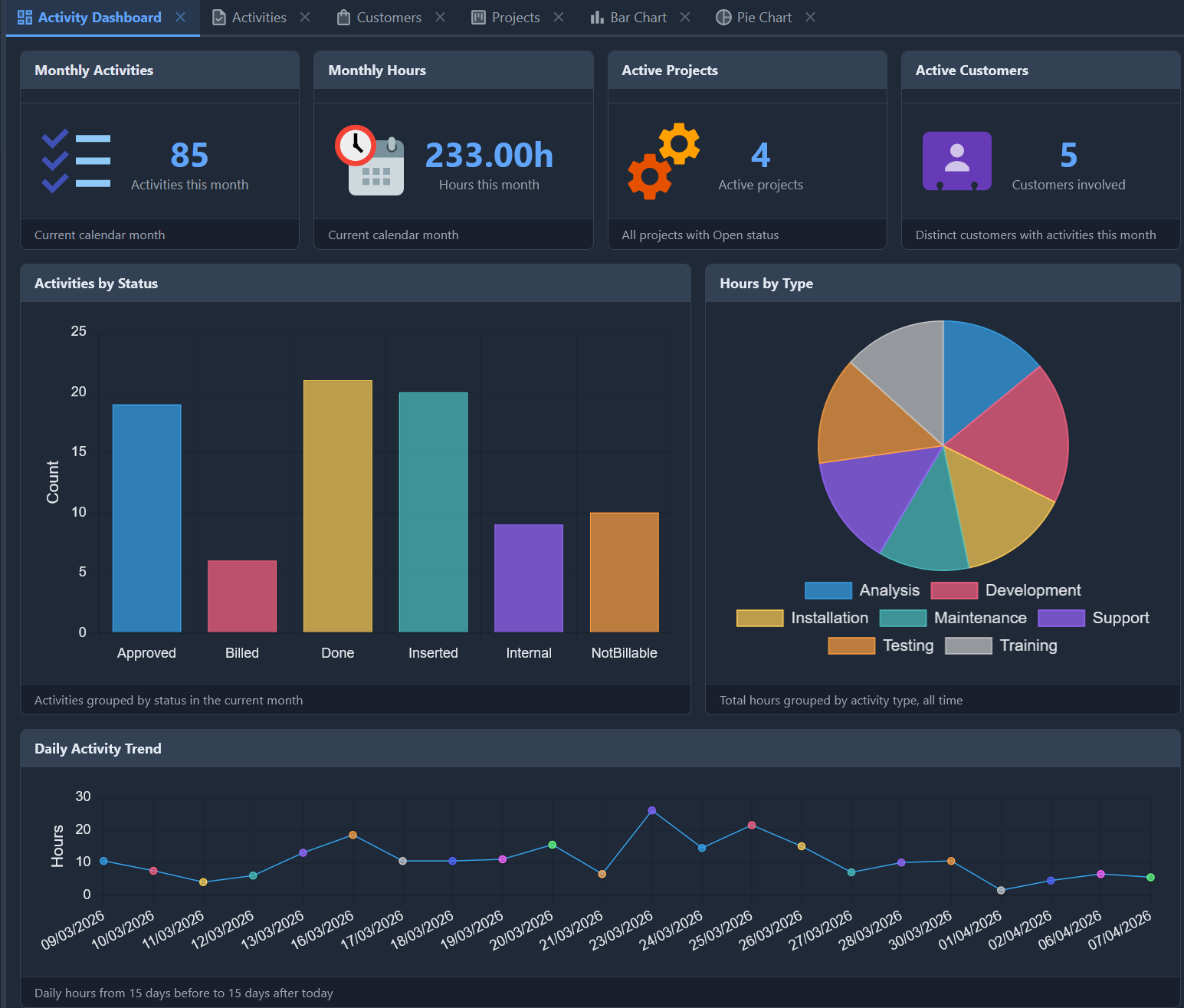
The picture shows the (flex) layout of the Dashboard component in the TasKitto demo.
All these controllers follow the same model as the others: they are inserted into a view with a few lines of YAML, they are fed with a SQL query, they are configured with YAML properties. No JavaScript is written.
KittoX includes a modern JWT authenticator (Auth: JWT) that:
DB, TextFile, custom)AccessControl: JWT reads permission rows directly from the kx_acl claim in the token — zero database queries per IsAccessGranted call. The same wildcard/regex semantics as the classic AccessControl: DB, but with the speed of an in-memory structure.
KIDEX (KittoX IDE Enterprise) is the visual development environment for KittoX, which accelerates the most repetitive operations:
Config.yaml with validation.po files for localization: extraction of strings from YAML metadata and Delphi code, merging with existing translationsKIDEX is based on custom RTTI attributes (YamlNode, YamlContainer, YamlSubNode) that decorate the framework's Delphi classes: the IDE automatically discovers available properties, types and allowed values — no manual template file to update at every release.
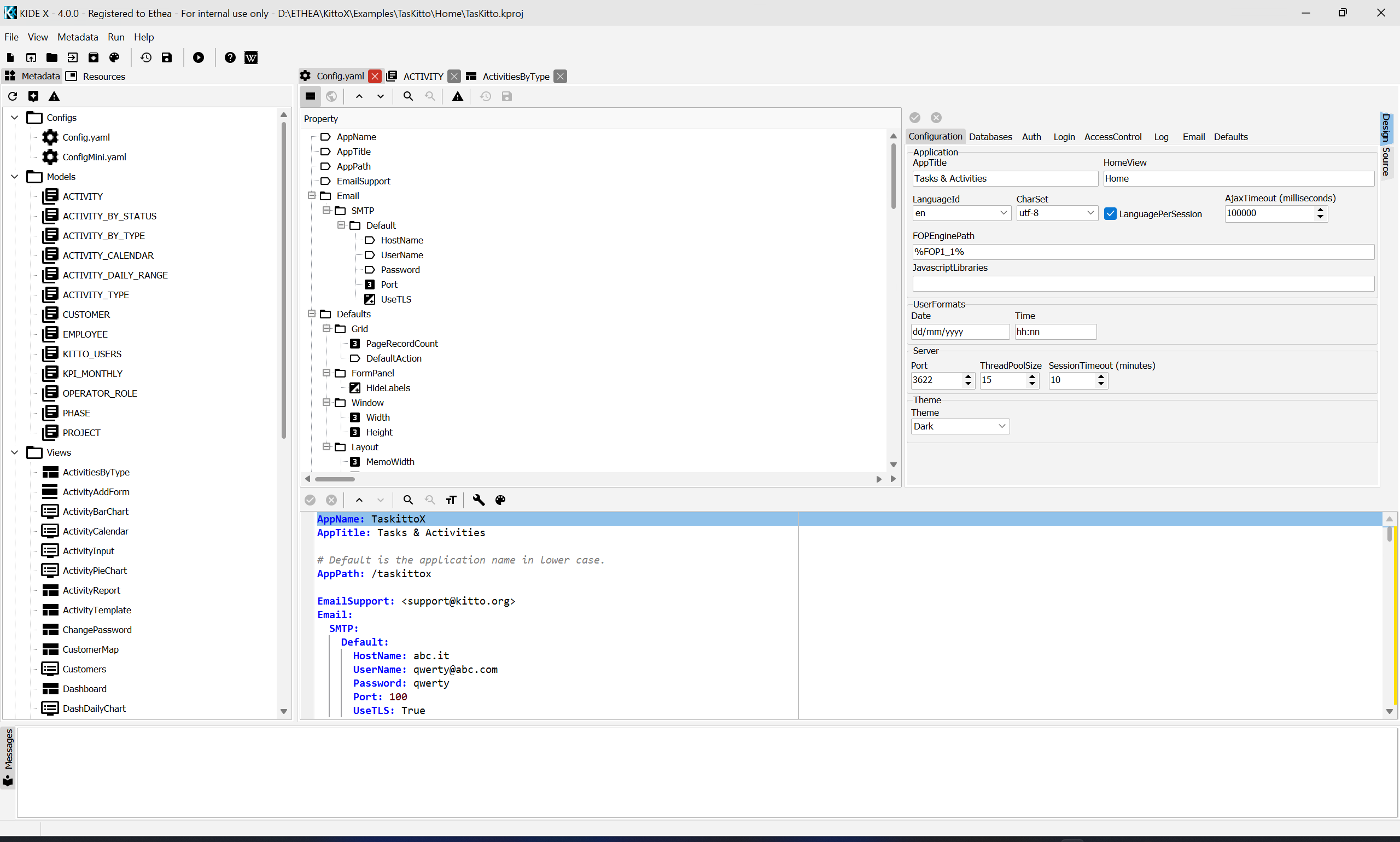
The picture shows the integrated development environment KIDEX.
The most innovative novelty of KittoX 4.0 Enterprise is MCPKittoX, a standalone server (MCPKittoX.exe) that implements the Model Context Protocol (MCP) and allows AI agents like Claude Desktop, Claude Code, Codex and LM Studio to drive KittoX development conversationally.
An AI agent with MCPKittoX configured can, in a single conversation:
Developer: "Create a KittoX application called Gestionale under D:\Dev,
            with FireDAC and SQL Server Northwind, then generate the models
            for all the tables."

→ MCPKittoX:
  1. Calls project_create_app → complete project scaffolding
     (with Auth: JWT/TextFile already configured, app working immediately)
  2. Calls models_create_from_db with dry_run=true → shows the tree
     of proposed actions (29 models, 177 fields, 13 references)
  3. With the developer's OK, dry_run=false → writes the YAML files.
     Output byte-identical to KIDEX's visual Model Wizard.
  4. The project compiles on the first try.
MCPKittoX is read-only by default. Write operations require an explicit --allow-update; deletions require --allow-delete and follow a two-phase pattern (preview → confirm). The --workspace=PATH flag creates a sandbox that prevents any filesystem access outside the specified root.
| Scope | Tool | Description |
|---|---|---|
meta |
meta_version, meta_capabilities, meta_list_metadata_templates |
Server info, feature flags, available templates |
project |
project_open, project_info, project_list_apps, project_close, project_create_app |
Complete project management |
models |
models_create_from_db |
Reverse engineering of models from a database |
The roadmap (Phase 4+) includes generation of Views, Layouts, MainMenu, validators, locale file updates, database introspection — all conversationally, without opening RAD Studio.
KittoX is not a closed system. HTTP routing is based on Delphi RTTI attributes, inspired by MARS/WiRL:
[TKXPath('/kx/view/{ViewName}')]
TKXMyHandler = class
public
  [TKXPath('/custom-data')]
  [TKXGET]
  procedure HandleCustomData(
    [TKXPathParam('ViewName')] const AViewName: string;
    [TKXContext] ADataView: TKDataView);
end;

initialization
  TKXResourceRegistry.Instance.RegisterResource(TKXMyHandler);
A custom handler registers itself in the initialization of its own unit: just include it in the project and routing is automatically discovered via RTTI. No modifications to the framework, no manual registration in central configuration files. It is the same mechanism with which the enterprise modules (Chart, Calendar, Map) are implemented: including or excluding them from the project is sufficient to activate or deactivate the related features.
The framework includes enterprise tools for the most common operations in a business application:
Each tool is a YAML Controller: it is activated by adding a few lines to the view definition, without any Delphi code.
KittoX is not tied to a single deployment model:
| Mode | Description |
|---|---|
| Standalone | Integrated Indy server, direct startup as VCL app or Windows Service |
| Desktop Embedded | WebView2 inside a VCL window — native desktop look, zero browser chrome |
| Console | Headless server, Docker-friendly |
| ISAPI (IIS) | Native IIS DLL, maximum Windows Server integration |
| Apache Module | Native Apache 2.4 module |
The same source code, the same YAML metadata, five deployment .dpr files — one per mode, automatically generated by the wizard.
KittoX is available in two complementary editions, both downloadable and testable without any initial cost.
The KittoX core is entirely open source under the Apache 2.0 license, one of the most permissive licenses available: free use — including commercial and closed-source — with no royalties, no obligations to redistribute the code. It includes all the fundamental controllers (List, Form, Wizard, BorderPanel, TabPanel, TreePanel, TilePanel, TemplateDataPanel, GroupingList, HtmlPanel, StatusBar, ToolBar, FlexPanel), attribute-based routing, JWT authentication, multi-database support and all three example applications (HelloKitto, TasKitto, KEmployee).
Two installation methods:
Automatic setup (recommended): 👉 Download KittoXSetup.exe
The installer copies the sources, registers the paths in the Delphi IDE, installs the KIDEX visual IDE in trial mode and configures the entire environment in a few clicks.
Git clone (for those who want the source code):
git clone https://github.com/EtheaDev/KittoX.git
The repository contains the Delphi packages ready for versions 10.4, 11, 12 and 13, with PowerShell scripts for automatic builds across all platforms (BuildAllPackagesD13.ps1 and similar).
The Enterprise edition adds the controllers for advanced visualizations (ChartPanel, CalendarPanel, GoogleMap, Dashboard), the reporting tools (ReportBuilderTool, ExportExcelTool with FlexCel, MergePDFTool), the Desktop Embedded Mode (WebView2) and — above all — the two productivity tools that change the way you work with KittoX:
The setup automatically installs a fully functional 90-day trial version, sufficient to evaluate the Enterprise edition on a real project, from the first line of YAML to production deployment.
To request the trial license key after installation, simply fill out the registration form in the IDE or contact Ethea directly:
👉 ethea.it/supporto · ✉️ info@ethea.it
When the trial expires, the KittoX framework (Core + compiled Enterprise modules) continues to work normally: only the KIDEX IDE and MCPKittoX require a commercial license to continue use.
The entire KittoX documentation is published online, constantly updated and searchable:
Over 100 pages that cover every aspect of the framework: from the introductory guide to detailed references for each controller, from architectural patterns (master-detail, layered ACL, JWT) to practical How-Tos (calculated fields, images as fields, conditional filters, BLOB uploads, multi-database). Each page includes working YAML examples taken from the demo applications, so every concept is immediately verifiable by cloning the repository.
The three example applications — HelloKitto, TasKitto, KEmployee — are complete projects that demonstrate real-world usage patterns: multi-level master-detail, DB / TextFile / custom authentication, three-tier ACL, multi-database support (SQL Server / PostgreSQL / Firebird on the same application), localization, dashboards, exports.
All three example applications — together with KittoSCM, a real multi-tenant application in production — are available online and accessible immediately from any browser, with nothing to download or install. Each demo runs exactly the source code included in the distribution: by browsing the application you see the framework at work, and then you can open the corresponding YAML in the repository to see how it was built.
| Demo | URL | Description |
|---|---|---|
| 🎀 HelloKitto | scm.ethea.it/hellokittox/ | Starter showcase: grids with grouping, card layout, master-detail, tile/tree menus, mobile mode |
| 📋 TasKitto | scm.ethea.it/taskittox/ | Task tracker with projects/phases/activities, calendar, dashboard with charts, three-tier ACL |
| 👥 KEmployee | scm.ethea.it/kemployeex/ | Employee management on Firebird Employee.fdb, multi-field references, Neptune theme |
| 🏆 KittoSCM | scm.ethea.it/scm/ | Real application in production: multi-tenant management software for Italian sports clubs (~90 models, FatturaPA, dual-mode users/admin) |
::: tip Demo credentials
For HelloKitto, TasKitto and KEmployee use user: guest password: password.
For KittoSCM you can log in as a parent (BRZCRL68B12C523K / password) or as an ASD administrator (SYSDBA / password).
:::
KittoSCM is particularly interesting: it is not a demo built to showcase the framework, but a real application in production deployed to several Italian sports clubs from the same codebase, with per-club Config.yaml overrides. It handles enrollments, family groups, fees and installments, medical visits, federation registrations, internal messaging, accounting and FatturaPA electronic invoicing. It is the concrete demonstration of how far you can push KittoX in real business scenarios.
For the complete feature details of each demo, see the Live Demo page in the documentation.
KittoX is a deliberately radical choice: instead of adapting to the recent conventions of the web (JSON APIs, SPA frameworks, ORM), it redesigns the architecture around Delphi's strength — the ability to build robust server-side logic, directly connected to relational databases — using HTMX to bring REST into its most efficient form.
The result is a framework where:
For Delphi teams that develop business applications, KittoX offers something rare: the possibility of delivering a complete and professional web application by investing time in business logic — not in infrastructure.
KittoX is the framework that Ethea S.r.l. uses to build its own enterprise applications. Every evolution of the framework arises from the concrete needs of real production projects — business management software, workflow systems, reporting portals, vertical applications.
When you choose KittoX, you adopt the same tool with which Ethea delivers its own projects — with the guarantee of a team that knows it in depth and will continue to evolve it for a long time.

If you want to evaluate KittoX for your project, download the setup, try the Enterprise edition for 90 days and — if you want to discuss a concrete use case with us — we are at your disposal. 🚀
Carlo Barazzetta — Ethea S.r.l. info@ethea.it · www.ethea.it · KittoX Documentation KittoX 4.0 — Apache 2.0 (core) / AGPL-3.0 or Commercial (enterprise) · 90-day trial