🔁 Vibe Coding with Delphi, One Year Later: We Are Already Living in the Future!
Almost a year after the article that started the discussion on Delphi-PRAXiS: what really happened, what I learned, and why today I open the Delphi IDE only to touch up forms.
📅 Where We Left Off
On December 3, 2025 I published Vibe Coding with Delphi: When Artificial Intelligence Becomes Your Pair Programmer. I described three experiments with Claude Code: a new rendering engine for SVGIconImageList, the TStyledPanel component for StyledComponents, and the refactoring of a VCL+FMX MVC project. The biggest surprise had been watching the AI edit a .dfm file correctly on the first try.
The article started a long discussion on Delphi-PRAXiS: seven pages of comments between December 2025 and January 2026, with posts from highly respected Delphi developers. Some were enthusiastic, others skeptical, a few openly against it.
I ended that article with "This is only the beginning", and one year later I can say it was true. In fact, it may have been an understatement.
In short, one year later:
- I open the Delphi IDE almost only to touch up forms by hand or for visual debugging.
- I finally did the two things I had always postponed: documentation and unit tests, including GUI tests.
- I rewrote from scratch a framework that had reached a dead end: Kittoˣ, web development with Delphi+HTMX, which also comes with its own MCP server.
- AI has moved inside our Delphi applications, with Delphi HelpChatAI.
- I use AI for everything: preparing technical and sales documents, drafting analyses for customers, preparing slides for conference talks, automating tedious tasks on the web (with the built-in Claude agent)...
- It has been a great help in porting applications from Delphi 5/6 to Delphi 12/13: more than 4 million lines of code.
🧑💻 My Work Today: Less IDE, More Direction
The biggest change is not technical: it is in how I work. A year ago Claude Code was a tool I used for some tasks. Today it is my main development environment. RAD Studio remains essential, but for specific things: adjusting a form layout by hand, checking how a component looks at design time, step-by-step debugging when it is really needed.
I spend the rest of my day on what used to be a small part of my time: deciding what to do and checking how it was done. I describe the goal, discuss the approach, review the plan, review the code, run the tests. I hardly write any code by hand anymore, but I read much more of it, and I must say my skills have grown: let's admit it, today I can build things I did not have the skills to build before.
The tool has grown too. Compared to a year ago, in my daily work I now routinely use:
- Well-maintained CLAUDE.md files in every repository, updated as the project evolves: they are the project's memory and the single thing that most affects the quality of the results.
- MCP servers for databases (Firebird, SQL Server, Oracle, PostgreSQL): Claude reads real schemas and data instead of guessing them.
- Hooks that automate repetitive checks, for example a notification when a long task has finished.
- Several parallel sessions, one that develops and one that reviews, each with its own context.
- Remote control: with the Claude app and the magic /remote-control command I can keep an eye on the work at any time and give the confirmations needed for longer tasks.
- The most capable model available, always. Slower, but more precise: the time saved on corrections is worth far more than the time spent waiting. You burn through "Fable" tokens quickly, but its power is impressive!
📚 First Achievement: Documentation
Every developer knows the phrase "I'll write the documentation later". And knows that "later" often never comes. For years our open-source projects had a README or, at best, a wiki section with some documentation and screenshots that struggled to keep up with the project. Pascal units had scattered comments. Project documentation for customers was almost always behind the code.
This year that problem was solved!
📝 Inside the code
Pascal units now have consistent documentation comments on classes, methods, properties and events. Claude writes them by reading the code and how it is used, not by paraphrasing the method signature. When the code changes, updating the comment is part of the same task.
🌐 Documentation sites with VitePress
In the original article I showed the first two VitePress sites, for SVGIconImageList and StyledComponents. Today every Ethea open-source component has its own site, with guides, examples and a full Reference section. They are all collected in the Ethea Showroom: 15 projects including components, frameworks, editors and shell extensions.
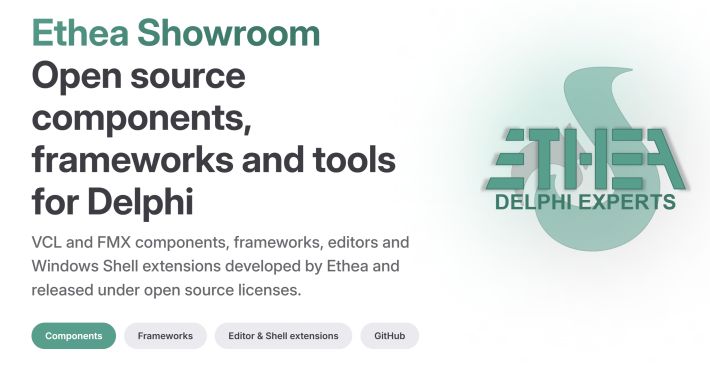
The Ethea Showroom: open-source components, frameworks, editors and shell extensions for Delphi, each with its own documentation site.
📖 Customer project documentation
The same approach applies to the applications we develop for customers. Specifications, user manuals, architecture documents, release notes: all in Markdown, written together with Claude and kept up to date with the code. To read and write them we use our own tools: MarkdownProcessor as an extended Markdown processor, MarkdownShellExtensions as an editor and preview in Windows Explorer, and MarkdownHelpViewer to bring documentation into the application as context-sensitive help: Ethea's free Markdown Tools.
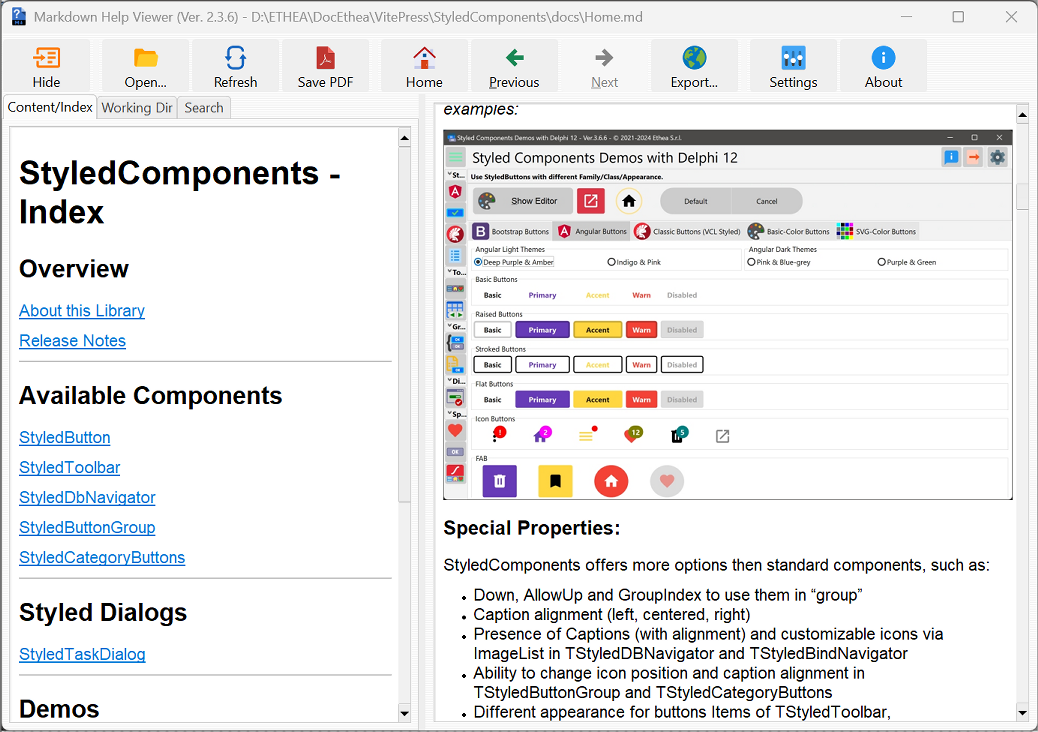
MarkdownHelpViewer showing a project's Markdown documentation, with index, search and PDF export.
The key point: documentation is no longer a separate activity to schedule. It is a natural by-product of development. And, as we will see, it is also the foundation for the AI assistant we now integrate into our applications.
🚀 The publishing process
Documentation is now an automated step in the project pipeline, all the way to automated commit/push/release/Doc.Deploy. Publishing a new release on GitHub and updating the documentation site has become very simple.
🧪 Second Achievement: Unit Tests (and GUI Tests)
The second thing I never found time for was automated testing. In the Delphi world this is a familiar story: lots of code written over many years, a lot of logic inside form event handlers, very few tests.
With Claude Code, writing tests with DUnitX has become routine. For every new feature I ask for tests along with the code. For existing code, Claude analyzes the units, identifies the testable parts and suggests where a small refactoring is needed to make them testable. The Kittoˣ framework, for example, now has 328 DUnitX tests running on Win32 and Win64.
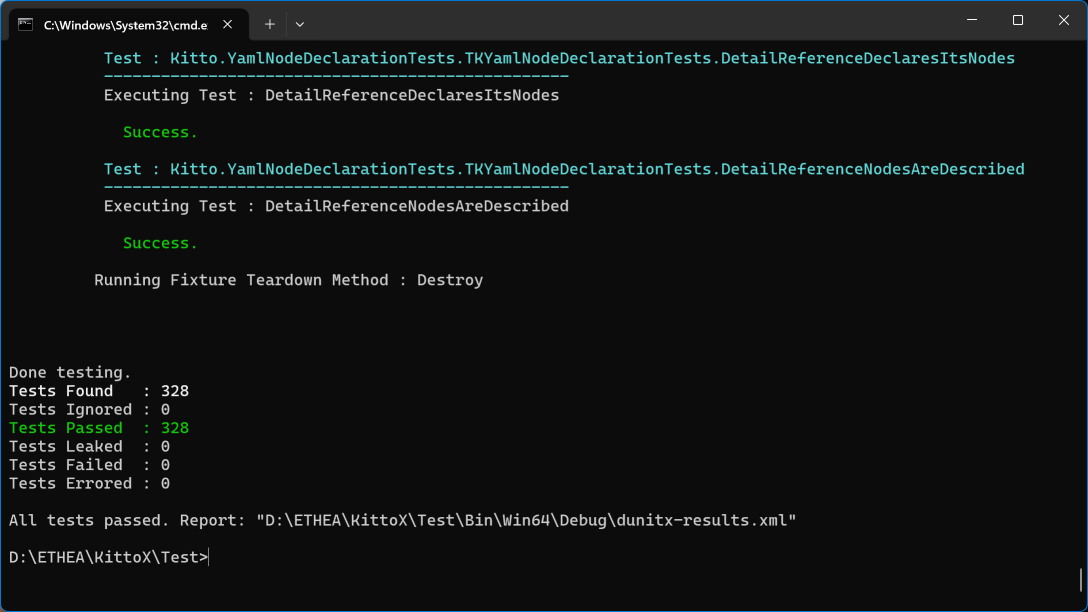
The Kittoˣ DUnitX suite: 328 tests, all green.
🖱️ What's new: Claude tests the user interface too
This was this year's surprise. Claude Code has learned to simulate user interaction with the GUI using Windows messages: it starts the application, finds windows and controls, sends clicks, keystrokes and text, reads the controls' state and checks the result.
It can also capture screenshots of the windows and look at them. This way it checks that a form looks as expected, that a layout does not break at a different DPI, that a light or dark theme is applied correctly. In practice it closes the loop on its own: edit, compile, run, try, look, fix.
😲 A year ago I was amazed that the AI could edit a .dfm file. Today it compiles the application, fixes the errors, runs it, clicks the buttons, captures the screen and tells me that a label is truncated at 150% scaling. And proposes the fix.
One of the most valid objections on the forum was that AI-written tests can give a false sense of security: "all tests are green" does not mean the code is correct. That is true, and I have even introduced regressions despite having tests in place (poorly written ones). But the difference from before is huge: before, the tests simply did not exist!
🌐 A Framework Reborn: Kittoˣ
Kitto is a Delphi framework for data-driven web applications that we have been developing for many years. However, the ExtJS-based version had reached a dead end: the client technology had aged and lost backward compatibility, and rewriting it for the new versions of ExtJS required an effort we could never justify.
With the help of Claude Code we rewrote it. The result is Kittoˣ, a web framework for Delphi and HTMX:
- Applications defined by YAML metadata, with server-generated HTML.
- Direct data access to SQL Server, PostgreSQL, MySQL, Oracle, Firebird.
- Data model mapped onto SQL entities.
- JWT authentication, REST/JSON APIs with an OpenAPI 3.0 specification and Swagger UI.
- Charts, calendars, dashboards, wizards; built-in HTTP server or Windows service.
- A visual IDE, KIDEX, to design applications.
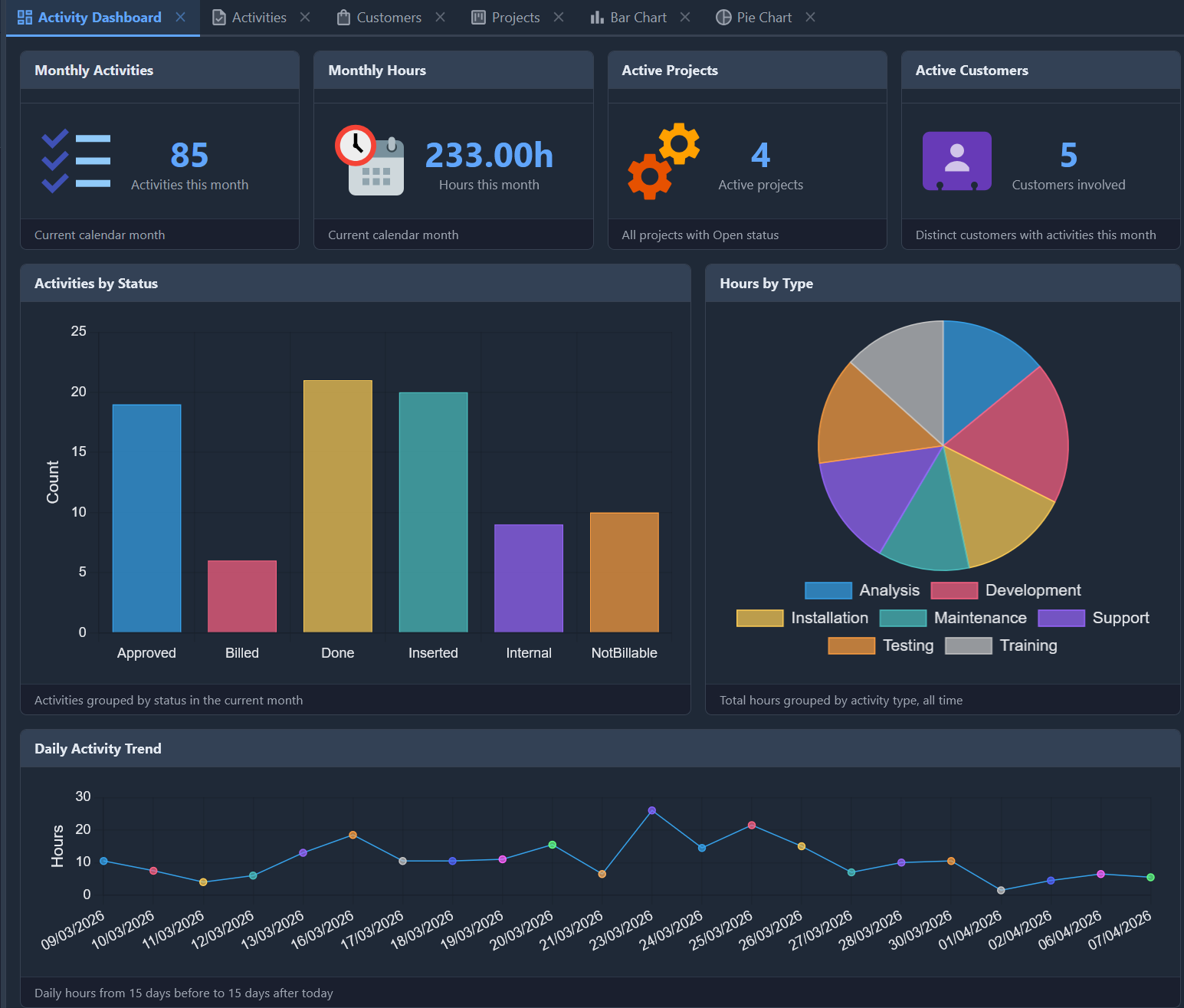
The TasKitto activity dashboard, one of the Kittoˣ demo applications: server-generated HTML and HTMX, with Chart.js charts and no client-side JavaScript framework.
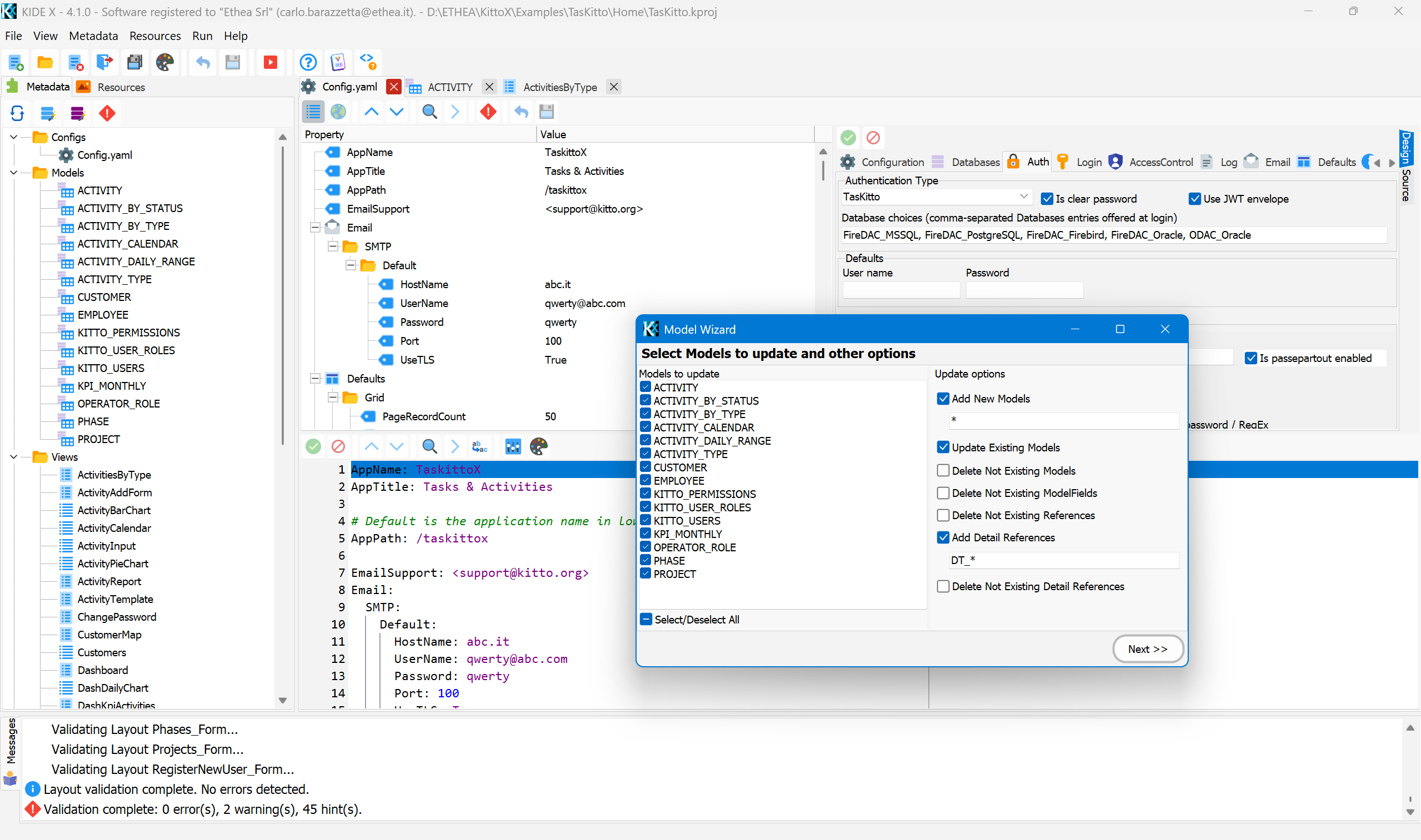
KIDEX: the YAML metadata editor, the wizard that generates models from the database, and project validation.
🔌 MCP: AI that develops with the framework
The new version of Kittoˣ could not do without MCP-KittoX, an MCP (Model Context Protocol) server that exposes KIDEX features to AI agents: Claude Code, Claude Desktop, Codex, LM Studio and any other MCP client. An agent can scaffold a new application, generate models from an existing database, validate metadata and generate Kittoˣ views following the developer's directions, while always doing it the right way.
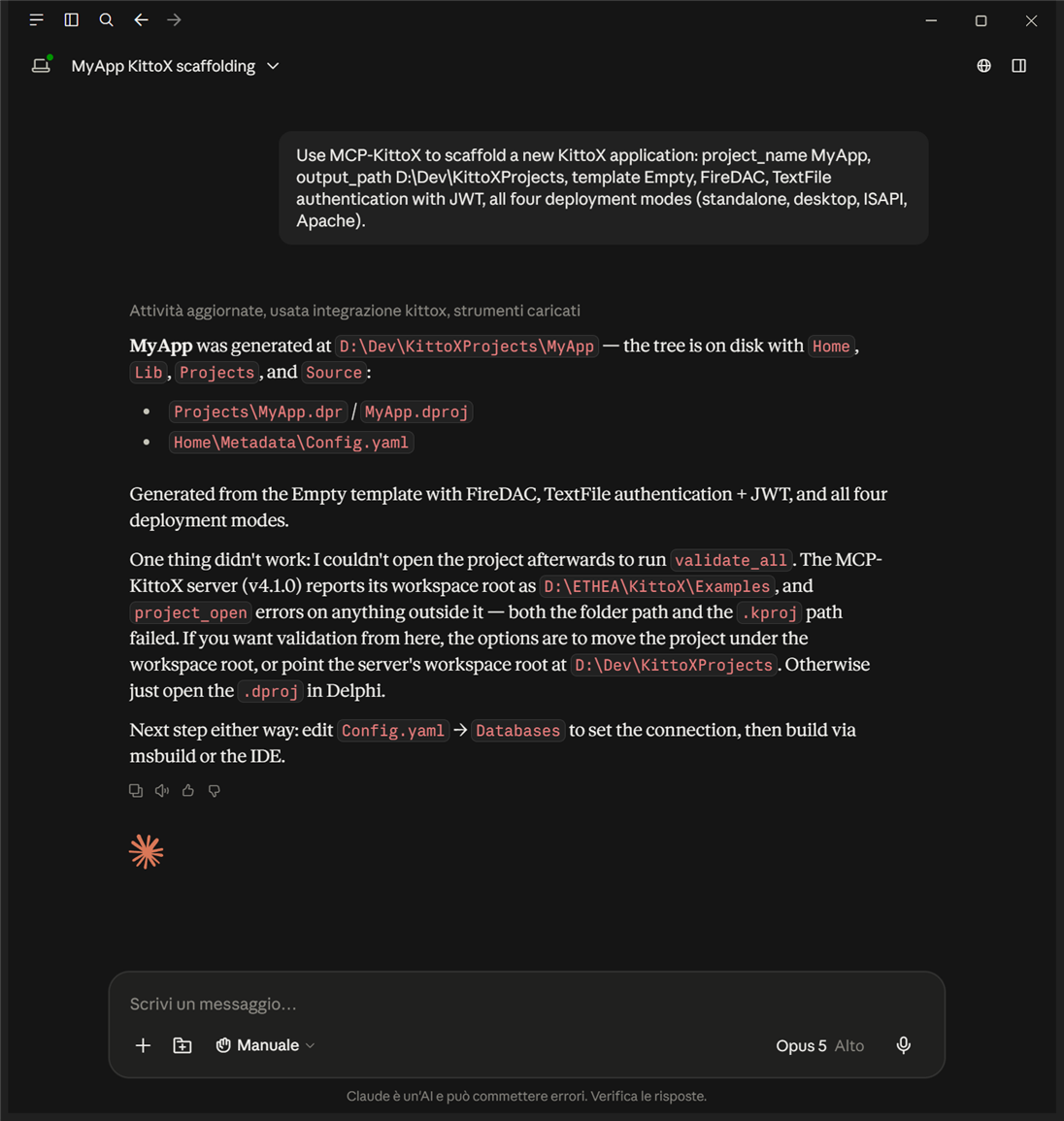
Claude Desktop using MCP-KittoX to scaffold a new Kittoˣ application. Note that the agent also reports what did not work and suggests how to proceed.
The circle is complete: a framework rewritten with AI, which in turn gives AI the tools to build applications. The live demos (HelloKitto, TasKitto, KEmployee, Sport Club Manager) are linked from the Kittoˣ website.
💬 AI Moves Into the Applications: Delphi HelpChatAI
So far I have talked about AI helping me develop. In recent months something new happened: AI has moved inside our Delphi applications, to serve their users.
Delphi HelpChatAI turns an application's help into a conversation. The user presses F1 and a chat opens that knows which screen they are on. Answers are based on the application's own Markdown documentation: the documentation that, finally, now exists.
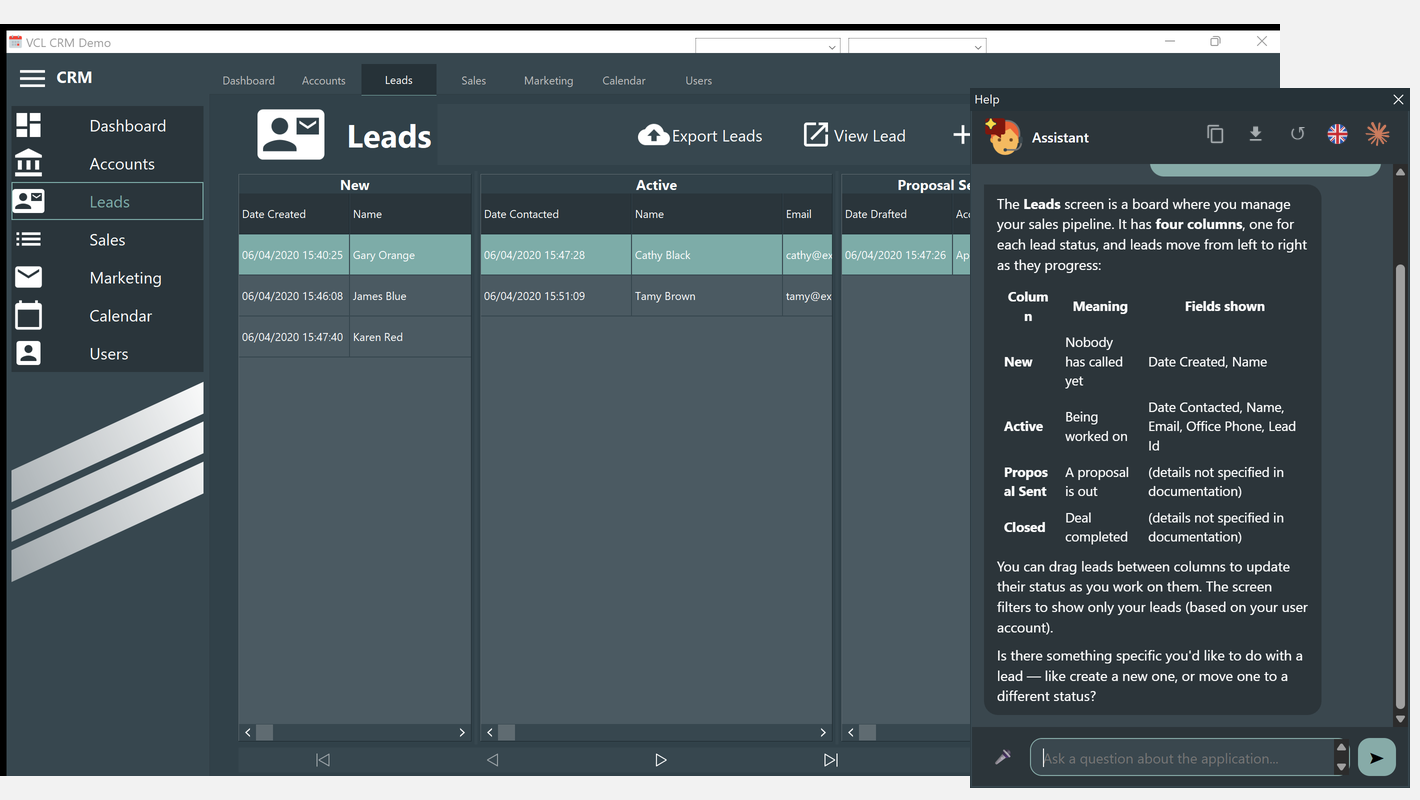
Delphi HelpChatAI in a VCL CRM demo: the assistant explains the Leads screen the user is on.
- Components for VCL (TVclHelpChatAI, with WebView2) and FireMonkey (TFmxHelpChatAI), with a single shared engine.
- Works with the
HelpKeywordandHelpContextvalues already in the application. - The assistant can perform controlled actions: only the ones the developer has explicitly enabled, and asking the user for confirmation before changing anything.
- It can run in-process or through a HelpChatAI server, so the model's API key never reaches the user's machine.
- A documentation search provider can answer even offline, with no API key.
This is an important shift in perspective. AI is no longer just a tool for those who write software: it becomes a feature of the software itself. And with controlled actions, users can ask the application to do something, not just explain how to do it.
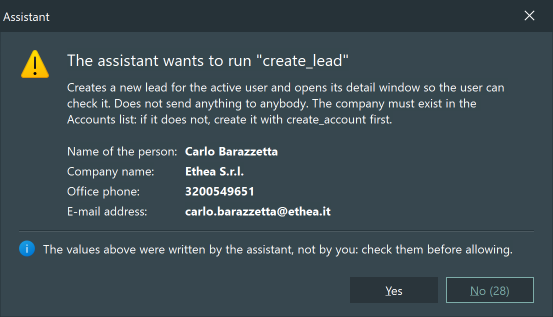
A controlled action: before creating a new lead, the assistant shows the data it filled in and asks the user for confirmation.
🏛️ Modernizing Legacy Apps: From Delphi 5/6 to Delphi 12/13
Anyone who has worked with Delphi for many years knows the problem: huge applications, written in very old versions, that work and make money for customers, but that nobody dares to touch.
This year we tackled porting some third-party applications still written in Delphi 5 or Delphi 6 to a recent Delphi 12/13: one of them has more than 4 million lines of code. Anyone who has done such a migration knows what it means: the move to Unicode, unmaintained third-party components to replace, deprecated APIs, code that relied on the old compiler's behavior, and so on...
On a project of this size Claude Code does not replace the analysis work: it makes it sustainable. It helped us to:
- analyze the codebase and classify recurring issues;
- apply the same fixes consistently across thousands of units;
- write replacement components and form migration procedures;
- produce detailed reports for each migration, to keep track of what was changed and why;
- keep the new version's code aligned while the current one continues to be updated and maintained.
In one case, along with the porting, we also modernized the user interface of old applications: High-DPI support, light and dark themes, vector SVG icons, and our StyledComponents for that extra touch. Work that for years had stayed in the "when we have time" drawer.
This also answers one of the forum's objections: "AI cannot understand the architecture of a codebase with millions of lines". It is true that it does not read it all at once. But neither do we. With a good CLAUDE.md, a clear work plan and a developer who knows the system in charge, it works one part at a time, just like a human team would.
💬 The Forum, One Year Later
Rereading the Delphi-PRAXiS discussion today is interesting. Many objections were serious, and some pushed me to improve the way I work. Let me go back to them.
❓ "You can't trust what it writes"
Right. You must not trust it blindly. But the answer is not to give up: it is to build a verification system. Compilation, automated tests, GUI tests, code review, a second session acting as reviewer. Hallucinations exist, but this loop catches them long before they reach production.
❓ "Who will maintain all that AI-written code?"
The same team that maintained the code before. With one difference: today that code is documented and covered by tests, which often was not the case before. Paradoxically, code written with AI is easier to maintain than a lot of code written by hand in past years.
❓ "It costs too much" and "what about customer data?"
On cost, my answer is the same as a year ago: it pays for itself many times over. A rewritten framework, 15 documentation sites, a multi-million-line migration: with only the resources of a small software house, none of these projects would have been possible. On confidentiality, we use a business plan with the correct data-usage settings, and we wrote internal guidelines on what can and cannot be shared. It is a topic to take seriously, not a reason to stand still.
❓ "What about junior developers?"
This is the concern I share most. AI amplifies the skills of those who have them. Those who are still building them risk skipping important steps. I believe that today the role of experienced developers also includes this: teaching how to guide, verify and understand why a solution is right. Not just how to write code.
✨ Prophetic?
I don't want to sound presumptuous, but I think I can say that the article was, at least in part, prophetic. At the end of 2025 you could glimpse an enormous potential. Today that potential is everyday reality, and not just for me. I believe that even the strongest skeptics of the time, including some very well-known and respected names in the Delphi community, have to acknowledge that the world of software development has changed. And not by a little.
🌍 The World Has Changed (Actually, It Has Been Turned Upside Down)
What I experienced with Delphi is a small example of something much bigger. In these twelve months we have seen projects built from scratch that until recently would have required years of work and large teams.
One example above all: the storytold / ArtCraft organization on GitHub. Besides ArtCraft, an environment for AI image and video creation, the project includes a whole suite of "clean-room" reimplementations of famous applications, written from scratch in Rust: a word processor modeled on Microsoft Word, a presentation tool modeled on PowerPoint, a CAD modeled on AutoCAD, and more. Dozens of repositories with tens of thousands of stars, created in a time frame that would have been unthinkable without AI agents (the repositories indeed contain the CLAUDE.md and AGENTS.md files that guide them).
A year ago it seemed an exaggeration to say that AI could build software of this size from scratch! Today it is a fact.
For us Delphi developers the message is clear. Our language, our frameworks and our applications are not excluded from this transformation. On the contrary: with decades of code to document, test and modernize, we are among those who can benefit the most, especially thanks to the strong backward compatibility the language has always maintained. In our case we don't have to "rewrite" everything from scratch: we can keep the core and the battle-tested business logic while modernizing at the same time, as happened with Kittoˣ and with our "legacy" products.
🧭 What I Learned in Twelve Months
- Context is everything. A well-written CLAUDE.md and a well-structured work plan are worth more than any brilliant prompt. Invest time to keep them up to date.
- Plan first, then code. For non-trivial tasks I have a plan written first, discuss it, correct it. Only then does coding begin.
- Verifying is the new programming. Tests, review, a second session that critiques the first. The time I don't spend writing I spend checking.
- Connect AI to real data. MCP servers for databases and tools turn an assistant that guesses into a collaborator that knows.
- Documentation and tests are no longer optional. They cost so little that there is no longer any excuse for skipping them.
- The expert remains essential. I wrote it a year ago and I confirm it. The role changes: less executor, more architect, reviewer and guide.
🚀 Conclusion: What Now?
A year ago I wrote: "Welcome to the future of Delphi development". That future arrived sooner than expected. My work has changed radically, and I would not go back.
If you were skeptical a year ago, I invite you to try again today, with a real project, a good CLAUDE.md and the patience to learn how to guide the tool. If you have already started, I would love to hear about your experience: what worked, what didn't, where you found the limits.
If you like, we can talk about it in person in Rome, at ITDevCon on November 19 and 20, where I will be giving a talk on exactly this topic: "Un assistente AI dentro le tue applicazioni Delphi, VCL e FMX" (An AI assistant inside your Delphi VCL and FMX applications).