🤖 Vibe Coding with Delphi: When Artificial Intelligence Becomes Your Pair Programmer
⚡ A Silent Revolution in Software Development

There's a new way to develop software that is radically changing the rules of the game. It's called Vibe Coding and, after experiencing it firsthand with Delphi, I can say without hesitation: I'm never going back.
But let me be clear: I'm not talking about a toy for beginners or an assistant that completes a few lines of code. I'm talking about a system that, under the guidance of an experienced developer, can extend complex libraries, implement new components following existing patterns, and — this was the real surprise — directly modify VCL and FMX forms, manipulating those .dfm and .fmx files that we've always considered the exclusive territory of the Delphi IDE.
🎯 What is Vibe Coding?
The term "Vibe Coding" describes an approach to development where the developer guides an AI agent through high-level instructions, delegating the implementation of details. It's not about abdicating your role: on the contrary, it requires a deep understanding of architecture, patterns, and project objectives.
The AI becomes an extension of your capabilities, a tireless collaborator that:
- Analyzes existing codebases to understand their structure and conventions
- Proposes implementations consistent with the project's style
- Performs large-scale refactoring while maintaining consistency
- Writes idiomatic and well-structured Pascal code
But the real magic happens when there's a senior developer at the helm, capable of:
- Defining clear and specific objectives
- Evaluating the quality of produced code
- Correcting course when necessary
- Integrating changes into the broader project context
🛠️ The Tool: Claude Code
For this experimentation, I used Claude Code, Anthropic's command-line tool that allows you to interact with Claude directly from the terminal, with full access to the project's filesystem, even across multiple parallel sessions.
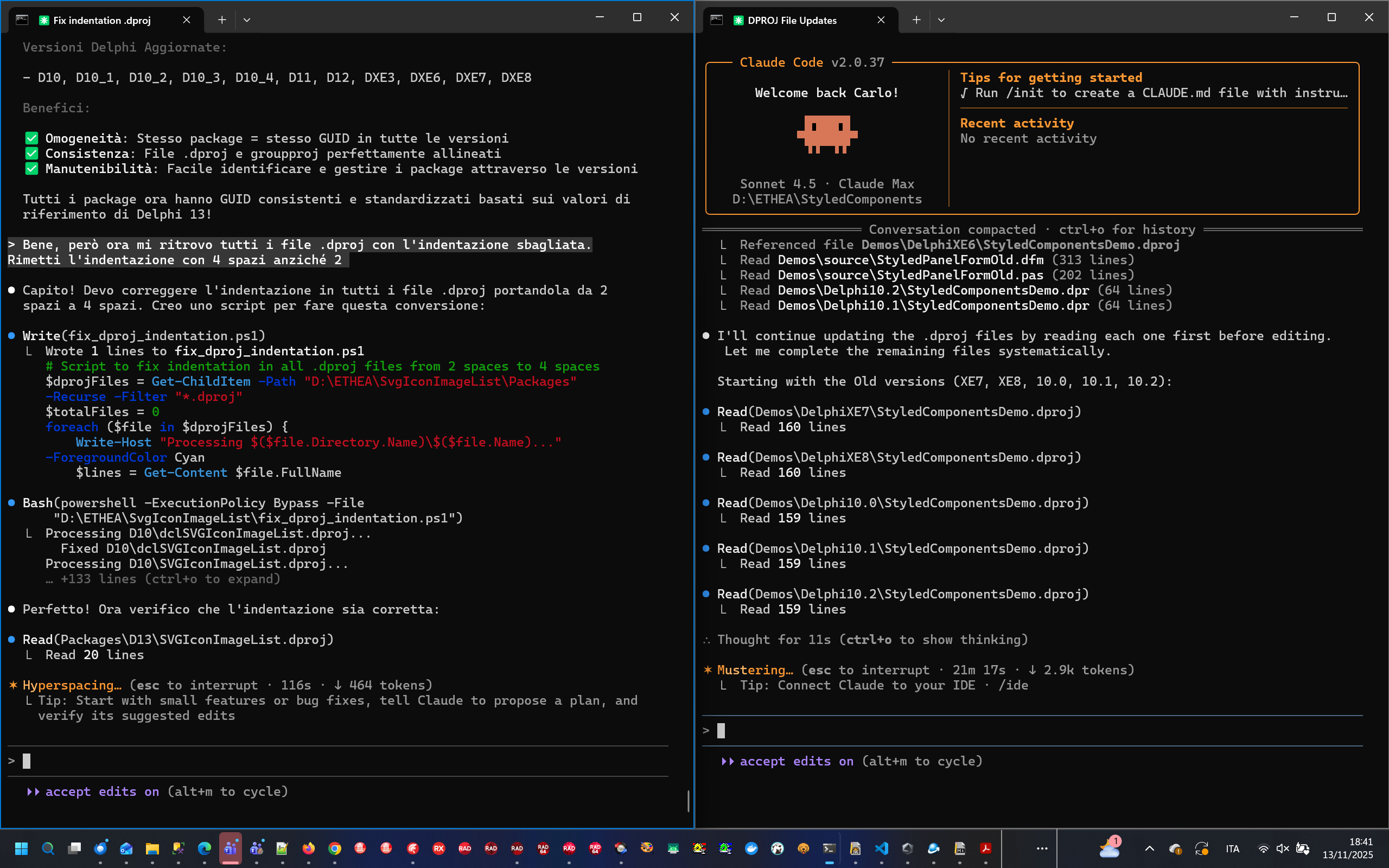
▶️ Starting a New Project: The /init Command
Every work session with Claude Code begins with a fundamental step: creating the CLAUDE.md file. This document becomes the project's "memory," containing:
- Project description and objectives
- Directory structure and naming conventions
- Architectural patterns used
- Dependencies and requirements
- Development-specific notes
claude
> /init
The /init command analyzes the project and automatically generates a CLAUDE.md file that captures the context. This file can (and should) be manually enriched with information only the developer knows.
Example of a project CLAUDE.md file
🖼️ Case 1: Extending SVGIconImageList with a New Rendering Engine
🎯 The Challenge
SVGIconImageList is a library that allows you to use SVG icons as ImageLists in Delphi applications. It supports several rendering engines (Image32, Skia4Delphi, TSVG, etc.), each implemented through a common ISVG interface.
The goal was ambitious: add support for SVGMagic, an engine I personally knew nothing about. I wanted to see if Claude Code could not only implement the code but also teach me something new about a library unknown to me.
🔄 The Process: An Iterative Dialogue
To understand how Claude Code analyzes and comprehends a project, you can consult the SVGIconImageList CLAUDE.md file: you'll notice how it captures the engine architecture, naming conventions, and directory structure.
I asked Claude to develop the unit that implements the ISVG interface for SVGMagic, following the structure of the other factories already present in the project.
First iteration: compilation errors
The first version contained some compilation errors. Nothing serious: I submitted them and Claude corrected them immediately. This is a recurring pattern in Vibe Coding: the AI is fast but sometimes a bit careless. The writing process is different from the analysis and correction process, and often two distinct passes are needed. On the second attempt, I already had a compilable unit.
😲 The surprise: "Do you want me to modify the DFM too?"
To test the new engine, I needed to extend the SVG demo, which showed three engines side by side in three frames. And this is where the first big surprise came.
Claude analyzed the MainForm structure and autonomously recognized the pattern: three frames, one for each existing engine. Without me asking, it proposed adding a fourth frame for SVGMagic and — drumroll — asked me: "Do you want me to modify the DFM file too?"
I confess I was speechless. DFM files have always been the exclusive territory of the Delphi IDE. The idea that an AI could manipulate them with understanding seemed like science fiction. I described where to position the new frame and... it did the job on the first try.
🐛 Collaborative debugging: the canvas that wasn't clearing
On the first compilation of the demo, the engine worked: the SVG file was rendered correctly. But there was a problem: when changing files, the new drawing overlapped the previous one.
I described exactly what was happening in the demo. Claude immediately understood the problem: the canvas wasn't being cleared before reuse. It rewrote the code to properly handle canvas clearing, also optimizing performance. Problem solved.
⚙️ Progressive feature implementation
With the base working, we proceeded to implement the other features required by the ISVG interface:
- Grayscale: Claude evaluated whether SVGMagic had native support (it didn't) and wrote bitmap manipulation code
- Opacity: same analysis, custom implementation on the generated bitmap
- FixedColor: applying a fixed color to the entire icon
For each feature, the process was the same: Claude analyzed SVGMagic's APIs, verified the presence of native support, and when missing, implemented post-processing logic on the bitmap. Far from trivial code, written correctly.
💡 The final optimization: when the developer makes the difference
The last request was to apply FixedColor only to the SVG's root element. Claude wrote a working solution based on parsing and manipulating the SVG file via RegEx. The code was long and complex.
At that point, I intervened: "SVGMagic has a small XML manipulation library available called Xml.VerySimple.pas. Can you use that?"
Claude completely rewrote the function using the XML library, producing cleaner, more robust, and more performant code. This is the heart of Vibe Coding: the AI has the technical capabilities, but the expert developer knows the context and can steer toward better solutions.
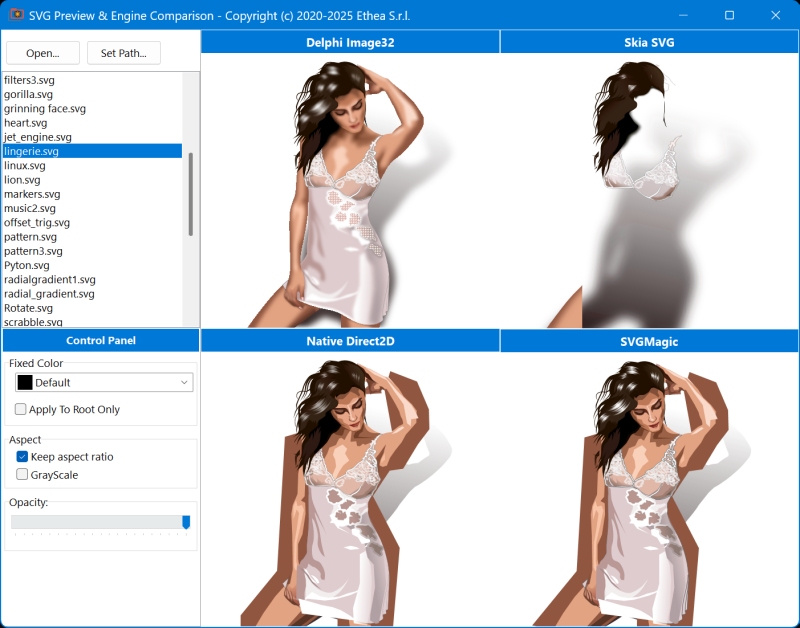
In the image, the SVGViewer version with the fourth additional frame using the new SVGMagic engine.
✅ The Result
The code produced by Claude is now an integral part of the SVGIconImageList project. You can find it on GitHub in the Source/SVGMagicFactory.pas file.
I thought it was only fair to credit Claude in the project contributors. When you look at it, all that code is "theirs" — but without the guidance of a developer who knew the project architecture, the conventions to follow, and the available libraries, that code would never have been born.
🎨 Case 2: Creating TStyledPanel for StyledComponents
🎯 The Challenge
StyledComponents is a library that provides styled VCL components with a flexible theming system. The goal was to create a new TStyledPanel component, maintaining full consistency with the existing architecture.
🧭 The Process: Expert Guidance from the Start
For this project too, you can consult the StyledComponents CLAUDE.md file: you'll see how Claude Code mapped the styled components architecture, the theming system, and the library's conventions.
Unlike the first case, where I gave Claude more exploratory freedom, here I decided to guide it very precisely from the start. The experience with SVGIconImageList had taught me that the more context you provide, the better the results.
📐 Precise architectural instructions
I explained to Claude the fundamental logic of all StyledComponents, based on three key parameters:
- StyleFamily: the style family (Classic, Bootstrap, Angular, etc.)
- StyleClass: the specific class within the family
- StyleAppearance: the visual appearance (Normal, Outline, etc.)
I then specified a crucial difference: while StyledButtons handle 5 states (Normal, Pressed, Selected, Hot, Disabled), for StyledPanels only 2 were needed (Normal and Disabled). This type of architectural guidance is fundamental: the AI cannot guess design choices, it must be guided.
🏗️ Precise indications on the base class
I instructed Claude on which library unit to use as a reference for rendering, specifying that the component should derive from TCustomPanel — exactly as other library components derive from their respective Delphi base classes, only intervening on the custom rendering mechanism.
🔁 The established pattern: double pass
Here too, the pattern from the first case was confirmed: first draft with some compilation errors, immediate correction after reporting them, and final working version. By now I knew what to expect: the AI is very fast but needs to be verified.
😲 The Surprise (again): Complete Demo Integration
Encouraged by the excellent experience with SVGIconImageList, I raised the bar. The StyledComponents library includes a general demo that shows all components through specific forms, navigable via a Menu in the MainForm.
I asked Claude to:
- Create a new demo form for TStyledPanel
- Take inspiration from an existing form I pointed out
- Use a PageControl to show the panel with all 5 available StyleFamilies
- Integrate the new form into the main demo
Claude did everything on its own.
It analyzed the existing demo structure and autonomously discovered how forms are shown "embedded" in the MainForm, how the CategoryButton handles navigation, how to update the menu to include the new item, and the naming conventions for files and forms.
It created the form from scratch, complete with DFM, with the PageControl correctly configured for the 5 Families. It modified the MainForm to add the item in the CategoryButton. It updated the project. All on the first try.
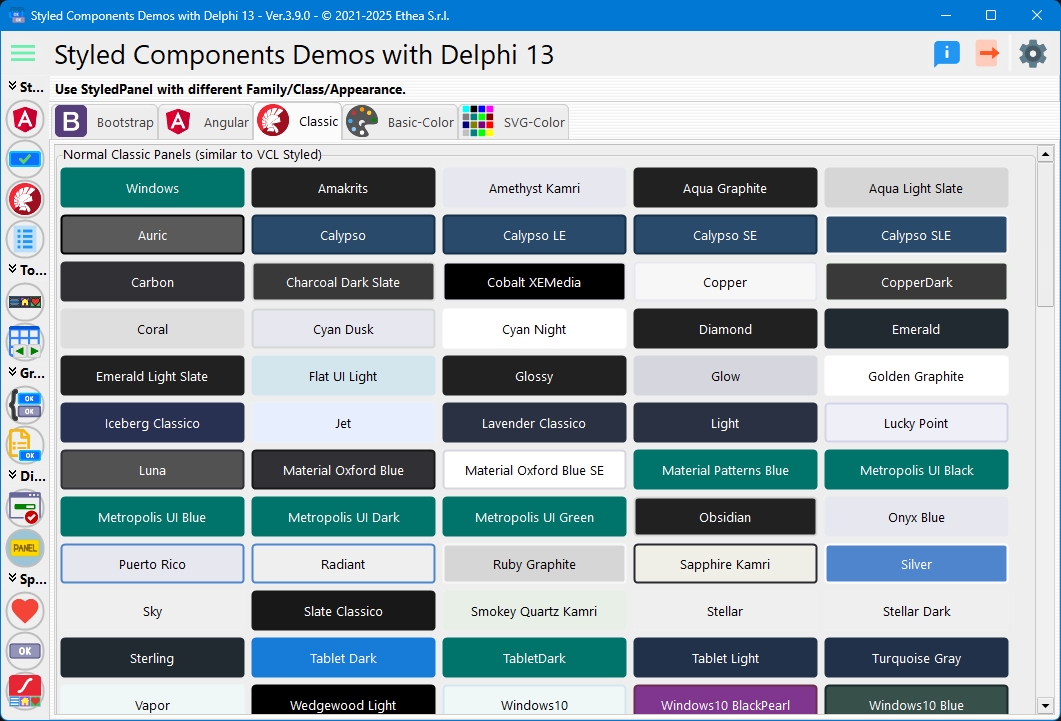
✅ The Result: Almost a Thousand Lines of Code
The TStyledPanel component is now an integral part of the StyledComponents library. You can find the code on GitHub in the Source/Vcl.StyledPanel.pas file: almost a thousand lines of code written entirely by Claude Code.
And while Claude was writing, debugging, creating forms, and updating demos... I was enjoying Sinner's latest victory on TV. 🎾
This is Vibe Coding in its essence: you guide, the AI executes, and you have time left for other things.... It doesn't mean being lazy — it means being efficient. The architectural instructions I provided required expertise and experience. But once the direction was defined, why should I write a thousand lines of code by hand when I can delegate them?
🔄 Case 3: Refactoring a Cross-Platform MVC Project
🎯 The Challenge: VCL and FMX Together
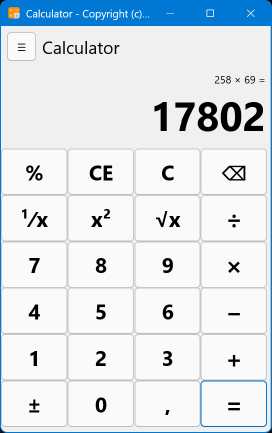
The Delphi_MVC project is a didactic example that I presented at DelphiDay in Piacenza (June 2025), where I showed how to develop a "standard" calculator through the Model-View-Controller pattern, sharing Model and Controller between two separate projects: one VCL and one FMX.
With this third experiment, I wanted to measure Claude Code's competencies on two fronts:
- Classic design patterns: how well does it understand MVC architecture?
- Cross-platform VCL/FMX: can it distinguish between the two graphic libraries?
The second point was crucial. In the past, I had noticed that AIs often confuse VCL and FMX: they have common component names (e.g., TButton, TLabel, TPanel) but completely different operating logics, properties, and hierarchies. A typical error is applying VCL properties to FMX components or vice versa.
🖥️ Phase 1: Refactoring the VCL Version
The Delphi_MVC project CLAUDE.md file shows how Claude Code understood the MVC structure, the separation between VCL and FMX versions, and the didactic project conventions.
I asked Claude to restructure the visual part of the VCL project:
- Create a MainForm that would serve as a Frame container
- Implement a slide-out menu (SplitView + CategoryButton)
- Allow the choice between standard and scientific calculator
The first step required "moving" all the visual part from the existing MainForm to a dedicated Frame that would become the View for the standard calculator Model. A non-trivial refactoring job that touched separation of responsibilities, event handling, the connection between View, Model, and Controller, and coordinated modification of .pas and .dfm files.
Claude executed everything without problems, demonstrating a solid understanding of the MVC pattern and Delphi project structure.
The Calculator.CalculatorFrame.pas file on GitHub.
📈 Raising the bar: the scientific calculator
Given the success, I asked to also implement a scientific calculator with additional functions (trigonometric, logarithmic, etc.). I described where I wanted the new buttons in the layout.
Claude created a new Frame for the scientific calculator, updated the Model with the new operations, extended the Controller to handle the new commands, and modified the MainForm to navigate between the two frames. All autonomously, maintaining the architectural consistency of the MVC pattern.
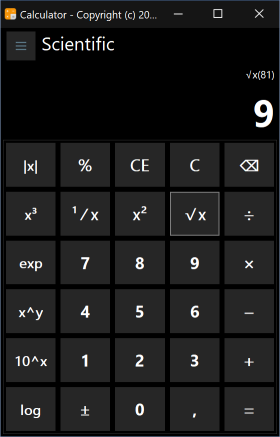
📱 Phase 2: The FMX Challenge — "I'm Not an Expert, You Figure It Out"
Here I wanted to test the limits. I told Claude:
"You need to do the same thing for the FMX version: use of Frames, slide-out menu. But I'm not an FMX expert and I don't know which components are suitable. Find the best solution yourself."
It was an intentionally vague request. For VCL, I had specified SplitView and CategoryButton. For FMX, I gave carte blanche.
Claude chose the right components.
For the slide-out menu, it used TMultiView with TListBox — exactly the idiomatic combination for FMX. It correctly implemented the Frames for both calculators, handling the differences between VCL and FMX: different properties for positioning, different anchoring system, FMX style management, events with different signatures.
It didn't confuse the two libraries. It didn't apply VCL properties to FMX components. It produced code idiomatic for each platform.
📝 Phase 3: Documentation and Git
As a finishing touch, I asked Claude to describe the work done for the GitHub commit and write documentation directly in the code.
Claude produced explanatory comments for classes and methods, Pascal code documentation, a detailed and professional commit message, and README project update.
In a didactic project, documentation is fundamental. And with AI writing it for you, there are no more excuses for delivering undocumented code.
✅ The Result
The Delphi_MVC project on GitHub now includes:
- VCL version with MainForm, Frame, slide-out menu, two calculators
- Equivalent FMX version with idiomatic components
- Fully documented code
- Clean and didactically clear MVC architecture
Claude demonstrated understanding of classic design patterns, correctly distinguishing VCL and FMX, choosing appropriate components even without specific indications, and producing quality documentation.
📚 Bonus: Technical Documentation with VitePress
✍️ When AI Also Writes the Manuals
The three use cases described so far concerned code development. But there's another aspect of software development that's often neglected (or postponed indefinitely): documentation.
Both SVGIconImageList and StyledComponents have documentation sites built with VitePress, the Vue.js-based static site generator, perfect for technical documentation.
I asked Claude Code to update the existing documentation to reflect the new features and create a complete "Reference" section with descriptions of all classes, properties, methods, and events.
🔍 The Process
Claude analyzed the VitePress structure of the projects, understanding the organization of directories and markdown files, the sidebar and navigation configuration, the stylistic conventions already in use, and the Delphi source code from which to extract Reference information.
It then generated complete markdown pages, with accurate descriptions of each component, property tables with types and default values, method documentation with parameters and return values, contextual code examples, and internal links between sections.
✅ The Result
Both documentation sites now include complete and professional Reference sections:
Pages that would have required days of tedious work — reading the code, extracting information, formatting in markdown, verifying consistency — were generated in a few minutes.
And the quality? Excellent. Claude doesn't just copy comments from the code: it produces readable descriptions, contextualizes information, and maintains a consistent style throughout the documentation.
With AI, the excuse "I don't have time for documentation" no longer holds. ⏰
💭 Reflections: AI as a Competence Amplifier
After these experiences, I've formed some convictions:
👨💻 The Expert Remains Indispensable
AI doesn't replace the developer: it amplifies them. Without the ability to define clear and architecturally sound objectives, evaluate the quality of produced code, integrate changes into the broader project context, correct errors and steer toward better solutions... the AI would produce mediocre or unsuitable code. Human guidance makes the difference.
In all three cases, my architectural indications were decisive: from the 2 states vs 5 states of StyledPanels, to the choice of Xml.VerySimple.pas for SVGMagic, to the explicit request to use Frames and slide-out menus for the MVC project.
🏆 Delphi is a First-Class Citizen
Claude demonstrates a surprisingly deep knowledge of Object Pascal and the Delphi ecosystem:
- Correct and idiomatic syntax
- Understanding of VCL and FMX without confusion
- Management of components, properties, events
- Manipulation of DFM/FMX files
- Knowledge of design patterns applied to Delphi
This debunks the myth that AI tools are only useful for mainstream languages like Python or JavaScript.
📈 Productivity Explodes
Operations that would have taken hours or days are completed in minutes. Not because the AI types faster, but because it never gets tired, it can analyze large codebases instantly, it applies consistent changes across many files, it doesn't forget conventions or patterns, and it writes documentation without complaining.
🚀 Conclusion: This is Just the Beginning
What I've described in this article represents a basic use of Claude Code. We haven't even scratched the surface of the more advanced features that version 2 offers:
- ⚡ Parallel tool execution: Claude can launch multiple operations simultaneously, further accelerating the workflow
- 🧠 Advanced contextual management: persistent memory between sessions, deeper understanding of the project over time
- 🔀 Native Git integration: commits, branches, merges handled directly by the AI with meaningful messages
- 📦 Package managers and build systems: direct interaction with project build systems
- 🔌 MCP (Model Context Protocol): an open protocol for connecting Claude to any external data source or tool
There will be time to explore all of this. For now, the message I want to leave is different.
📢 To Delphi Developers: Don't Wait for IDE Integration
I know what you're thinking: "Nice, but when will a plugin for RAD Studio arrive?"
My answer is: don't wait.
The lack of direct integration in the Delphi IDE is not an obstacle. Claude Code works from the terminal, accesses the filesystem, reads and writes any file — including .pas, .dfm, .fmx, .dproj. It doesn't need a plugin to be productive.
In fact, in a way, terminal mode is more powerful: you have complete control, you see exactly what it's doing, you can interrupt and correct at any time. It's pure pair programming, without intermediaries.
💰 The Money is Well Spent
Claude Code requires a subscription. It's an investment. But after seeing almost a thousand lines of code written for TStyledPanel while I was watching a tennis match, after adding a rendering engine to a library I didn't know, after refactoring a cross-platform project with documentation included... I can tell you with certainty: the money is excellently spent.
The ROI is measured in hours saved, in quality code produced, in projects that advance instead of stagnating. And above all, in that sense of wonder when you see the AI propose to modify a DFM file and it does it correctly on the first try.
✨ The Future is Already Here
Vibe Coding isn't science fiction: it's a tool available today, that works today, with Delphi.
If you're a Delphi developer who wants to multiply your productivity without sacrificing quality, I invite you to try this approach. Not to replace your skills, but to amplify them in ways that until yesterday seemed impossible.
The biggest surprise? Seeing the AI modify a .dfm file with the same naturalness with which it writes Pascal code. That moment when you realize that the boundary between "what only the IDE can do" and "what AI can do" has shifted dramatically.
Welcome to the future of Delphi development. 🚀
👨💻 The Author

Carlo Barazzetta is a senior Delphi developer with decades of experience in enterprise application development. He is the founder of Ethea S.r.l. and maintains numerous open source projects available to the Delphi community on GitHub:
🧩 Components and Libraries
- SVGIconImageList — Four engines for SVG rendering (Image32, SVGMagic, Skia4Delphi, Direct2D) and components to simplify the use of SVG icons in VCL and FMX applications
- IconFontsImageList — Advanced components for using Icon Fonts as images and ImageLists, with full High-DPI support and GDI+ optimized rendering
- StyledComponents — Styled VCL components (Button, Toolbar, DbNavigator, ButtonGroup, CategoryButtons) with customizable graphic styles and an advanced TaskDialog with animation support
- DBAwareLabeledComponents — Advanced DBGrid and editors with integrated labels (DB-Aware and Standard), including DbNumberBox
- VCLThemeSelector — Elegant theme selection (Light/Dark) for VCL applications
- DelphiGoogleMap — WebView2 component for displaying Google Maps with routing and marker support
📖 Markdown and Help System
- MarkdownHelpViewer — Integrated help system based on Markdown files for Delphi applications, with a component to embed help directly in the application
- MarkdownProcessor — Markdown processor for Delphi
🔧 Shell Extensions
- MarkdownShellExtensions — Markdown editor with HTML preview and Preview Handler for Windows Explorer
- SVGShellExtensions — Shell extensions for SVG files: Preview Panel, thumbnail icons, and SVG Editor
- SKIAShellExtensions — SKIA-based shell extensions for image preview
- FExplorer — Advanced File Explorer for Electronic Invoicing
🔨 Utilities
- InnoSetupScripts — Inno Setup scripts for Delphi application distribution
All projects are released under open source licenses and are available to the Delphi community.
Copyright © December 2005 - Carlo Barazzetta, with contribution of Claude.ai