CARD PROGRAM FOR COMMODORE 64 - BASIC V2
USER MANUAL
WHAT IS THE CARD PROGRAM FOR
The CARD program is used to draw playing cards on the screen. The cards are displayed using redefined graphic symbols. It is possible to display any type of card in any part of the screen.
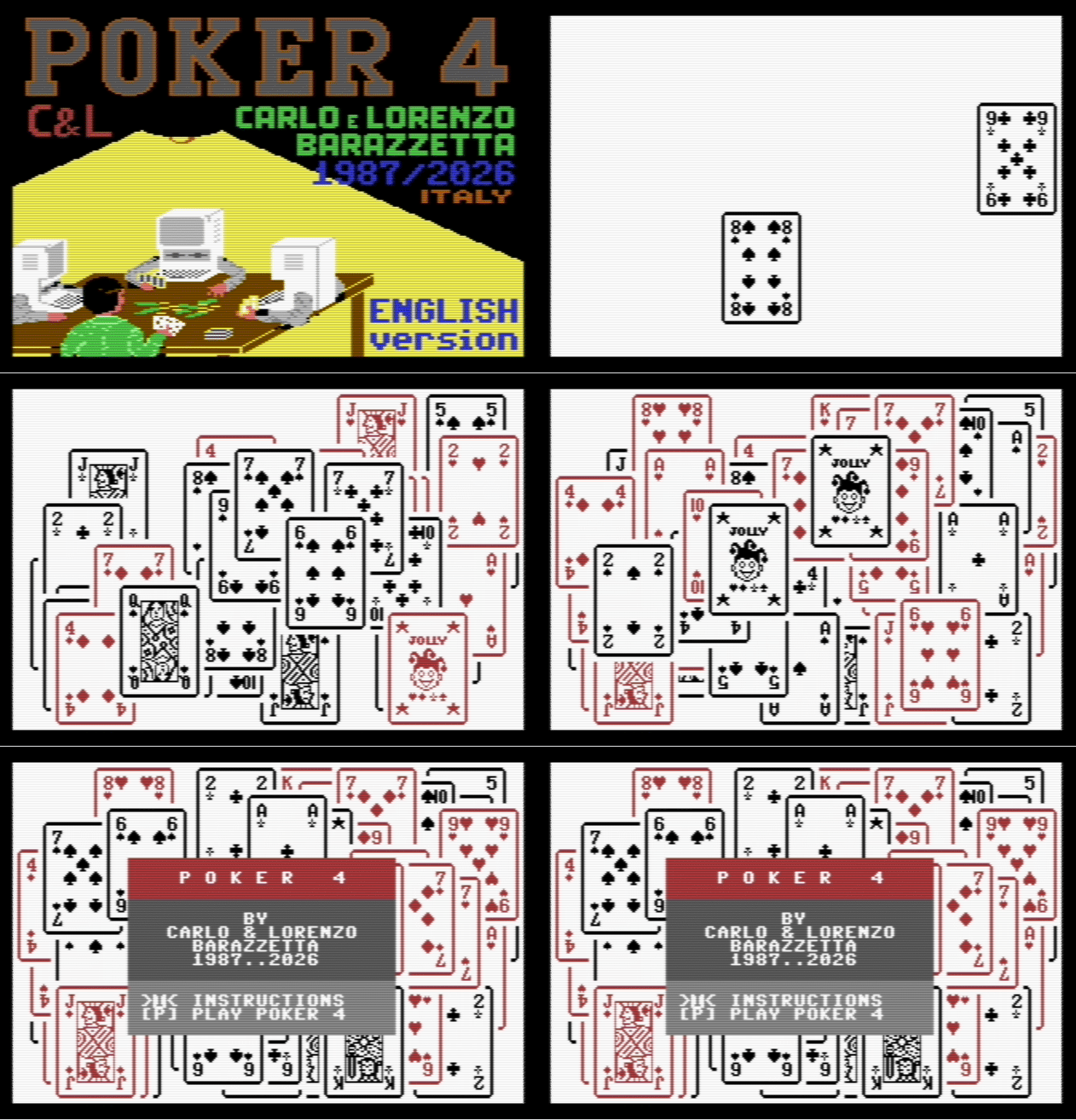
In this animation, an example of CARDS printed randomly as the initial background of the "Poker4-en" game written in BASIC using the CARD program (real-time speed).
STRUCTURE OF THE CARD PROGRAM WITH BASIC V2
The CARD program consists of two prg files: CARD SYMBOLS and CARD ROUTINES.
CARD SYMBOLS
The CARD SYMBOLS file contains the data for the redefined graphic symbols and before being loaded into memory, the memory needs to be protected from BASIC usage with
POKE44,16After that, you can load the prg file from disk with
LOAD"CARD SYMBOLS",8,1or from tape with
LOAD"CARD SYMBOLS",1,1The file loaded this way occupies 2K of RAM memory in the BASIC area, specifically locations 2048 to 4095 inclusive.
CARD ROUTINES
The CARD ROUTINES file contains all the machine language routines that allow drawing playing cards on the screen. This prg file is loaded from disk with
LOAD"CARD ROUTINES",8,1or from tape with
LOAD"CARD ROUTINES",1,1and does not occupy memory in the BASIC area, but locations 49152 to 49788 inclusive. After loading these two files, you need to issue the commands
POKE4096,0 and NEWAt this point you can start writing your BASIC program or load one from disk or tape.
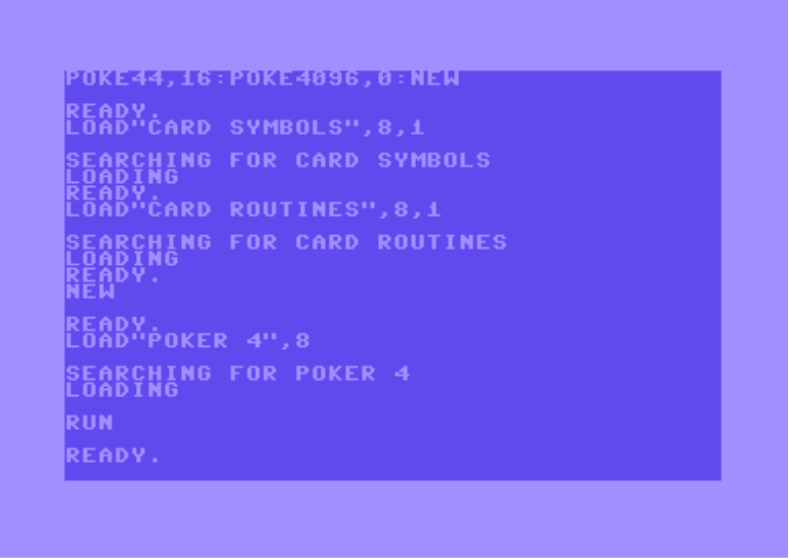
In the image above, an example of the loading sequence for the game "Poker 4"
USING THE CARD COMMAND
To use the CARD command, you must, at the beginning of your program, assign the value 49152 to a variable (e.g., K1) and call the routine K1+138 which, in addition to enabling the CARD command (which if not enabled would cause a
?SYNTAX ERROR), disables the shift and commodore keys (uppercase/lowercase switching) and enables the new character set that contains, in addition to letters, numbers, and other non-graphic symbols, e.g.:
**!"#$%&'()+-£**the redefined graphic symbols for drawing cards.
WARNING: if the THEN instruction is followed by CARD, you must add a ":" (colon) between the two instructions to avoid a ?SYNTAX ERROR. e.g.:
IFA<0THEN:CARD0,1,2,3THE 4 PARAMETERS OF THE CARD COMMAND
The CARD command is followed by 4 numeric parameters separated by commas.
The first two parameters indicate the X and Y position on the screen where the upper left corner of the card will be displayed (e.g., if both parameters are zero, the card is displayed in the upper left corner of the screen).
To avoid a
?ILLEGAL QUANTITY ERRORthe X position of the card must have a value between 0 inclusive and 34 exclusive, while the Y position must have a value between 0 inclusive and 17 exclusive.
The third parameter refers to the card to display on screen: values 1 to 10 refer to cards from ace to 10, while values 11 to 13 refer respectively to jack, queen, and king; value 14 refers to the joker, while value 15 refers to the face-down card (or card back); finally, value 0 clears the card displayed at the position specified by the two previous parameters.
The fourth and last parameter refers to the card suit: 0=spades; 1=clubs; 2=diamonds; 3=hearts.
However, if the card to display is the face-down card (third parameter=15), the last parameter refers to the deck being used: 1=blue deck; 2=red deck.
If the card to display is the joker, it will be black or red depending on the suit in the last parameter (if the last parameter is 0 or 1, i.e., spades or clubs, the joker will be black, otherwise it will be red).
Finally, if the card to display is the "clear" card, the last parameter can have any value between 0 inclusive and 4 exclusive, but it cannot be omitted.
The program below continuously displays a random card (except the clear card) in a random part of the screen using the function
RND(0)Here is the code:
10 K1=49152
20 PRINTCHR$(147):POKE53280,0:POKE53281,15
30 SYSK1+138:REM ENABLE CARD COMMAND
40 CARDRND(0)*34,RND(0)*17,RND(0)*15+1,RND(0)*4
50 GOTO40
LIST OF CARD ROUTINES
Enabling routines:
K1+138: enables the CARD command and calls K1+150.
K1+150: disables the shift and commodore keys (uppercase/lowercase switching) and calls K1+158.
K1+158: enables the CARD character set.
Disabling routines:
K1+169: disables the CARD command and calls K1+181.
K1+181: disables the CARD character set.
Other routines:
K1+232: replaces the CARD command (e.g., CARD0,1,2,3 can be replaced with SYSK1+232,0,1,2,3). This way you can also avoid enabling the CARD command with SYSK1+138, by only doing SYSK1+150.
K1+269: redraws the previously drawn card (The parameter values of the last drawn card are found in locations K1+132 to K1+135 inclusive).
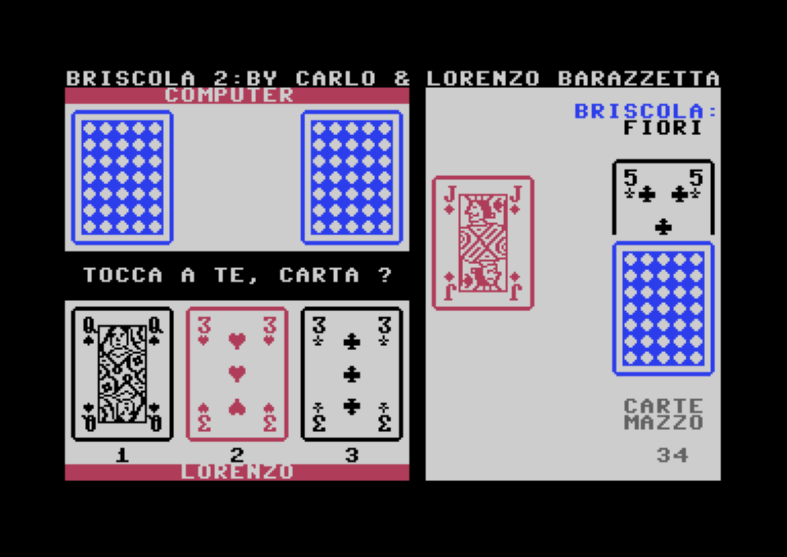
In the image above, the "desktop" of the game "Briscola 2"
CHANGING THE COLORS OF FACE-DOWN CARDS
When displaying a face-down card (third parameter=15), it is displayed in blue or red depending on the deck number in the last parameter (1=blue deck, 2=red deck). These two colors are specified in locations K1+136 (which contains 6, i.e., blue) and K1+137 (which contains 2, i.e., red). By modifying the contents of these two locations, you can change the color of the two decks. E.g.:
POKEK1+136,5changes the color of deck 1 from blue to green.
CARD ROUTINES 2 - OFF-SCREEN CLIPPING
A second version of the CARD ROUTINES is available: CARD ROUTINES 2, which extends the CARD command to support off-screen coordinates with automatic clipping.
With the original CARD ROUTINES, the X position must be between 0 and 33 and Y between 0 and 16, so the card is always fully visible on screen. With CARD ROUTINES 2, X can range from -6 to 39 and Y from -8 to 24, allowing cards to be drawn partially off-screen. The portion of the card that falls outside the visible screen area is automatically clipped.
CARD ROUTINES 2 is fully backward-compatible: existing programs that use coordinates within the original range work without any change.
To use CARD ROUTINES 2 instead of the original, simply load the file CARD ROUTINES 2 in place of CARD ROUTINES:
LOAD"CARD ROUTINES 2",8,1The loading sequence and all routines (K1+138, K1+150, K1+169, K1+232, K1+269) work exactly the same way. The only difference is the extended coordinate range for the X and Y parameters.
The program below continuously displays a random card in a random position using the extended range:
10 K1=49152
20 PRINTCHR$(147):POKE53280,0:POKE53281,1
30 SYSK1+138:REM ENABLE CARD COMMAND
40 CARDINT(RND(0)*46)-6,INT(RND(0)*33)-8,RND(0)*14+1,RND(0)*4
50 GOTO40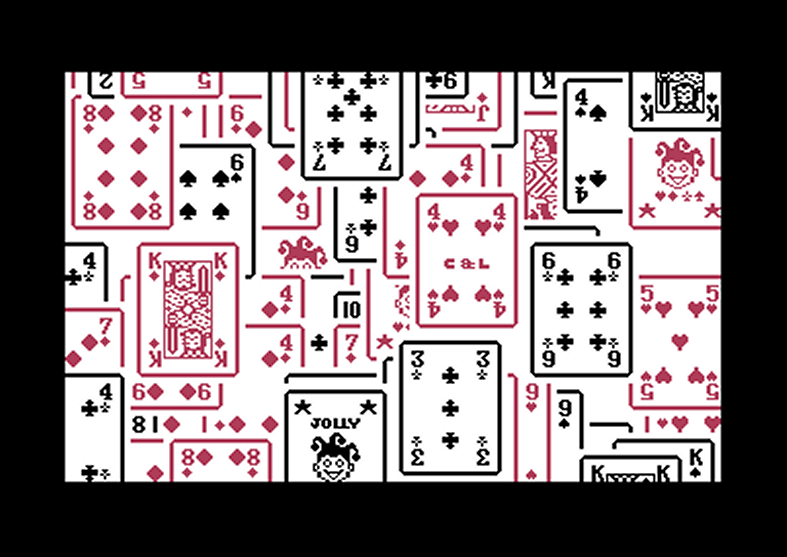
In the image above, 100 random cards drawn with the new extended coordinates. Cards near the screen edges are automatically clipped.
USING THE CARD COMMAND WITH EXPANDED BASIC
If you want to use the CARD program with expanded BASIC versions, you should not enable the CARD command (SYSK1+138) because it only works with BASIC V2.
Instead, you should use the routine K1+232 which essentially replaces that command (see LIST OF CARD ROUTINES).
As an example, below is the program previously described using the routine K1+232 instead of the CARD command.
10 K1=49152
20 PRINTCHR$(147):POKE53280,0:POKE53281,15
30 SYSK1+150:REM ENABLE
40 SYSK1+232,RND(0)*34,RND(0)*17,RND(0)*15+1,RND(0)*4
50 GOTO40
RELOCATING THE CARD ROUTINES
The CARD routines are allocated in locations 49152 to 49788 inclusive.
If you want to move them to another memory area because the normally used area (from 49152 to 49788) needs to be used by the BASIC expansion or other routines, you can do so using the N command of the ZOOM monitor. For example, if you want your CARD ROUTINES to be loaded into locations 4096 to 4732, you should proceed as follows:
For disk:
.L "CARD ROUTINES" 08 1040
.N 108A 127C 5000 C000 C27C
.S "@0:CARD ROUTINES" 08 1040 127D
For tape:
.L "CARD ROUTINES" 01 1040
.N 108A 127C 5000 C000 C27C
.S "CARD ROUTINES" 01 1040 127D
This way the CARD routines will be loaded into locations 4096 to 4732 instead of 49152 to 49788.
However, to use them, this memory area must be protected from BASIC usage, so before loading the "CARD SYMBOLS" file you must issue the commands POKE43,126 and POKE44,18. After that, you can load the "CARD SYMBOLS" and "CARD ROUTINES" files and issue the commands POKE4733,0 and NEW. Remember, however, to change the assignment K1=49152 at the beginning of the program to K1=4096.
USING CARD FROM MACHINE LANGUAGE
To use the CARD program from Machine Language, you must insert the values of the 4 parameters in locations K1+132 to K1+135 and call the routine K1+269.
Before calling this routine, however, make sure that decimal mode is disabled, otherwise disable it with the CLD instruction.
REPLACING THE CARD COMMAND
It is possible to replace the CARD command with any other command (e.g., CARTA) as long as it is no longer than 8 characters.
This command is stored in locations K1+120 to K1+127 in ASCII code form.
The last character of the command (e.g., the D in CARD) is marked by having the most significant bit (MSB) set to 1.
Below is the listing of a BASIC subroutine that, when called, replaces the CARD command with the command present in the variable A$.
10000 IFLEN(A$)=0ORLEN(A$)>8THENSTOP
10010 FORA=1TOLEN(A$)
10020 POKEK1+119+A,ASC(MID$(A$,A,1))OR-128*(A=LEN(A$))
10030 NEXT
10040 RETURN
For example, if you want to change the CARD command to the CARTA command, just assign the string "CARTA" to A$ (A$="CARTA") and call the subroutine with GOSUB10000. After that, to display cards use the CARTA command instead of CARD. Below is the listing previously described using the CARTA command instead of the CARD command.
10 K1=49152
20 A$="CARTA":GOSUB10000:A$="":A=0
30 PRINTCHR$(147):POKE53280,0:POKE53281,15
40 SYSK1+138:REM ENABLE CARTA COMMAND
50 CARTARND(0)*34,RND(0)*17,RND(0)*15+1,RND(0)*4
60 GOTO50
10000 IFLEN(A$)=0ORLEN(A$)>8THENSTOP
10010 FORA=1TOLEN(A$)
10020 POKEK1+119+A,ASC(MID$(A$,A,1))OR-128*(A=LEN(A$))
10030 NEXT
10040 RETURN
One final warning: the new command (e.g., CARTA) must not contain BASIC commands, otherwise this new command cannot be used (e.g., if the CARD command is replaced with PRINTCAR, it cannot be used because the computer will interpret this command as a PRINT CAR, i.e., as a "print the contents of variable CAR").
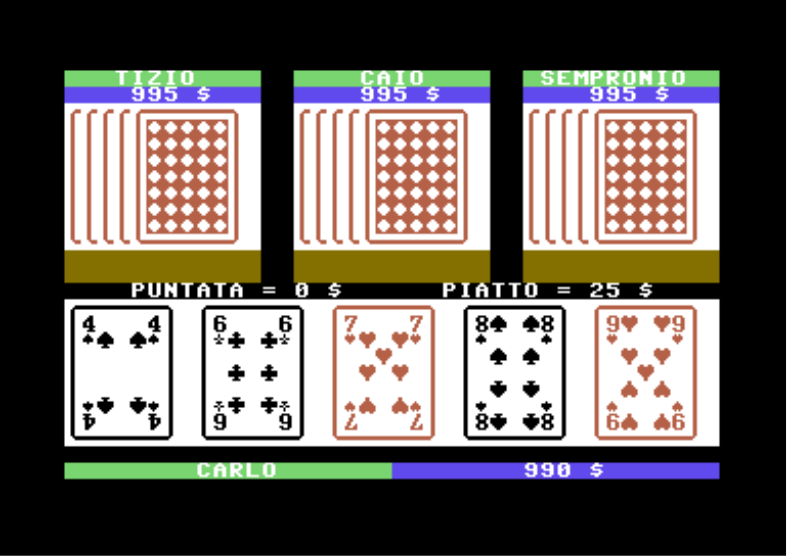
In the image above, the "desktop" of the game Poker 4
COMPLETE CARD SET
All cards rendered by the CARD library on a Commodore 64.
Standard Cards
| Value | Spades ♠ | Clubs ♣ | Diamonds ♦ | Hearts ♥ |
|---|---|---|---|---|
| A |  |  |  |  |
| 2 |  |  |  |  |
| 3 |  |  |  |  |
| 4 |  |  |  |  |
| 5 |  |  |  |  |
| 6 |  |  |  |  |
| 7 |  |  |  |  |
| 8 |  |  |  |  |
| 9 |  |  |  |  |
| 10 |  |  |  |  |
| J |  |  |  |  |
| Q |  |  |  |  |
| K |  |  |  |  |
Special Cards
| Black Joker | Red Joker | Blue Back | Red Back |
|---|---|---|---|
 |  |  |  |
APPENDIX: TABLE OF CARD GRAPHIC SYMBOLS
| POKE Code | Displayed Symbol |
|---|---|
| 0 to 63 | standard Commodore 64 |
| 64 | A for ace |
| 65 to 73 | 2 to 10 |
| 74 | J for jack |
| 75 | Q for queen |
| 76 | K for king |
| 77 | joker star |
| 78 | upper left corner |
| 79 | upper right corner |
| 80 | upside-down A for ace |
| 81 to 84 | upside-down 2 to 5 |
| 85 | horizontal line |
| 86 | upside-down 7 |
| 87 | lower left corner |
| 88 | lower right corner |
| 89 | upside-down 10 |
| 90 to 92 | upside-down J, Q and K |
| 93 to 95 | c&l symbols |
| 96 | large spade |
| 97 | large club |
| 98 | large diamond |
| 99 | large heart |
| 100 | upside-down large spade |
| 101 | upside-down large club |
| 102 | face-down card symbol |
| 103 | upside-down large heart |
| 104 to 107 | small suit symbols |
| 108 to 111 | upside-down small suit symbols |
| 112 to 126 | joker symbols |
| 127 | vertical line |
| 128 to 191 | standard Commodore 64 |
| 192 to 212 | jack symbols |
| 213 to 233 | queen symbols |
| 234 to 254 | king symbols |
| 255 | € - euro symbol |
Note how the standard non-graphic symbols of the Commodore 64 (letters, numbers, and others like !"#$%&') are kept unchanged in this new character set so that in addition to cards, messages and numbers can also be displayed.